
How to Reinstall Whatsapp on Your Device
Are you tired of dealing with a non-functional WhatsApp app? Do you want to reinstall the application without losing your old conversations? You’re in the right place! In this article, we’ll guide you through the process of reinstalling WhatsApp on various devices, including Android, iPhone, PC (Windows), and Mac.
Why Reinstall Whatsapp?
WhatsApp is a popular messaging app that allows users to send messages, make voice and video calls, and share media with friends and family. However, sometimes the app may malfunction or stop working due to various reasons. In such cases, reinstalling WhatsApp can help resolve the issue.
Reinstalling Whatsapp on Android Devices
If you’re using an Android device and want to reinstall WhatsApp without missing your old conversations, follow these steps:
- Backup Your Chat: Go to Settings > Chats > Backup of chats and execute a backup.
- Disinstall Whatsapp: Long press on the WhatsApp icon and select “Uninstall”.
- Reinstall Whatsapp: Open the Google Play Store, search for WhatsApp, install it, and follow the prompts.
Reinstalling Whatsapp on Iphone Devices
If you’re using an iPhone and want to reinstall WhatsApp without losing your old conversations, follow these steps:
- Backup Your Chat: Go to Settings > Chats > Backup of chats and execute a backup.
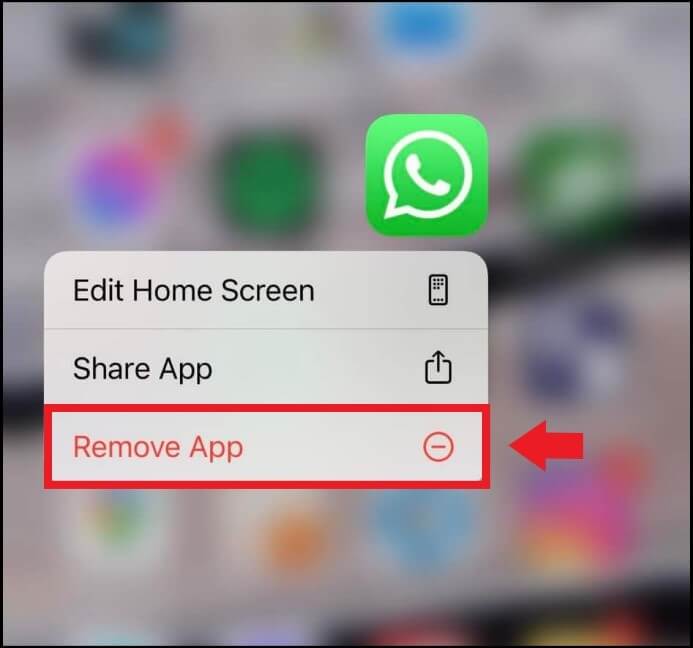
- Disinstall Whatsapp: Delete the WhatsApp app from your home screen.
- Reinstall Whatsapp: Open the App Store, search for WhatsApp Messenger, install it, and follow the prompts.
Reinstalling Whatsapp on PC (Windows) Devices
If you’re using a Windows device and want to reinstall WhatsApp without losing your old conversations, follow these steps:
- Disinstall Whatsapp: Uninstall WhatsApp from your computer.
- Reinstall Whatsapp: Open the Microsoft Store, search for WhatsApp, install it, and follow the prompts.
Reinstalling Whatsapp on Mac Devices
If you’re using a Mac device and want to reinstall WhatsApp without losing your old conversations, follow these steps:
- Disinstall Whatsapp: Uninstall WhatsApp from your computer.
- Reinstall Whatsapp: Open the Mac App Store, search for WhatsApp, install it, and follow the prompts.
Transferring Whatsapp Data Between Devices
If you’re switching from an Android device to an iPhone or vice versa, you can transfer your WhatsApp data using the “Move chats to iOS” feature on WhatsApp. This will allow you to transfer your conversations, media, and other data to your new device.
Troubleshooting Common Issues
Sometimes, reinstalling WhatsApp may not resolve the issue. If you’re experiencing problems with WhatsApp after reinstalling it, try the following:
- Check if the app is up-to-date.
- Restart your device.
- Clear cache and data from the app.
- Contact WhatsApp support for further assistance.
Conclusion
Reinstalling WhatsApp can be a straightforward process that helps resolve common issues with the app. By following these steps, you can reinstall WhatsApp on various devices without losing your old conversations. Remember to backup your chat before uninstalling the app and use the “Move chats to iOS” feature if you’re switching between Android and iPhone devices.
Frequently Asked Questions (FAQs)
- Q: Why do I Need to Reinstall Whatsapp?
A: You may need to reinstall WhatsApp due to various reasons such as bugs, updates, or compatibility issues with your device. - Q: Will I Lose my Old Conversations When Reinstalling Whatsapp?
A: No, if you’ve backed up your chat before uninstalling the app, you’ll be able to retrieve it after reinstalling WhatsApp. - Q: How do I Backup my Whatsapp Chat?
A: Go to Settings > Chats > Backup of chats and execute a backup. - Q: Can I Transfer my Whatsapp Data Between Devices?
A: Yes, you can use the “Move chats to iOS” feature on WhatsApp to transfer your conversations, media, and other data to your new device. - Q: What if Reinstalling Whatsapp Doesn’t Resolve The Issue?
A: Try checking if the app is up-to-date, restarting your device, clearing cache and data from the app, or contacting WhatsApp support for further assistance.
Conclusion
Reinstalling WhatsApp can be a simple process that helps resolve common issues with the app. By following these steps and troubleshooting tips, you can reinstall WhatsApp on various devices without losing your old conversations. Remember to backup your chat before uninstalling the app and use the “Move chats to iOS” feature if you’re switching between Android and iPhone devices.


