
Removing Credit Card From Phone: A Step-by-step Guide
Are you tired of having a credit card linked to your phone, but can’t figure out how to remove it? Look no further! In this article, we’ll guide you through the process of removing a credit card from your phone on both Android and iOS devices.
Why Remove Credit Card From Phone?
Removing a credit card from your phone is a simple way to protect yourself from potential fraud. If someone gains access to your phone, they may be able to make unauthorized purchases using your linked credit card. By removing the card, you can prevent any unwanted transactions and keep your finances safe.
Removing Credit Card From Android Device
If you’re using an Android device, follow these steps to remove a credit card from Google Pay:
- Open Google Wallet: First, open the Google Wallet app on your Android device.
- Tap on Menu: Tap on the menu icon (three horizontal lines) in the top left corner of the screen.
- Select Payment Methods: From the menu, select “Payment methods”.
- Choose Credit Card: Choose the credit card you want to remove from the list of payment methods.
- Tap on Edit: Tap on the edit button next to the credit card.
- Remove Card: Select the option to remove the card.
Alternatively, you can also remove a credit card from Google Pay by accessing the Google Pay website on your computer and following these steps:
- Log in to Google Pay: Log in to your Google Pay account on the Google Pay website.
- Select Payment Methods: From the dashboard, select “Payment methods”.
- Choose Credit Card: Choose the credit card you want to remove from the list of payment methods.
- Remove Card: Select the option to remove the card.
Removing Credit Card From Ios Device
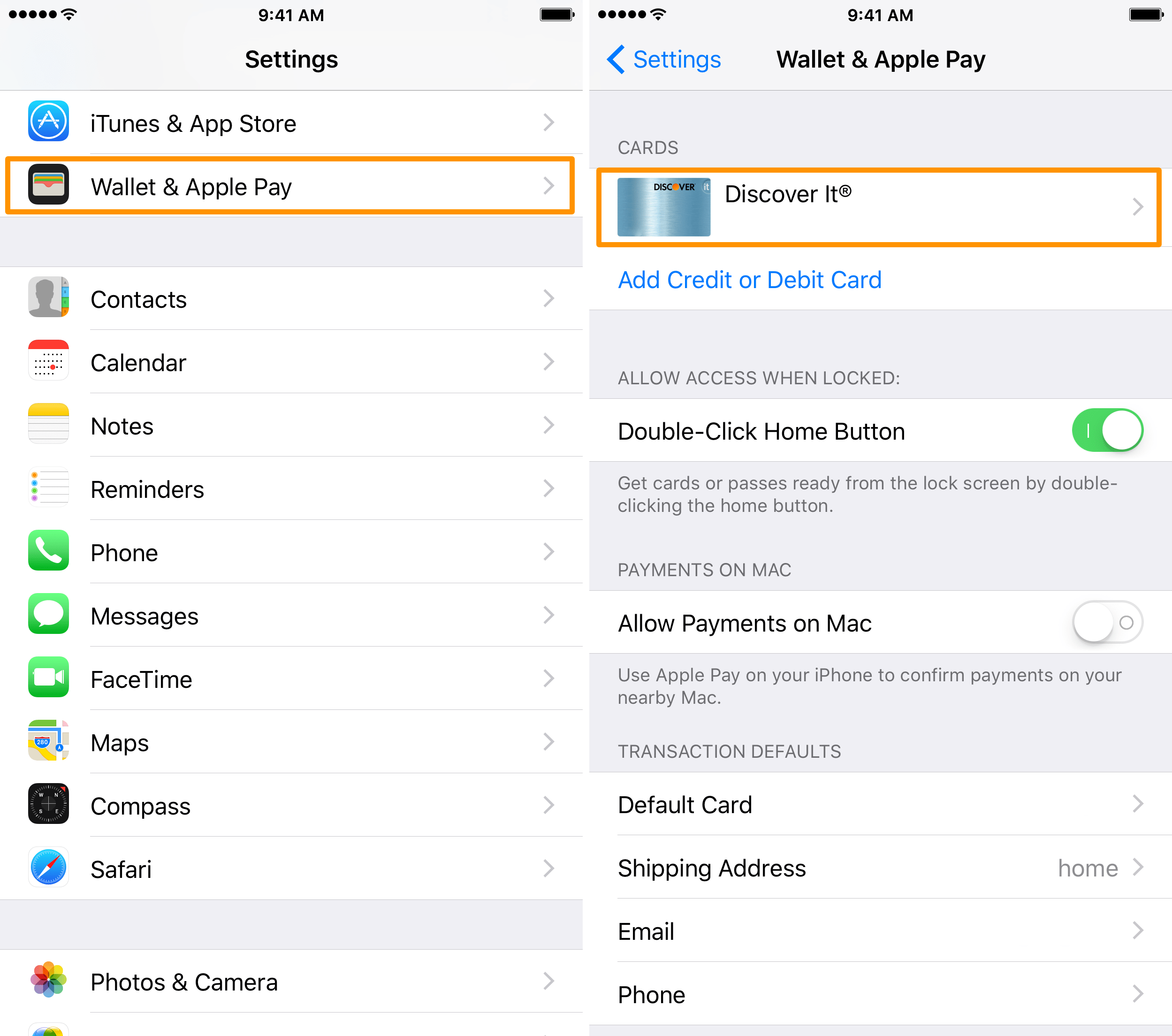
If you’re using an iOS device, follow these steps to remove a credit card from Apple Pay:
- Open Wallet App: First, open the Wallet app on your iOS device.
- Tap on Menu: Tap on the menu icon (three horizontal lines) in the top left corner of the screen.
- Select Credit Card: From the menu, select the credit card you want to remove.
- Tap on Edit: Tap on the edit button next to the credit card.
- Remove Card: Select the option to remove the card.
Alternatively, you can also remove a credit card from Apple Pay by accessing the Settings app on your iOS device and following these steps:
- Open Settings App: Open the Settings app on your iOS device.
- Select Payment & Cash: From the settings menu, select “Payment & Cash”.
- Choose Credit Card: Choose the credit card you want to remove from the list of payment methods.
- Remove Card: Select the option to remove the card.
Removing Credit Card From Other Services
If you’re using a service like Amazon or Netflix, follow these steps to remove a credit card:
- Open App: Open the app for the service (e.G., Amazon or Netflix).
- Tap on Menu: Tap on the menu icon (three horizontal lines) in the top left corner of the screen.
- Select Payment Methods: From the menu, select “Payment methods”.
- Choose Credit Card: Choose the credit card you want to remove from the list of payment methods.
- Remove Card: Select the option to remove the card.
Removing Credit Card From Temu
If you’re using Temu, follow these steps to remove a credit card:
- Open App: Open the app for Temu on your Android device (or iOS device).
- Tap on Menu: Tap on the menu icon (three horizontal lines) in the top left corner of the screen.
- Select Payment Methods: From the menu, select “Payment methods”.
- Choose Credit Card: Choose the credit card you want to remove from the list of payment methods.
- Remove Card: Select the option to remove the card.
Conclusion
Removing a credit card from your phone is a simple process that can help protect you from potential fraud. By following these steps, you can safely remove a credit card from Google Pay, Apple Pay, and other services on both Android and iOS devices. Remember to always keep your finances secure by regularly reviewing and updating your payment methods.
Frequently Asked Questions (FAQs)
- Q: Why do I Need to Remove my Credit Card From my Phone?
A: Removing your credit card from your phone can help protect you from potential fraud. - Q: Can I Still Use Google Pay or Apple Pay Without a Credit Card Linked?
A: Yes, you can still use Google Pay or Apple Pay without a credit card linked by adding other payment methods (e.G., Debit cards). - Q: How do I Know if my Credit Card is Linked to my Phone?
A: Check your Google Pay or Apple Pay app for any listed credit cards. - Q: Can I Remove a Credit Card From Another Person’s Account?
A: No, you can only remove a credit card from your own account. - Q: How Often Should I Review And Update my Payment Methods?
A: It’s recommended to regularly review and update your payment methods every 3-6 months. - Q: Can I Still Make Payments Using Other Services Like Amazon or Netflix Without a Linked Credit Card?
A: Yes, you can still make payments using these services by linking other payment methods (e.G., Debit cards). - Q: How do I Contact Customer Support if I Have Issues With my Credit Card Removal?
A: Contact the respective service’s customer support team for assistance. - Q: Is Removing a Credit Card From my Phone Going to Affect my Account Balance or History?
A: No, removing a credit card from your phone will not affect your account balance or history.
I hope this article has been helpful in guiding you through the process of removing a credit card from your phone on various services.


