
Cryptolocker: How to Avoid And Remove This Ransomware
If you’re reading this article, it’s likely because you’ve fallen victim to the notorious CryptoLocker ransomware. Don’t worry; we’ll guide you through how to avoid and remove this malware.
What is Cryptolocker?
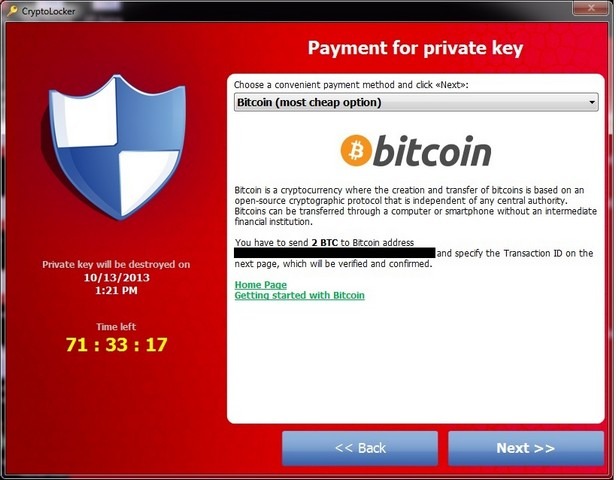
CryptoLocker is a type of ransomware that encrypts your files, making them inaccessible unless you pay a ransom in cryptocurrency. This malware spreads via phishing emails or infected websites and can also be spread through botnets.
How Does Cryptolocker Work?
Here’s how it works:
- Phishing Emails: You receive an email with an attachment or link that appears legitimate but actually contains the CryptoLocker malware.
- Encryption: Once you open the attachment or click on the link, the malware encrypts your files, making them inaccessible.
- Ransom Demand: The malware then demands a ransom in cryptocurrency to restore access to your files.
How to Avoid Falling Victim to Cryptolocker
To avoid falling victim to CryptoLocker, follow these simple tips:
- Keep Your Software Up-to-date: Ensure that your operating system, browser, and other software are up-to-date with the latest security patches.
- Use Antivirus Software: Install reputable antivirus software and keep it updated to protect against malware.
- Be Cautious With Emails And Links: Avoid opening suspicious emails or clicking on links from unknown sources. Never download attachments from unfamiliar senders, as they may contain malware like CryptoLocker.
Removing Cryptolocker
If you’ve fallen victim to CryptoLocker, don’t panic. Here’s what you can do:
- Disconnect From The Internet: Immediately disconnect your computer from the internet to prevent further damage.
- Use Malware Removal Tools: Utilize reputable malware removal tools like Malwarebytes Anti-Malware or Norton Power Eraser to remove the CryptoLocker malware.
Tools For Removing Cryptolocker
Here are some effective tools for removing CryptoLocker:
- Malwarebytes Anti-malware: This tool is specifically designed to detect and remove ransomware, including CryptoLocker.
- Norton Power Eraser: This powerful tool can remove malware, including ransomware like CryptoLocker.
Super Anti-spyware
Another effective tool for removing malware, including ransomware like CryptoLocker, is SUPER Anti-Spyware. This software offers a free trial version that you can use to scan and remove malware from your computer.
- Removing The Malware: Once you’ve identified the malware, follow the instructions provided by the removal tool to delete it.
- Restoring Your Data: After removing the malware, try to restore your files from backups or alternative sources. If your files are encrypted, unfortunately, they may be unrecoverable.
Conclusion
Falling victim to CryptoLocker can be a traumatic experience. However, by being cautious and taking proactive steps to protect yourself against ransomware, you can minimize the risk of infection. Remember to keep your software up-to-date, use reputable antivirus software, and avoid suspicious emails and links.
If you do fall victim to CryptoLocker, don’t panic. Use reliable malware removal tools like Malwarebytes Anti-Malware or Norton Power Eraser to remove the malware, and try to restore your files from backups or alternative sources.
Faqs
Here are some frequently asked questions about CryptoLocker:
- Q: What is Cryptolocker?
A: CryptoLocker is a type of ransomware that encrypts your files, making them inaccessible unless you pay a ransom in cryptocurrency. - Q: How Does Cryptolocker Spread?
A: CryptoLocker spreads via phishing emails or infected websites and can also be spread through botnets. - Q: What Should I do if I Fall Victim to Cryptolocker?
A: If you fall victim to CryptoLocker, disconnect your computer from the internet, use reputable malware removal tools like Malwarebytes Anti-Malware or Norton Power Eraser to remove the malware, and try to restore your files from backups or alternative sources. - Q: Can I Recover my Encrypted Files?
A: Unfortunately, if your files are encrypted by CryptoLocker, they may be unrecoverable. However, you can try to restore them from backups or alternative sources.
How to Protect Yourself Against Ransomware
To protect yourself against ransomware like CryptoLocker:
- Keep Your Software Up-to-date: Ensure that your operating system, browser, and other software are up-to-date with the latest security patches.
- Use Antivirus Software: Install reputable antivirus software and keep it updated to protect against malware.
- Be Cautious With Emails And Links: Avoid opening suspicious emails or clicking on links from unknown sources.
Cryptolocker: How to Stay Safe
To stay safe from CryptoLocker:
- Keep Your Data Backed Up: Regularly back up your important files to an external hard drive or cloud storage service.
- Use Strong Passwords: Use strong, unique passwords for all of your online accounts.
- Be Cautious With Email Attachments And Links: Avoid opening suspicious emails or clicking on links from unknown sources.
Conclusion
Falling victim to CryptoLocker can be a traumatic experience. However, by being cautious and taking proactive steps to protect yourself against ransomware, you can minimize the risk of infection. Remember to keep your software up-to-date, use reputable antivirus software, and avoid suspicious emails and links.
If you do fall victim to CryptoLocker, don’t panic. Use reliable malware removal tools like Malwarebytes Anti-Malware or Norton Power Eraser to remove the malware, and try to restore your files from backups or alternative sources.


