
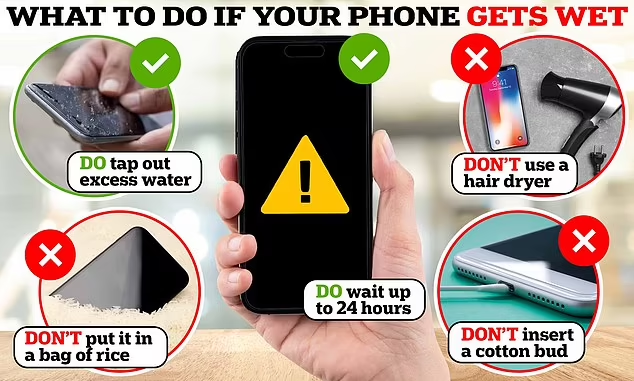
Removing Water From a Phone’s Sim Card Tray: A Step-by-step Guide
Are you tired of dealing with the frustration of water getting into your phone’s SIM card tray? Look no further! In this article, we’ll provide you with a step-by-step guide on how to remove water from a phone’s SIM card tray.
Symptoms of Water Damage in a Phone’s Sim Card Tray
Before we dive into the solution, let’s first understand the symptoms of water damage in a phone’s SIM card tray. If your phone has been exposed to water, you may notice:
- The phone’s screen is unresponsive or stuck
- The phone is not turning on or is taking longer than usual to turn on
- Water droplets are visible around the SIM card tray
Method 1: Using a Throw of Air
The first method we’ll discuss is using a throw of air to remove water from the SIM card tray. This method is simple and effective.
How to Use a Throw of Air
To use this method, follow these steps:
- Turn off your phone
- Dry the outside of the phone with a soft cloth or paper towel
- Use a blow dryer on a low setting to dry the SIM card tray area
- Hold the phone at an angle and gently blow air through the SIM card tray slot
- Repeat this process several times until you feel confident that all water has been removed
Method 2: Using Absorbent Material
The second method we’ll discuss is using absorbent material to remove water from the SIM card tray.
How to Use Absorbent Material
To use this method, follow these steps:
- Turn off your phone
- Remove any accessories such as cases or covers
- Place a small amount of absorbent material (such as silica gel packets) around the SIM card tray slot
- Allow the material to sit for 24-48 hours to allow it to absorb all water
- Once the material has done its job, remove it and inspect the SIM card tray area
Method 3: Cleaning The Connettor
The third method we’ll discuss is cleaning the connettore (which is the connection point between the phone’s SIM card tray and the phone itself).
How to Clean The Connettor
To clean the connettor, follow these steps:
- Turn off your phone
- Use a soft cloth or brush to gently remove any debris or water from the connettore area
- Apply a small amount of cleaning solution (such as soap and water) to the connettore area
- Gently scrub the area with a soft-bristled brush
- Rinse the area with clean water and allow it to dry completely
Method 4: Resetting Your Phone
If none of the above methods work, you may need to reset your phone.
How to Reset Your Phone
To reset your phone, follow these steps:
- Go to your phone’s settings
- Look for the “Backup and recovery” option
- Select the “Reset device” option
- Follow the on-screen instructions to complete the reset process
Conclusion
Removing water from a phone’s SIM card tray can be a daunting task, but with these step-by-step guides, you should be able to get your phone up and running in no time.
Frequently Asked Questions (FAQs)
- Q: What Are The Symptoms of Water Damage in a Phone’s Sim Card Tray?
A: Symptoms include an unresponsive or stuck screen, difficulty turning on the phone, and visible water droplets around the SIM card tray. - Q: How do I Dry my Phone After Exposing it to Water?
A: Turn off your phone and use a soft cloth or paper towel to dry the outside of the phone. Use a blow dryer on a low setting to dry the SIM card tray area. - Q: Can I Use Any Type of Material to Absorb Water From my Phone’s Sim Card Tray?
A: No, it’s best to use silica gel packets specifically designed for this purpose. - Q: How Long Does it Take For The Absorbent Material to Work?
A: Allow the material to sit for 24-48 hours to allow it to absorb all water. - Q: What if None of These Methods Work And my Phone Still Isn’t Working Properly?
A: In this case, you may need to reset your phone or take it in for professional repair.
By following these step-by-step guides, you should be able to remove water from a phone’s SIM card tray with ease.


