
Renaming a Link: A Comprehensive Guide
Are you tired of sharing long and complicated links on social media or in conversations? Do you want to make it easier for others to access the content you’re trying to share? Look no further! Renaming a link is a simple yet effective way to make your online interactions more efficient. In this article, we’ll explore the benefits of renaming a link, how to do it on various platforms, and some useful tools that can help you achieve this.
Why Rename a Link?
Renaming a link may seem like a trivial task, but it has several advantages. Firstly, it makes your links look more aesthetically pleasing, especially when shared on social media. A shorter and more personalized link is easier to remember and type in, making it less likely for typos or mistakes.
Secondly, renaming a link can help you shorten the URL, which is another significant benefit. Shorter URLs are not only easier to share but also less prone to errors. This is particularly useful when sharing links on platforms like Twitter, where character limits can be restrictive.
Tools For Renaming a Link
There are several tools available that can help you rename a link with ease. Here are some of the most popular ones:
Bit.ly
One of the most widely used URL shorteners is Bit.Ly. This tool allows you to create a shortened link by entering the original URL and a desired name for your new link. You can also choose from various themes and colors to customize your link.
To use Bit.Ly, simply follow these steps:
- Go to bit.Ly and sign up with Google or fill out the registration form.
- Click on the “Create New” button and select “Link.”
- Enter the URL you want to shorten in the “Destination” field.
- Type a name for your new link in the “Title” field.
- Click on the “Create” button, and Bit.Ly will generate a shortened link.
Urly
Another popular tool for renaming a link is Urly. This service allows you to create a short URL without registering an account. Simply enter the original URL and click on the “Shorten” button to get your new link.
To use Urly, follow these steps:
- Go to urly.Com and enter the URL you want to shorten in the top field.
- Click on the “Shorten” button to generate a shortened link.
- You can also customize your link by entering a name in the bottom field.
- Copy or share your new link as desired.
Tinyurl
TinyURL is another popular tool for renaming a link. This service allows you to create a short URL without registering an account. Simply enter the original URL and click on the “Make TinyURL” button to get your new link.
To use TinyURL, follow these steps:
- Go to tinyurl.Com and enter the URL you want to shorten in the top field.
- Click on the “Make TinyURL” button to generate a shortened link.
- You can also customize your link by entering a name in the bottom field.
- Copy or share your new link as desired.
Renaming a Link on Word
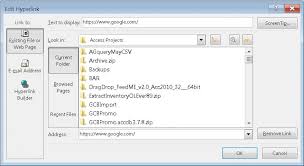
If you’ve inserted a link into a Microsoft Word document, renaming it is relatively simple. Here’s how:
- Select the link you want to rename.
- Right-click on the link and select “Modify Link” from the contextual menu.
- In the “Link Properties” window, erase the current URL in the “Text to display” field.
- Type a new name for your link in this field.
- Click OK to save changes.
Renaming a Link on Facebook
If you’ve shared a link on Facebook and want to rename it, here’s what you can do:
- Copy and paste the original URL into a new browser tab or window.
- Delete the current URL in the text field where the link was inserted.
- Type a new name for your link in this field.
- Share your updated link as desired.
Conclusion
Renaming a link is a simple yet effective way to make online interactions more efficient. By using tools like Bit.Ly, Urly, and TinyURL, you can create shortened links that are easier to share and less prone to errors. Whether you’re sharing links on social media or in conversations, renaming a link can help you communicate more effectively. So next time you need to share a long URL, don’t hesitate – rename it with ease!
Frequently Asked Questions
- Q: What is The Purpose of Renaming a Link?
A: Renaming a link makes it easier to remember and type in, reducing errors and typos. - Q: Can I Rename a Link on Any Platform?
A: Yes, you can rename links on various platforms, including social media, email, and Microsoft Word documents. - Q: Do I Need an Account to Use Url Shorteners Like Bit.Ly or Urly?
A: No, most URL shorteners do not require registration to use. - Q: Can I Customize The Appearance of my Shortened Link?
A: Yes, many URL shorteners allow you to choose themes and colors for your shortened links.
We hope this article has helped you understand the benefits of renaming a link and how to do it using various tools and platforms!


