
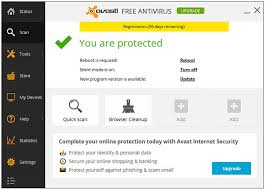
How to Renew Avast Free on Windows
Are you tired of seeing pop-ups asking you to renew your Avast free antivirus? Do you want to know how to keep using this powerful tool without spending a dime? Look no further! In this guide, we’ll show you step-by-step how to renew Avast free on Windows.
Before We Begin
Before starting the process, make sure you have the latest version of Avast installed on your PC. To check, follow these simple steps:
- Click on the Avast icon on your desktop or in the notification area.
- Select “Settings” from the dropdown menu.
- Go to the “General” tab and click on the “Update” button.
If you’re running an outdated version, update it now to ensure you have the most recent features and security patches.
Renewing Avast Free
Now that we’ve covered the basics, let’s dive into renewing Avast free:
- Open Avast by double-clicking its icon on your desktop or in the notification area.
- Click on the menu icon (three horizontal lines) at the top right corner of the window.
- Select “Settings” from the dropdown menu.
- Go to the “My subscriptions” section and find the “Avast Free Antivirus” entry.
- If your license has expired, you’ll see a red flag indicating that it’s not valid. Click on the “Reactivate” button.
What Happens Next?
When you reactivate Avast free, you’ll be prompted to choose between two options:
- Renew with the current version (free).
- Upgrade to Avast Premium Security (paid).
If you want to stick with the free version, click on the “Continue with the free version” button.
Upgrading to Avast Premium Security
If you decide to upgrade to the paid version, follow these steps:
- Click on the “SPEND TO PREMIUM” button.
- Review the pricing plans and choose the one that suits your needs.
- Follow the prompts to complete the transaction using a valid payment method.
Renewing Avast Free on Mac
If you’re running Avast free on a Mac, don’t worry – the process is similar:
- Open Avast by clicking its icon in the Launchpad or Finder.
- Click on the menu icon at the top right corner of the window.
- Select “Preferences” and then go to the “General” tab.
- Check for updates by clicking on the “Update” button.
Since Avast free doesn’t expire on Mac, you won’t see any prompts to renew. However, if you want to upgrade to a paid version or check your subscription status, follow these steps:
- Go to the “My subscriptions” section.
- Click on the “Spend To Premium” button.
Renewing Avast Free on Android And Iphone
Avast is also available as an app for Android and iOS devices. Here’s how to renew it:
For Android:
- Open the Avast app on your device.
- Tap on the menu icon at the top right corner of the screen.
- Select “Upgrade” from the dropdown menu.
For iPhone/iPad:
- Open the Avast app on your device.
- Tap on the menu icon at the top left corner of the screen.
- Select “Upgrade” from the dropdown menu.
Conclusion
Renewing Avast free is a straightforward process that ensures you continue using this powerful antivirus tool without any interruptions. By following these step-by-step guides for Windows, Mac, Android, and iPhone, you’ll be able to keep your device protected with the latest features and security patches.
Faqs
Q: What happens if I don’t renew my Avast free license?
A: If you fail to renew your Avast free license, it will expire, and you might see pop-ups asking you to reactivate. However, this won’t affect the functionality of the app.
Q: Can I upgrade from Avast free to a paid version?
A: Yes! You can easily upgrade to Avast Premium Security or Ultimate by following the prompts in the app.
Q: Are there any promotions for upgrading to Avast Premium Security?
A: Yes, we have special offers for users who want to upgrade from Avast free. Keep an eye out for these deals in the app!
Q: Can I use Avast on multiple devices with a single license?
A: Yes, some paid versions of Avast allow you to protect up to 10 devices with a single subscription.
Q: How often should I update my Avast software?
A: It’s essential to keep your Avast software updated regularly to ensure you have the latest features and security patches.
Q: What are the benefits of using Avast Premium Security over Avast free?
A: With Avast Premium Security, you’ll get advanced protection against ransomware, websites mimicking banks, and online shopping threats. You’ll also receive immediate notifications in case of unauthorized Wi-Fi access.
Q: Can I use a promo code to get a discount on my Avast subscription?
A: Yes! We occasionally offer promo codes for new users or special occasions. Keep an eye out for these deals on our website or social media channels!


