
How to Report a Problematic Profile on Instagram
Are you tired of dealing with spam or harassment on Instagram? Do you want to report a profile that’s violating the platform’s community guidelines? Look no further! In this guide, we’ll show you how to report a problematic profile on Instagram using various methods.
Why Report a Profile on Instagram?
Reporting a profile on Instagram can help prevent further harassment or spamming. It also helps maintain a safe and respectful environment for all users. If you’re experiencing issues with a particular profile, it’s essential to take action and report the problem.
How to Report a Profile on Android/ios Devices
To report a profile on your smartphone or tablet, follow these steps:
- Open the Instagram app.
- Go to the profile of the user you want to report.
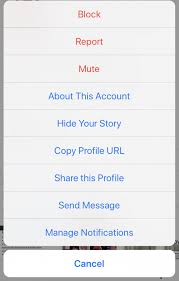
- Tap on the three dots (…) in the top-right corner.
- Select “Report” from the menu.
- Choose the reason for reporting the profile (e.G., Spam, harassment, or other).
- Follow the prompts to select the type of content that’s causing the issue.
- Tap “Forward” to send a signal to Instagram.
How to Report a Profile on PC
Reporting a profile on your computer is similar to the mobile app:
- Go to the official Instagram website or open the desktop app.
- Navigate to the profile you want to report.
- Click on the three dots (…) next to the user’s name.
- Select “Report” from the menu.
- Choose the reason for reporting the profile.
- Follow the prompts to select the type of content that’s causing the issue.
- Click “Forward” to send a signal to Instagram.
How to Report a Fake Profile on Instagram
If you suspect someone is using your name or pretending to be another person, you can report this issue:
- Open the Instagram app.
- Navigate to the profile of the user who’s fake.
- Tap on the three dots (…) in the top-right corner.
- Select “Report” from the menu.
- Choose “Fake Profile” as the reason for reporting.
- Follow the prompts to select the type of content that’s causing the issue.
- Tap “Forward” to send a signal to Instagram.
How to Report a Stolen Profile on Instagram
If you believe your account has been compromised, follow these steps:
- Open the Instagram app.
- Go to the login page.
- Tap on “Get help with access.”
- Enter your username and password.
- Follow the prompts to verify your identity.
- Select “My account has been hacked” as the reason for reporting.
- Click “Send a signal” to report the issue.
Conclusion
Reporting a problematic profile on Instagram is an essential step in maintaining a safe and respectful environment. Whether it’s spam, harassment, or fake profiles, taking action can prevent further issues. By following these steps, you can report a profile using various methods, including mobile devices and PC.
Faqs
- Q: Why Should I Report a Problematic Profile on Instagram?
A: Reporting a problematic profile helps maintain a safe and respectful environment for all users. - Q: What Are The Reasons For Reporting a Profile on Instagram?
A: You can report profiles for spam, harassment, fake profiles, or other issues that violate Instagram’s community guidelines. - Q: How do I Report a Profile on Android/ios Devices?
A: Open the Instagram app, go to the profile of the user you want to report, tap on the three dots (…), select “Report,” and follow the prompts. - Q: Can I Report a Fake Profile on Instagram?
A: Yes, if someone is using your name or pretending to be another person, you can report this issue by following the steps outlined above. - Q: What Should I do if my Account Has Been Compromised?
A: Follow the steps outlined above to report the issue and regain control of your account. - Q: How Long Does it Take For Instagram to Respond to a Reported Profile?
A: The time it takes for Instagram to respond can vary, but they’ll investigate the issue as soon as possible. - Q: Can I Report Multiple Profiles at Once?
A: Yes, you can report multiple profiles by following the same steps outlined above. - Q: What Happens if I Report a Profile That’s Not Violating Instagram’s Community Guidelines?
A: Instagram will review your report and take action accordingly. If the reported profile doesn’t violate community guidelines, no further action will be taken.


