
How to Reset Your Bluetooth Headphones: A Step-by-step Guide
Are you tired of dealing with malfunctioning Bluetooth headphones? Do you want to know how to reset your bonnets and get them working correctly again? You’ve come to the right place! In this guide, we’ll walk you through the process of resetting your Bluetooth headphones for various brands, including Sony, JBL, Huawei, Bose, Panasonic, and Cellularline.
Common Problems With Bluetooth Headphones
Before we dive into the reset process, let’s talk about some common problems that might be affecting your Bluetooth headphones. These include:
- Lack of connection
- Audio distortions or unstable sound quality
- Range issues
These problems can often be resolved by resetting your Bluetooth headphones. So, let’s get started!
Preparation is Key
Before you begin the reset process, make sure to follow these preliminary steps:
- Disconnect All Devices: Ensure that all devices connected to your headphones are disconnected.
- Turn Off Your Headphones: Switch off your headphones before proceeding with the reset process.
Resetting Bluetooth Headphones For Different Brands
Now, let’s dive into the specific reset procedures for each brand:
Sony
To reset your Sony Bluetooth headphones, follow these steps:
- For the WH-CH510, press and hold the power button and volume down button simultaneously for 5 seconds.
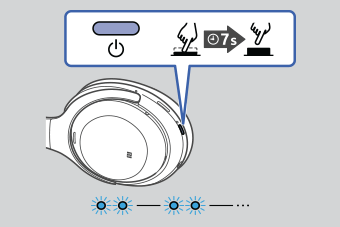
- If the above method doesn’t work, try initializing the device in factory settings by connecting it to a USB cable, turning off the device, and pressing the power button and volume down button together for more than 7 seconds.
Jbl
To reset your JBL Bluetooth headphones, follow these steps:
- For the Tune 500BT, turn off the device, disconnect all connected devices, and press and hold the volume up and down buttons simultaneously for 5 seconds.
- For the Vibe 100TWS, place the earbuds in their charging case, ensure they’re securely locked, and press the button on the right earbud until the LED flashes quickly twice. Release the button, wait 1 second, and repeat the process.
Huawei
To reset your Huawei Bluetooth headphones, follow these steps:
- Press and hold the power button for around 10 seconds. The LED light will change color during this process.
- Consult the user manual or download a copy from the official Huawei website for specific instructions.
Bose
To reset your Bose Bluetooth headphones, follow these steps:
- For the QuietComfort 35 II, turn off the device, wait 30 seconds, connect it to a power source using an adapter, and disconnect the USB cable after 5 seconds.
- Consult the user manual or download a copy from the official Bose website for specific instructions.
Panasonic
To reset your Panasonic Bluetooth headphones, follow these steps:
- Press and hold the power button for around 3-5 seconds until the LED light starts flashing. Release the button and consult the user manual or download a copy from the official Panasonic website for specific instructions.
Cellularline
To reset your Cellularline Bluetooth headphones, follow these steps:
- Consult the user manual or download a copy from the official Cellularline website for specific instructions.
Reseting Bluetooth Headphones For Music Sound
If you have Music Sound Bluetooth headphones and need to reset them, we recommend consulting the user manual or contacting the company directly via their website.
Conclusion
Resetting your Bluetooth headphones can often resolve common problems like connection issues, audio distortions, and range issues. Remember to follow these preliminary steps before attempting a reset: Disconnect all devices, turn off your headphones, and consult the specific instructions for your brand of headphones. With this guide, you should be able to get your Bluetooth headphones up and running smoothly in no time!
Frequently Asked Questions (FAQs)
- Why do I Need to Reset my Bluetooth Headphones?
Resetting your Bluetooth headphones can resolve common problems like lack of connection, audio distortions, or range issues.
- What Are The Benefits of Resetting my Bluetooth Headphones?
Resetting your Bluetooth headphones can improve their performance, ensure a stable connection, and enhance overall sound quality.
- How Often Should I Reset my Bluetooth Headphones?
You may need to reset your Bluetooth headphones periodically, especially if you’re experiencing frequent disconnections or audio issues.
- What Are Some Common Mistakes to Avoid When Resetting my Bluetooth Headphones?
Avoid disconnecting devices while the reset process is underway and ensure that your headphones are turned off before proceeding.
- Can I Reset my Bluetooth Headphones Without a User Manual?
While it’s possible to try, consulting the user manual or contacting the manufacturer directly can provide specific instructions tailored to your brand of headphones.
- Why do Some Brands Have More Complex Reset Procedures Than Others?
Reset procedures may vary depending on the brand and model of headphones, so be sure to consult the specific instructions for your device.
- Can I Still Use my Bluetooth Headphones if They’re Not Functioning Properly After a Reset?
If your headphones are still malfunctioning after a reset, consider consulting the manufacturer or contacting their support team for further assistance.


