
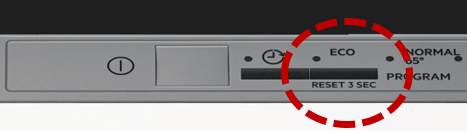
How to Reset Your Dishwasher: A Step-by-step Guide
Are you tired of dealing with a faulty dishwasher that just won’t work right? Look no further! In this guide, we’ll show you how to reset your dishwasher in a few simple steps.
Sometimes, a simple reset can resolve many common problems with your dishwasher, avoiding the need for costly repairs or replacements. Don’t worry if you’re not tech-savvy; following these easy instructions will have your dishwasher up and running in no time.
What You Need to Know Before We Begin
Before we dive into the nitty-gritty of resetting your dishwasher, it’s essential to understand that the process can vary depending on the specific model and brand. While some dishwashers may require a simple button press, others might need more complicated procedures. Don’t worry; we’ll provide you with general steps and specific instructions for popular brands.
Resetting Your Dishwasher: A General Overview
To reset your dishwasher, follow these basic steps:
- Turn Off The Appliance: Press the power button to turn off the dishwasher.
- Unplug or Disconnect: Unplug the dishwasher from the power outlet or disconnect it from the electrical supply.
- Wait For 5 Minutes: Allow the inner electronics to reset and cool down.
- Plug Back in or Reconnect: Plug the dishwasher back into the power outlet or reconnect it to the electrical supply.
- Turn on The Appliance: Press the power button to turn on the dishwasher.
Resetting Specific Brands
Now that you know the general process, let’s dive into specific instructions for popular brands:
Candy Dishwasher
To reset your Candy dishwasher, press and hold the Start/Pause button for around 5-10 seconds until you hear a beep or see the lights on the control panel flashing. This indicates that the common program has been erased, and your dishwasher is now reset.
If you still experience problems, try pressing and holding both the Start/Pause and Program buttons simultaneously for 3-5 seconds. If this doesn’t work, consult your user manual or contact Candy customer support for further assistance.
Electrolux Dishwasher
For an Electrolux dishwasher, press and hold the Reset button (usually marked with a ring with a line or a triangle with an arrow) for around 2-3 seconds. Then, select and initiate a new wash cycle to test if the reset has been successful.
Refer to your user manual or download the correct guide from Electrolux’s website by entering your product code in the search bar. This will provide you with specific instructions tailored to your model.
Whirlpool Dishwasher
To reset a Whirlpool dishwasher, press and hold the Cancel/Drain button (usually marked with an icon) for around 3 seconds. You might need to press and hold this button simultaneously with another button on your control panel.
Consult your user manual or visit Whirlpool’s website to find the correct procedure for your model. Enter your product code in the search bar, and you’ll be guided through the process of downloading the relevant guide.
Bosch Dishwasher
When resetting a Bosch dishwasher, press and hold the Reset button (usually marked with an X or the word “Reset”) for around 3-5 seconds until the lights on the control panel stop flashing. This indicates that the reset has been initiated.
Refer to your user manual or download the correct guide from Bosch’s website by entering your product code in the search bar. This will provide you with step-by-step instructions tailored to your model.
Smeg Dishwasher
If a simple reset doesn’t work, you might need to restore the factory settings for an SMEG dishwasher. Press and hold the determined buttons simultaneously, as specified in your user manual or downloaded guide from SMEG’s website.
Enter your product code in the search bar on SMEG’s website to find the correct procedure for your model.
Neff Dishwasher
To reset a NEFF dishwasher, press and hold the Reset button (usually marked with an X or an icon) for around 3-5 seconds until you hear a beep or see the lights on the control panel flashing. This indicates that the reset has been initiated.
Refer to your user manual or visit NEFF’s website to find the correct procedure for your model. Enter your product code in the search bar, and you’ll be guided through the process of downloading the relevant guide.
Beko Dishwasher
When resetting a Beko dishwasher, press and hold the Start/Pause button (usually marked with an icon) for around 3-5 seconds. Choose the desired cycle, initiate it, and test if the reset has been successful.
Consult your user manual or download the correct guide from Beko’s website by entering your product code in the search bar. This will provide you with step-by-step instructions tailored to your model.
Hotpoint Dishwasher
To reset a Hotpoint dishwasher, press and hold the Lighting/Sleep button (usually marked with an icon) for at least 5-10 seconds. If your appliance has a digital control panel, there might be a specific Reset button you need to press.
Refer to your user manual or visit Hotpoint’s website to find the correct procedure for your model. Enter your product code in the search bar on Hotpoint’s website, and you’ll be guided through the process of downloading the relevant guide.
Conclusion
Resetting your dishwasher can be a straightforward process if you follow these general steps and specific instructions for popular brands. Remember to always consult your user manual or download the correct guide from your manufacturer’s website if you’re unsure about the procedure.
By following these simple steps, you’ll have your dishwasher up and running in no time, saving you money on costly repairs and ensuring a sparkling clean kitchen.


