
The Ultimate Guide to Resolving a Black Monitor on Your Smartphone
Are you experiencing a black monitor on your smartphone? Don’t worry, this is a common issue that can be resolved with a few simple steps. In this article, we will guide you through the process of resolving a black monitor on both Android and iPhone devices.
What Causes a Black Monitor on My Smartphone?
A black monitor on your smartphone can be caused by various factors such as:
- Software glitches
- Hardware issues
- Overheating
Resolving a Black Monitor on an Android Device
If you have an Android device, follow these steps to resolve the issue:
Step 1: Try a Soft Reset
A soft reset is a simple process that can help resolve minor software issues. To perform a soft reset:
- Hold down the power button for around 10-15 seconds
- Release the power button and wait for the device to restart
If this doesn’t work, proceed to the next step.
Step 2: Try a Hard Reset
A hard reset is a more comprehensive process that can help resolve software issues. To perform a hard reset:
- Hold down the power button and the volume-down button at the same time for around 10 seconds
- Release both buttons and wait for the device to restart
If this doesn’t work, proceed to the next step.
Step 3: Try a Factory Reset
A factory reset is a more drastic measure that can help resolve software issues. To perform a factory reset:
- Go to Settings > Backup & reset
- Select “Factory data reset”
- Confirm your decision
Resolving a Black Monitor on an Iphone Device
If you have an iPhone device, follow these steps to resolve the issue:
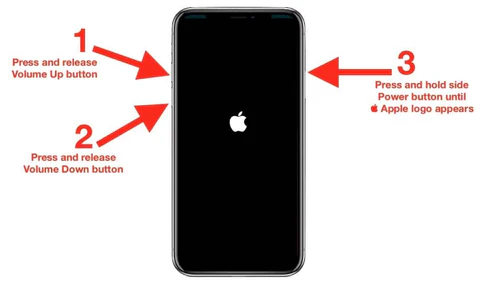
Step 1: Try a Hard Reset
A hard reset is a simple process that can help resolve minor software issues. To perform a hard reset:
- Press and hold down the sleep/wake button and the volume-down button at the same time for around 10 seconds
- Release both buttons and wait for the device to restart
If this doesn’t work, proceed to the next step.
Step 2: Try a Dfu Restore
A DFU (Device Firmware Update) restore is a more comprehensive process that can help resolve software issues. To perform a DFU restore:
- Connect your iPhone to your computer
- Open iTunes and select your device
- Put your iPhone in recovery mode by holding down the sleep/wake button for around 10 seconds, then releasing it while still holding down the volume-down button
- Wait for iTunes to detect your device
What to Do If None of These Steps Work?
If none of these steps work, it’s possible that there is a hardware issue with your device. In this case, you may need to visit an authorized service center or contact Apple support.
How to Recover Your Data After Resolving The Black Monitor Issue
After resolving the black monitor issue, you can recover your data by restoring from a backup or using a third-party recovery software.
Conclusion
Resolving a black monitor on your smartphone is a relatively simple process that can be completed with a few basic steps. By following these steps, you should be able to resolve the issue and get back to using your device as usual. If none of these steps work, it’s possible that there is a more serious hardware or software issue that requires professional attention.
Frequently Asked Questions (FAQs)
Q: What Causes a Black Monitor on my Smartphone?
A: A black monitor on your smartphone can be caused by various factors such as software glitches, hardware issues, or overheating.
Q: How do I Resolve a Black Monitor on an Android Device?
A: To resolve a black monitor on an Android device, try a soft reset, hard reset, or factory reset.
Q: How do I Resolve a Black Monitor on an Iphone Device?
A: To resolve a black monitor on an iPhone device, try a hard reset or DFU restore.
Q: What to do if None of These Steps Work?
A: If none of these steps work, it’s possible that there is a hardware issue with your device. In this case, you may need to visit an authorized service center or contact Apple support.
Q: How do I Recover my Data After Resolving The Black Monitor Issue?
A: After resolving the black monitor issue, you can recover your data by restoring from a backup or using a third-party recovery software.


