
How to Resolve Error ch05 Conditioner LG
Are you facing an error on your LG conditioner display? Don’t worry, we’ve got you covered! In this tutorial, we’ll guide you through a step-by-step process to resolve the error and get your conditioner working smoothly again.
What is Error ch05 Conditioner LG?
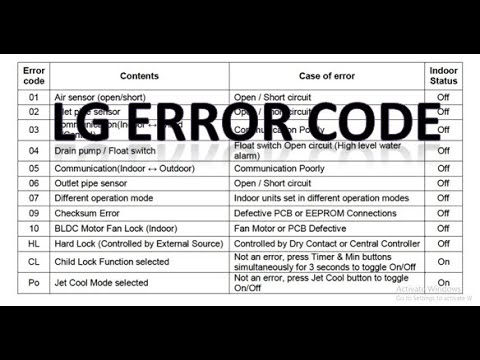
Error *ch05 is a common issue that occurs when there’s a problem with communication between the external unit (the engine) and the inner unit (the conditioner). This can cause the conditioner to malfunction, resulting in an error message on the display.
Prerequisites For Resolving Error ch05 Conditioner LG
Before we dive into the troubleshooting process, make sure you’ve checked the following:
- The conditioner is properly installed and levelled.
- There are no obstructions or blockages around the unit.
- The power supply is stable and not interrupted.
- You have a multimeter (optional) to perform some tests.
Step 1: Check Electrical Alimentation
The first step is to ensure that both units, inner and external, have a reliable electrical alimentation. Check if there are any automatic switches or blown fuses that might be causing the issue.
- If you find any problems, replace the fuse and check if the error persists.
- Make sure all cables are securely connected to their respective terminals.
Step 2: Inspect Links of Cuts
Links of cuts can often cause errors in communication. Check the links between the two units carefully and ensure they’re safe and not damaged.
- If you find any slackened or damaged links, replace them to resolve the issue.
- Make sure all cables are securely connected to their respective terminals.
Step 3: Clean Obstructions
Physical obstructions like dust, dirt, or vegetation can interfere with communication. Clean eventual obstructions around the unit and ensure there’s sufficient space for a correct airflow.
Step 4: Reimpostare The Unit
Sometimes, simply turning off and then on again can resolve minor problems. Try this method first before moving to more advanced troubleshooting steps.
- Turn off the power supply to both units.
- Wait for 5 minutes (as suggested by LG).
- Re-activate the units.
Step 5: Check External Unit’s Electronic Board
If the previous steps didn’t resolve the issue, it’s time to inspect the external unit’s electronic board. This might require some technical knowledge and caution.
- Ensure you have a multimeter handy.
- Locate the LED indicator near the cables of link.
- The LED should flash 5 times, then pause for a second, and repeat this pattern. If the LED doesn’t flash, it may indicate an issue with the internal unit’s electronic board.
Step 6: Substitute Fuses (If Necessary)
If you’ve identified a blown fuse or faulty electrical components, replace them accordingly.
- Make sure to follow proper safety procedures when working with electrical components.
- Use a multimeter to check for any short circuits or other issues.
Conclusion
Resolving error ch05 conditioner LG requires patience and attention to detail. By following these steps, you’ll be well on your way to resolving the issue and getting your conditioner working smoothly again. If you’re not comfortable with advanced troubleshooting, consider consulting a professional technician for assistance.
Frequently Asked Questions (FAQs)
- What Causes Error ch05 Conditioner LG?
Error *ch05 is typically caused by issues with communication between the external unit and the inner unit. - How do I Prevent Error *ch05 From Occurring?
Regular maintenance, proper installation, and checking electrical alimentation can help prevent this issue. - Can I Fix Error *ch05 Myself?
Yes, if you’re comfortable with basic troubleshooting and safety precautions. However, if you’re unsure or uncomfortable, consult a professional technician for assistance. - What Are The Symptoms of Error *ch05?
The conditioner may display an error message on the screen, or it might not turn on at all. - How Long Does it Take to Resolve Error *ch05?
Resolution time depends on the complexity of the issue and your level of technical expertise. - Can I Use a Multimeter to Diagnose Error *ch05?
Yes, a multimeter can help you identify issues with electrical components or short circuits. - Where Can I Find More Information About Error ch05 Conditioner LG?
Consult the LG official website, user manuals, or seek assistance from authorized service centers.
Important Notes
- Always follow proper safety procedures when working with electrical components.
- Consult a professional technician if you’re unsure or uncomfortable troubleshooting.
- Regular maintenance and proper installation can help prevent this issue.


