
How to Revive Your Phone: A Step-by-step Guide
Are you tired of dealing with a slow or unresponsive phone? Do you want to force your device to restart without using the physical buttons? Look no further! This article will guide you through the process of reviving your smartphone, whether it’s an Android or iPhone.
Understanding Why Your Phone Might Need Reviving
Before we dive into the step-by-step instructions, let’s quickly explore why your phone might need reviving in the first place. There are several reasons why your device might become unresponsive or slow:
- Overuse: If you’ve been using your phone non-stop for an extended period, it may have consumed too much memory and resources.
- Software glitches: Occasionally, software bugs can cause your phone to malfunction or freeze.
- Hardware issues: A faulty battery, overheating, or other hardware problems can also contribute to a slow or unresponsive phone.
Reviving Your Phone With Android
If you’re using an Android device, reviving it is relatively straightforward. Here’s what you need to do:
- Hold Down The Power Button: Press and hold the Power button until your phone turns off.
- Access The Menu: Long press on the Power button to access the menu.
- Select Restart: Tap on “Restart” and confirm by tapping on it again.
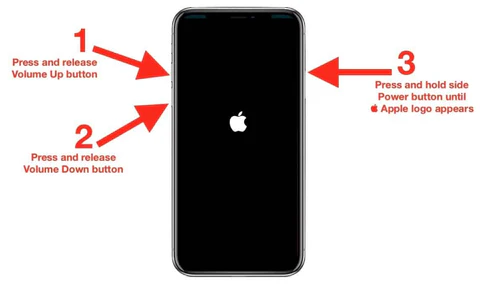
Reviving Your Phone With Iphone
If you’re using an iPhone, reviving it requires a few more steps:
- Hold Down The Sleep/wake Button: Press and hold the Sleep/Wake button until your phone turns off.
- Access The Menu: Hold down the Volume Down button while holding down the Sleep/Wake button.
- Select Restart: Release the buttons, then press and hold the Sleep/Wake button again until your phone restarts.
Reviving Your Phone Without Physical Buttons
If your physical buttons are damaged or unresponsive, you can still revive your phone using alternative methods:
- Android:
- Use the “AssistiveTouch” feature on newer devices.
- Download and install the “Shutdown” app from the Play Store.
- IPhone:
- Utilize the “Face ID” feature to access the menu and restart your device.
Reviving Your Phone if The Touchscreen Doesn’t Function
If your touchscreen is unresponsive, you can still revive your phone using alternative methods:
- Android:
- Press and hold the Power button for 10 seconds.
- Release the buttons and let your phone turn off automatically.
- IPhone:
- Hold down the Sleep/Wake button while holding down the Volume Down button.
Conclusion
Reviving your phone can be a lifesaver when it becomes unresponsive or slow. By following these step-by-step instructions, you should be able to get your device up and running smoothly again. Remember to always try the simpler methods first before resorting to more complex solutions.
Frequently Asked Questions (FAQs)
- Q: How Often Should I Revive my Phone?
A: You can revive your phone as needed, but it’s recommended to restart your device every few days or after heavy use. - Q: Can Reviving my Phone Cause Data Loss?
A: No, reviving your phone will not cause any data loss. However, if you’re using an Android device, make sure to back up your data before restarting. - Q: What Should I do if my Phone Won’t Turn Off?
A: If your phone refuses to turn off, try pressing and holding the Power button for a longer period or using alternative methods like AssistiveTouch. - Q: Can Reviving my Iphone Cause Damage to The Battery?
A: No, reviving your iPhone will not damage the battery. However, if you’re experiencing battery issues, consider replacing it. - Q: How do I Prevent my Phone From Becoming Slow or Unresponsive in The Future?
A: To keep your phone running smoothly, make sure to update your operating system regularly, close unused apps, and clean up storage space. - Q: Can Reviving my Phone Fix Software Glitches?
A: Reviving your phone might not necessarily fix software glitches, but it can help resolve minor issues. - Q: What Should I do if I’m Experiencing Hardware Issues With my Phone?
A: If you suspect that your phone has a hardware problem, consider contacting the manufacturer or visiting an authorized service center for assistance.
Additional Resources
For more information on reviving your phone, we recommend checking out the official guides and support pages provided by Android and Apple. You can also explore online forums and communities dedicated to smartphone enthusiasts for additional tips and advice.


