
How to Recover Messages on Whatsapp
Are you wondering how to recover messages on WhatsApp that have been erased or deleted? Don’t worry, we’ve got you covered! In this article, we’ll guide you through the process of recovering messages on WhatsApp, whether it’s on an Android or iOS device.
Recovering Messages on Whatsapp: A Step-by-step Guide
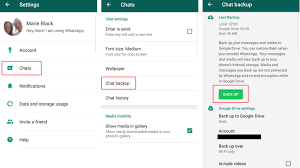
Before we dive into the details, let’s start with the basics. WhatsApp has a built-in feature called “Backup” that allows you to save your chat history and media files to Google Drive or local storage. If you’ve enabled this feature, recovering messages is a straightforward process.
Recovering Messages From Backup on Android
To recover messages from a backup on an Android device:
- Install WhatsApp on the new phone associated with the same number and account.
- Open WhatsApp and follow the initial configuration process.
- When prompted to restore chat history, select “Restore” and enter your Google Drive credentials if necessary.
Recovering Messages From Backup on Ios
To recover messages from a backup on an iOS device:
- Install WhatsApp on the new iPhone associated with the same number and Apple ID.
- Open WhatsApp and follow the initial configuration process.
- When prompted to restore chat history, select “Restore” and enter your Apple ID credentials if necessary.
Recovering Messages Without Backup on Android
If you haven’t enabled backup or don’t have a recent backup, there’s still hope! You can use third-party software like Dr.Fone from Wondershare to recover deleted messages. Here’s how:
- Download and install Dr.Fone on your computer.
- Connect your Android device to the computer via USB cable.
- Launch Dr.Fone and select “Recover Messages” from the menu.
- Follow the instructions to scan your device for deleted messages.
Recovering Messages Without Backup on Ios
Unfortunately, there’s no built-in feature in WhatsApp to recover messages deleted by a sender. However, you can try using third-party apps like WhatsRemoved+ (available on the Google Play Store) to record notifications and save deleted message trailers.
Transferring Conversations Between Devices
If you’re looking to transfer conversations from one device to another, whether it’s an Android or iOS device, here are some tips:
- For transferring conversations between two Android devices, follow the steps outlined in our previous guide.
- To transfer conversations from an iPhone to another iPhone, simply install WhatsApp on the new device and follow the initial configuration process.
- If you’re looking to transfer conversations from an Android device to an iOS device or vice versa, check out our tutorial on transferring chat history between devices.
Conclusion
Recovering messages on WhatsApp doesn’t have to be a daunting task. By following these step-by-step guides, you’ll be able to recover your deleted messages and continue chatting with friends and family. Remember to always enable backup and save your conversations regularly to avoid losing important messages in the future!
Faqs
- How do I Recover Messages on Whatsapp Without a Backup?
You can use third-party software like Dr.Fone from Wondershare or try using WhatsRemoved+ (on Android) to record notifications and save deleted message trailers. - Can I Transfer Conversations Between Devices?
Yes, you can transfer conversations between two Android devices by following the steps outlined in our previous guide. For transferring conversations from an iPhone to another iPhone, simply install WhatsApp on the new device and follow the initial configuration process. - How do I Recover Messages Deleted by a Sender?
Unfortunately, there’s no built-in feature in WhatsApp to recover messages deleted by a sender. However, you can try using third-party apps like WhatsRemoved+ (on Android) or attempt to recover a backup containing the deleted message. - What Happens if I Don’t Have a Recent Backup?
If you don’t have a recent backup, you may be able to recover messages using third-party software or by attempting to recover a backup containing the deleted message. - Can I Recover Messages on Whatsapp That Were Sent Before I Enabled Backup?
Unfortunately, no. You can only recover messages from backups created after enabling the feature. - How do I Enable Backup in Whatsapp?
To enable backup in WhatsApp, go to Settings > Chats > Backup and select “Backup on Google Drive” (on Android) or “Backup on iCloud” (on iOS). - Can I Transfer Conversations Between Devices Without Losing Media Files?
Yes, you can transfer conversations between devices without losing media files by enabling backup before transferring the chat history.
We hope this article has been helpful in answering your questions about recovering messages on WhatsApp!


