
How to Restore Whatsapp Conversations
Are you struggling to restore your WhatsApp conversations after switching phones or reinstalling the app? Don’t worry, this guide will walk you through the process of recovering your WhatsApp chats.
Why Can’t I Recover My Whatsapp Chats?
There are several reasons why you might not be able to recover your WhatsApp chats. One common reason is that WhatsApp doesn’t automatically back up your conversations when you uninstall or reinstall the app. Another reason is that if you’ve changed phones, WhatsApp won’t be able to access your old phone’s backup.
How to Restore Whatsapp on Android
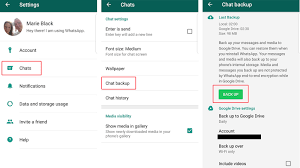
To restore WhatsApp on Android, follow these steps:
- Use Google Drive Backup: If you’ve enabled cloud backup in WhatsApp settings, you can use this method to recover your chats.
- Restore From Local Backup: If you don’t have a cloud backup, you can try restoring from a local backup file called msgstore.Db.Crypt15.
How to Restore Whatsapp on Iphone
To restore WhatsApp on an iPhone, follow these steps:
- Check Icloud Drive: Make sure that your old iPhone is connected to the same Apple ID and that iCloud Drive is enabled.
- Restore From Backup: If you have a backup of your WhatsApp conversations in iCloud Drive, you can restore them by reinstalling WhatsApp and following the prompts.
What Happens if I’ve Erased My Whatsapp Chats?
If you’ve erased your WhatsApp chats accidentally or on purpose, don’t worry! You might still be able to recover them using third-party software like Dr. Fone.
How to Recover Whatsapp Chats From a Computer
To recover WhatsApp chats from a computer, follow these steps:
- Connect Your Phone: Connect your phone to the computer and use software like Wondershare MobileTrans to transfer your WhatsApp chats.
- Use Whatsapp Web: You can also access your WhatsApp conversations on your computer by scanning a QR code with the WhatsApp app.
How to Reactivate My Suspended Whatsapp Account
If your WhatsApp account has been suspended, don’t worry! You can try unblocking it using unofficial versions of WhatsApp or contacting WhatsApp support directly.
Conclusion
Restoring WhatsApp conversations can be a bit tricky, but with this guide, you should be able to recover your chats easily. Remember to always enable cloud backup and local backups to prevent data loss in the future.
Faqs
- Q: Why Can’t I Recover my Whatsapp Chats?
A: There are several reasons why you might not be able to recover your WhatsApp chats, including lack of cloud or local backup. - Q: How do I Restore Whatsapp on Android?
A: You can use Google Drive backup or restore from a local backup file called msgstore.Db.Crypt15. - Q: How do I Restore Whatsapp on Iphone?
A: Check iCloud Drive and restore from a backup if you have one enabled. - Q: What Happens if I’ve Erased my Whatsapp Chats?
A: You might still be able to recover them using third-party software like Dr. Fone. - Q: How do I Recover Whatsapp Chats From a Computer?
A: Connect your phone to the computer and use software like Wondershare MobileTrans or access WhatsApp Web. - Q: How do I Reactivate my Suspended Whatsapp Account?
A: Try unblocking it using unofficial versions of WhatsApp or contacting WhatsApp support directly. - Q: Can I Restore Whatsapp on a New Phone?
A: Yes, you can use cloud backup or local backups to recover your chats. - Q: What if I Don’t Have a Backup of my Whatsapp Conversations?
A: You might still be able to recover them using third-party software like Dr. Fone or contacting WhatsApp support directly.
Useful Resources


