
How to Resonize Your Sony Tv: A Step-by-step Guide
Are you struggling to get your Sony TV up and running? Do you find yourself spending hours trying to sintonizzare the channels, only to end up with a list of full channels that don’t seem to convey anything? Don’t worry, we’re here to help! In this guide, we’ll walk you through the process of resonizing your Sony TV, step by step.
Understanding Your Options
Before we dive into the nitty-gritty of resonizing your TV, let’s take a moment to understand your options. There are two main ways to resonate your Sony TV: Automatic and Manual.
- Automatic Resonization: This is the easiest and quickest way to get your TV up and running. By selecting this option, your TV will automatically scan for digital frequencies using its built-in antenna.
- Manual Resonization: If you prefer a more hands-on approach or if automatic resonization doesn’t work for you, manual resonization is the way to go. This method allows you to manually search for specific channels and frequencies.
Step-by-step Guide: Automatic Resonization
If you’re short on time or want to get your TV up and running quickly, automatic resonization is the best option. Here’s how to do it:
- Press The Home Button: Press the home button on your remote control to access the main menu.
- Select Settings: Choose the settings option from the menu.
- Select Digital Setting: Scroll down to the digital setting option and select it.
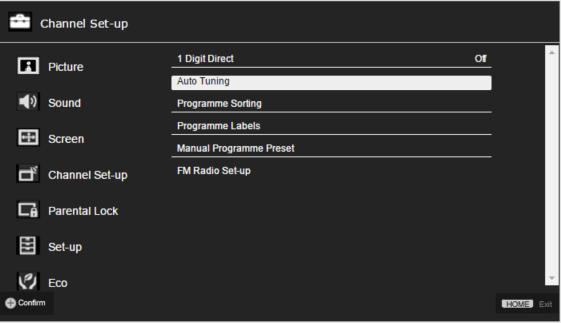
- Choose Automatic Preselection: Select the automatic preselection option, which will start scanning for digital frequencies using your TV’s built-in antenna.
- Wait For Scanning to Complete: Wait for the scanning process to complete, which may take a few minutes depending on the strength of your signal.
Step-by-step Guide: Manual Resonization
If automatic resonization doesn’t work for you or if you prefer a more hands-on approach, manual resonization is the way to go. Here’s how to do it:
- Press The Home Button: Press the home button on your remote control to access the main menu.
- Select Settings: Choose the settings option from the menu.
- Select Digital Setting: Scroll down to the digital setting option and select it.
- Choose Manual Preselection: Select the manual preselection option, which will allow you to manually search for specific channels and frequencies.
- Search For Channels And Frequencies: Use your remote control to search for specific channels and frequencies.
Troubleshooting Common Issues
Sometimes, despite following these steps, you may still experience issues with your TV’s resonization. Don’t worry! Here are some common problems and their solutions:
- No Signal: If you’re experiencing no signal, try updating your TV’s firmware or checking the antenna for any obstructions.
- Weak Signal: If your signal is weak, try repositioning your antenna or using a different type of antenna.
- Multiple Channels Display Same Number: If multiple channels display the same number, try rescanning for digital frequencies.
Conclusion
Resonizing your Sony TV may seem daunting at first, but with these step-by-step guides and troubleshooting tips, you’ll be up and running in no time! Remember to always consult the official guide on Sony’s website for any further assistance or detailed instructions. Happy resonizing!
Frequently Asked Questions (FAQs)
- Q: What is Resonization?
A: Resonization refers to the process of configuring your TV to receive digital channels. - Q: Why do I Need to Resonate my Tv?
A: You need to resonate your TV to access digital channels and ensure you’re receiving the best possible signal. - Q: How Long Does Automatic Resonization Take?
A: Automatic resonization typically takes a few minutes, depending on the strength of your signal. - Q: Can I Manually Search For Specific Channels?
A: Yes, you can manually search for specific channels and frequencies using the manual preselection option. - Q: What if I’m Experiencing Issues With my Tv’s Resonization?
A: Try updating your TV’s firmware or checking the antenna for any obstructions. If problems persist, consult the official guide on Sony’s website for further assistance.
Common Issues And Solutions
- No Signal: Update your TV’s firmware or check the antenna for any obstructions.
- Weak Signal: Reposition your antenna or use a different type of antenna.
- Multiple Channels Display Same Number: Rescan for digital frequencies.
Bonus Tips
- Make sure to follow these steps carefully and in order to ensure accurate resonization.
- If you’re experiencing issues, try consulting the official guide on Sony’s website for detailed instructions.
- Regularly updating your TV’s firmware can help prevent common issues with resonization.


