
Save Your Iphone Battery: 8 Tricks to Get to The Evening With 100% Charge
If you’re an iPhone user, you probably know how annoying it is to arrive at an evening with almost no battery. You are not alone! Even Apple smartphones can have battery life problems, especially if they are not updated or if you use applications that consume a lot of energy.
In this article, I will show you 8 tricks to save iPhone battery and get to the evening with 100% charge. Don’t worry, these tips are easy to follow even if you’re not very tech savvy!
Update Ios
The first thing to do is update your iPhone’s iOS to the latest version. While you might think this is obvious, many users forget to do this and then complain that their battery doesn’t last long enough.
To update the iOS, go to the iPhone settings section, select “general” and then “update software”. If there is a new version available, your iPhone will notify you and you can update.
Activate Energy Saving Mode
The second thing to do is activate the iPhone’s energy saving mode. This function is called “save energy” and can be activated in the settings > battery section.
When the electricity is poor, the iPhone will use less energy to operate, which means the battery will last longer.
Disable Location Tracking And Background Notifications
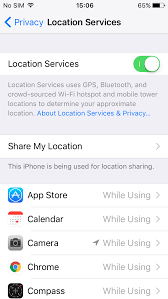
The third thing to do is to disable localization and background notifications for some applications. This can help reduce your iPhone’s energy use.
To do this, go to the settings > privacy and security > localization section and select “never use” or “only when in use”.
Furthermore, you can disable background notifications for some applications by going to the settings > notifications section.
Disable Automatic Brightness Adjustment
The fourth thing to do is to disable the automatic brightness adjustment of the iPhone. This can help reduce your iPhone’s energy use.
To do this, go to the settings > accessibility section and select “monitor and text size”. Then, disable the “automatic brightness adjustment” option.
Disable Unnecessary Notifications
The fifth thing to do is to disable unnecessary iPhone notifications. These notifications can be generated by the applications they use and can help reduce the iPhone’s energy use.
To do this, go to the settings > notifications section and select “never use” or “only when in use”.
Turn on Dark Mode
The sixth thing to do is activate the iPhone’s dark mode. This mode can help reduce iPhone power usage.
To do this, go to the settings > monitor and brightness section and select “dark mode”.
Do Not Close Open Applications
The seventh thing to do is not to close open applications on the iPhone. This can help reduce your iPhone’s energy use.
In fact, when you close applications, the operating system must be reloaded to reconnect applications and this requires more energy.
Uninstall Applications That Consume Too Much
The eighth thing to do is to uninstall the applications that consume too much energy on the iPhone. This can help reduce your iPhone’s energy use.
To do this, go to the applications section and select “delete” to delete applications you no longer use.
Conclusion
Here are the 8 tricks to save iPhone battery. I hope these tips were helpful to you! remember to update the ios, activate the energy saving mode, disable localization and background notifications, disable automatic brightness adjustment, disable unnecessary notifications, activate dark mode, do not close open applications and uninstall applications that they consume too much energy.
Frequently Asked Questions
- Why Does my Iphone Tell me That The Battery is Almost Empty?
The iPhone may say that the battery is almost at zero if you use a lot of power-hungry applications or if the power saving mode is not turned on.
- How Can I Activate Power Saving Mode on my Iphone?
To activate energy saving mode on your iPhone, go to the settings > battery section and select “save energy”.
- What Happens if I Disable Location Tracking on my Iphone?
If you disable location tracking on your iPhone, you may no longer receive location notifications for some applications.
- How Can I Activate Dark Mode on my Iphone?
To activate dark mode on your iPhone, go to the settings > monitor and brightness section and select “dark mode”.
- What Happens if I Don’t Close Open Applications on my Iphone?
If you don’t close open applications on your iPhone, you may not have to reload the operating system every time you close applications.
- How Can I Uninstall Applications That Consume Too Much Energy on my Iphone?
To uninstall applications that consume too much energy on your iPhone, go to the applications section and select “delete” to delete applications you no longer use.
- What Happens if I Replace The Iphone Battery?
If it replaces your iPhone’s battery, you may need to contact an Apple Center to have this done.
- How Can I Check The Battery Status on my Iphone?
To check the battery status on your iPhone, go to the settings > battery section and select “battery status and charge”.
I hope these answers were helpful to you!


