
How to Spare The Battery of Your Iphone: Tips And Tricks
Are you tired of your iPhone’s battery running out too quickly? Do you find yourself scrambling to charge it during the day? You’re not alone! Many iPhone users face this issue, but there are some simple tips and tricks that can help spare your battery. In this article, we’ll explore the best ways to extend the life of your iPhone’s battery.
Understanding Your Iphone’s Battery
Before we dive into the tips, it’s essential to understand how your iPhone’s battery works. The battery is designed to last for a certain number of charge cycles (typically 1,000). If you’re not careful, your battery can deteriorate faster than expected, leading to reduced autonomy.
Tip #1: Use The Low Power Mode
One of the most effective ways to spare your iPhone’s battery is by using the Low Power Mode. This feature reduces the power consumption of your device by:
- Reducing screen brightness
- Disabling Background App Refresh
- Turning off Location Services and Bluetooth
To enable Low Power Mode, go to Settings > Battery > Low Power Mode.
Tip #2: Disable Location Services
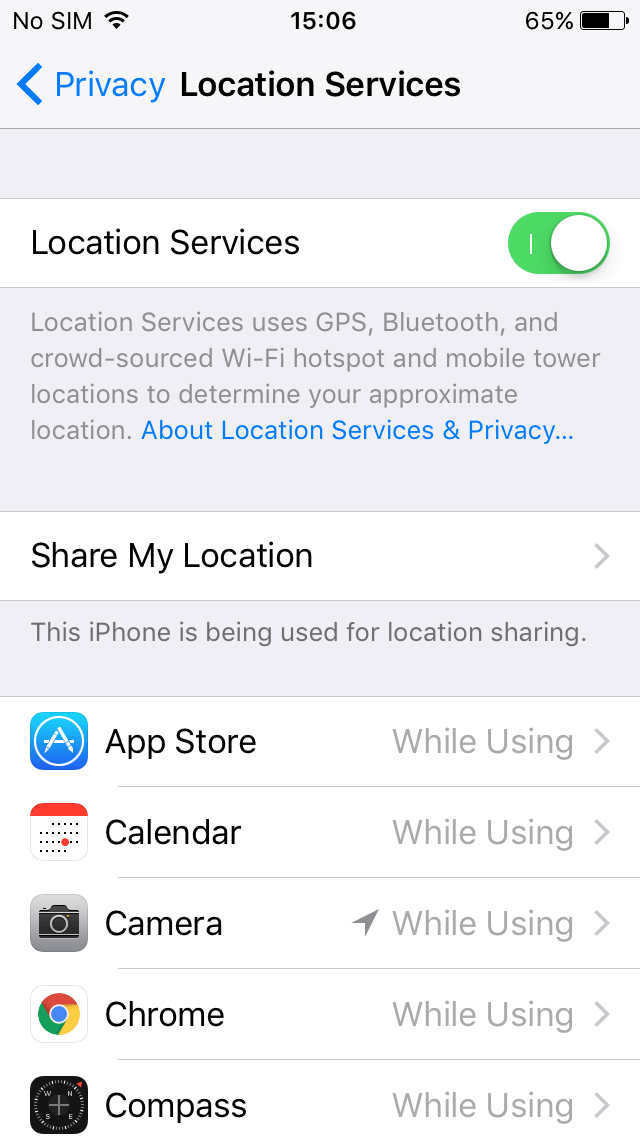
Location services can be a significant battery drain, especially if you’re using apps that rely heavily on GPS. To disable location services for individual apps, go to Settings > Privacy > Location Services and toggle off the switch next to each app.
Tip #3: Turn Off Push Notifications
Push notifications can also consume a lot of battery life. To turn them off, go to Settings > Notifications and toggle off the switch next to each app.
Tip #4: Use Airplane Mode in Low-signal Areas
When you’re in an area with poor network coverage, it’s best to enable Airplane mode. This will prevent your iPhone from constantly searching for a signal, which can drain your battery quickly.
Tip #5: Adjust Your Screen Brightness
Adjusting your screen brightness can also help conserve battery life. Try reducing the brightness by going to Settings > Display & Brightness and adjusting the slider.
Other Solutions to Spare Battery Iphone
In addition to these tips, here are some other solutions that can help:
- Disable 3D Touch on older iPhones
- Turn off Background App Refresh for unused apps
- Use a third-party battery-saving app
- Regularly restart your iPhone
Troubleshooting: What to Do if These Tips Don’t Work
If you’ve tried these tips and still experience poor battery life, it’s possible that there’s an underlying issue with your iPhone’s battery. If this is the case, consult Apple’s official resources for troubleshooting and potential solutions.
Conclusion
Sparing your iPhone’s battery can be achieved by following a few simple tips and tricks. By using Low Power Mode, disabling location services and push notifications, and adjusting your screen brightness, you can extend the life of your device’s battery. Remember to also keep an eye on your iPhone’s overall health and take steps to prevent battery degradation.
Frequently Asked Questions (FAQs)
- Q: How Often Should I Charge my Iphone?
A: Try to keep your iPhone charged between 30% and 80%. - Q: Can I Disable Background App Refresh For All Apps at Once?
A: Yes, go to Settings > General > Background App Refresh and toggle off the switch. -
Q: How Can I Check my Iphone’s Battery Health?
A: Go to Settings > Battery > Battery Health and look for the percentage value next to Maximum Capacity. -
Q: What Should I do if my Iphone’s Battery is Damaged or Deteriorated?
A: Consult Apple’s official resources for troubleshooting and potential solutions, such as replacing your iPhone’s battery or seeking support from an authorized Apple service provider. -
Q: Can I Use Third-party Battery-saving Apps on Ios 14 or Later Versions?
A: Yes, but be aware that some features might not work seamlessly due to restrictions imposed by Apple. -
Q: How Can I Troubleshoot Issues With my Iphone’s Battery?
A: Consult Apple’s official resources for troubleshooting and potential solutions, such as resetting your iPhone’s settings or seeking support from an authorized Apple service provider. -
Q: What Are Some Signs of a Deteriorated or Damaged Iphone Battery?
A: Watch out for symptoms like decreased autonomy, increased charging time, or erratic behavior when trying to charge your device. -
Q: Can I Replace my Iphone’s Battery if It’s Still Under Warranty?
A: Yes, consult Apple’s official resources for more information on their battery replacement policies and procedures.
Note that this article aims to provide general guidance and is not a comprehensive guide or an exhaustive list of solutions.


