
How to Search For Images: A Step-by-step Guide
Are you looking for a way to search for images on the internet? Whether it’s to find a specific photo, identify a person in a picture, or simply browse through beautiful landscapes, searching for images can be a fun and rewarding experience. In this article, we will explore the various ways to search for images online, using different services and tools.
Google Images: The Ultimate Image Search Engine
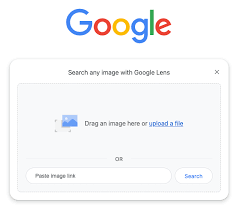
Google Images is one of the most popular and powerful image search engines available. With its vast database of images, you can easily find what you’re looking for by typing in keywords related to your search query. But did you know that Google Images also allows you to upload an image and find similar ones on the web? This feature is called “reverse image search” and it’s incredibly useful.
To use Google Images, simply click on the camera icon in the search bar, select “Upload a photo,” choose the image from your computer or mobile device, and then press enter. You’ll be presented with a list of similar images found online. This feature is also available on mobile devices through the Google Photos app.
Tineye: Another Powerful Image Search Engine
Another excellent option for searching for images is TinEye. This service allows you to upload an image or search using a URL, and it will return a list of similar images from around the web. TinEye uses advanced algorithms to identify matches, making it easier to find what you’re looking for.
To use TinEye, simply click on the “Upload” button, choose your image, and then press enter. You’ll be presented with a list of matching images.
Bing Images: Microsoft’s Image Search Engine
If you prefer using Bing instead of Google, you can also search for images on Bing Images. This service allows you to upload an image or search using keywords related to your query. The interface is similar to Google Images, and the results are usually accurate.
To use Bing Images, simply click on the camera icon in the search bar, select “Upload a photo,” choose the image from your computer or mobile device, and then press enter.
Pimeyes: A Tool For Identifying People in Images
If you’re looking to identify a person in a picture, PimEyes is an excellent tool to use. This service uses advanced algorithms to recognize faces and return results based on the image uploaded. However, please note that using PimEyes requires subscription (35.99 Euros/month) and it’s not meant for commercial or malicious purposes.
To use PimEyes, simply upload your image, select a face, and then press enter. You’ll be presented with a list of results showing the person in the picture.
Mobile Apps: Searching For Images on Your Phone
If you prefer searching for images on your phone, there are several mobile apps available that can help you achieve this goal. Some popular options include:
- Imagesearchman (Android): This app allows you to search for images using Google Images directly from your Android device.
- Reversee (iPhone/iPad): This app enables you to search for images using the reverse image search feature on iOS devices.
These apps are usually free to download and offer a simple, user-friendly interface for searching for images on the go.
How to Use Reverse Image Search
Reverse image search is a powerful tool that allows you to upload an image or search using a URL, and it will return a list of similar images from around the web. Here’s how to use it:
- Upload an Image: Simply click on the “Upload” button and choose your image.
- Search by Url: Enter the URL of the image you want to find similar ones for.
- Press Enter: Once you’ve uploaded or entered the URL, press enter to start the search.
Conclusion
Searching for images online can be a fun and rewarding experience. With Google Images, TinEye, Bing Images, PimEyes, and mobile apps like ImageSearchMan and Reversee, you have access to various powerful tools that make searching for images easy and convenient. Remember to use these services responsibly and follow the terms of service for each tool.
Faqs
- What is Reverse Image Search?
Reverse image search allows you to upload an image or search using a URL, and it will return a list of similar images from around the web. - How do I Use Google Images to Find Similar Images?
To use Google Images for reverse image search, click on the camera icon in the search bar, select “Upload a photo,” choose your image, and then press enter. - What is Tineye?
TinEye is another powerful image search engine that allows you to upload an image or search using a URL, and it will return a list of similar images from around the web. - How do I Identify People in Pictures Using Pimeyes?
To use PimEyes for identifying people in pictures, simply upload your image, select a face, and then press enter. You’ll be presented with a list of results showing the person in the picture. - What Mobile Apps Can I Use to Search For Images on my Phone?
Some popular options include ImageSearchMan (Android) and Reversee (iPhone/iPad).
I hope this article has been helpful!


