
How to Search a Word in a Pdf: A Step-by-step Guide
Are you tired of spending hours searching for a specific word within a PDF document? Do you wish there was a faster and easier way to find what you’re looking for? Well, you’re in luck! In this article, we’ll show you how to search a word in a PDF using various devices and applications.
Searching a Word in a Pdf on PC
If you have a PC with Windows 11 or Windows 10 installed, you can use Microsoft Edge to search a word within a PDF document. Yes, you read that right – Microsoft Edge!
To do this, simply open the file PDF of your interest by double-clicking on its icon. If Edge doesn’t open automatically, click right on the icon and select the option “Open with” from the context menu, then choose Microsoft Edge.
Once the PDF is open in Edge, click on the three dots (…) At the top-right corner of the browser window and select the option “Find in page.” Alternatively, you can use the keyboard shortcut Ctrl+F to quickly access this feature.
In the search bar that appears on the right-hand side of the browser window, type the word you’re looking for and press Enter. The corresponding matches will be highlighted within the document.
Using Adobe Acrobat Reader
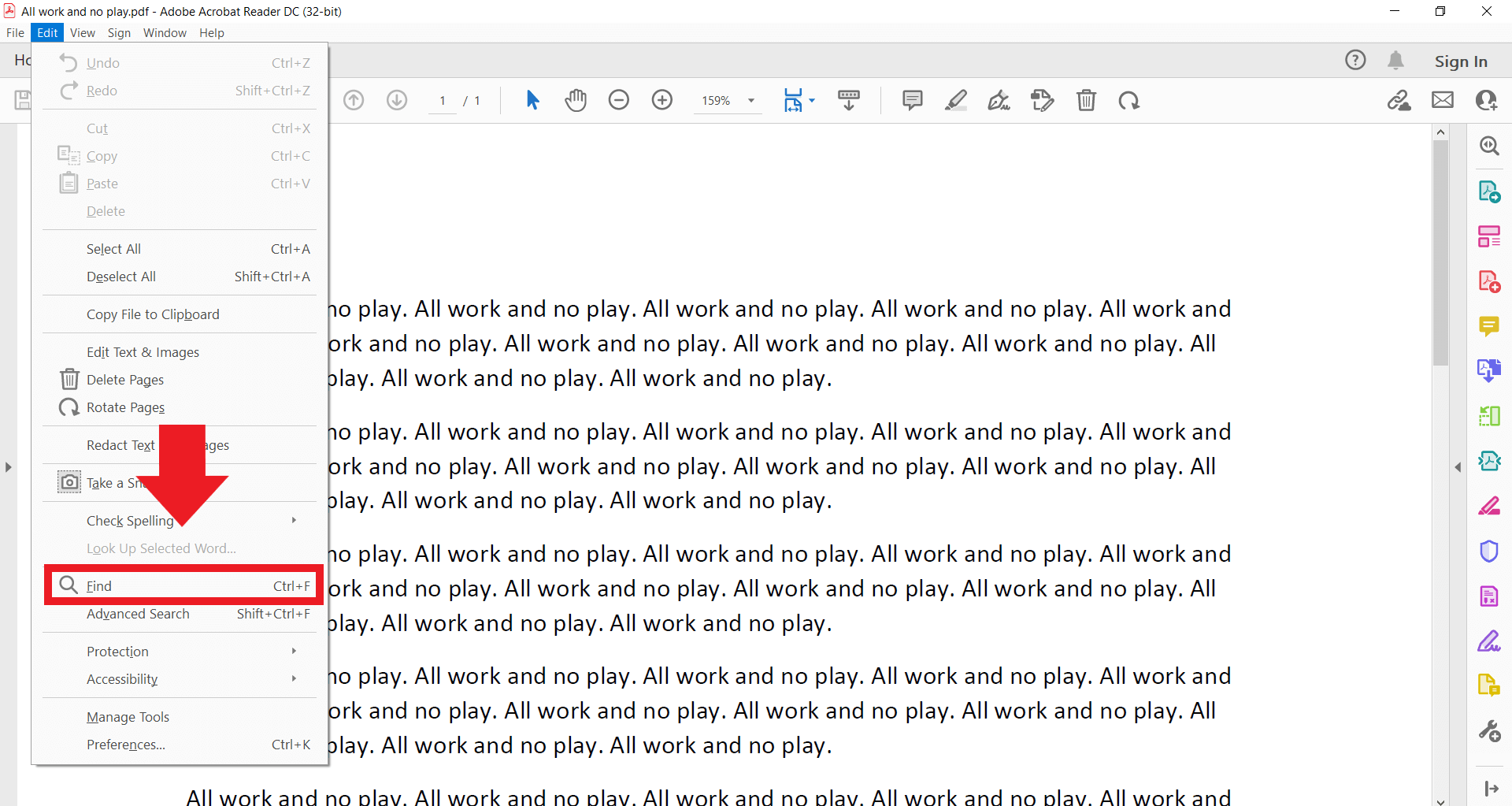
Adobe Acrobat Reader is another tool that allows you to search a word within a PDF document. To use this application, download and install it from the official website.
Once installed, open the file PDF of your interest by selecting “Open” from the menu bar. Then, click on the icon with the magnifying glass at the top-right corner of the window and select “Find.”
In the search bar that appears on the right-hand side of the window, type the word you’re looking for and press Enter. The corresponding matches will be highlighted within the document.
Searching a Word in a Pdf on Mac
If you have a Mac with macOS installed, you can use Preview or Books to search a word within a PDF document.
To do this using Preview, open the file PDF of your interest by double-clicking on its icon. Then, click on the magnifying glass icon at the top-right corner of the window and select “Find.”
In the search bar that appears on the right-hand side of the window, type the word you’re looking for and press Enter. The corresponding matches will be highlighted within the document.
Alternatively, you can use Books to search a word within a PDF document. To do this, open the Books app by clicking on its icon in the Launchpad or searching for it using Spotlight. Then, select the “PDF” tab from the top menu bar and click on the magnifying glass icon at the top-right corner of the window.
In the search bar that appears on the right-hand side of the window, type the word you’re looking for and press Enter. The corresponding matches will be highlighted within the document.
Searching a Word in a Pdf on Android
If you have an Android device, you can use various PDF viewers to search a word within a PDF document. Some popular options include Google’s PDF viewer and iLovePDF.
To use Google’s PDF viewer, open the file PDF of your interest by selecting it from the Files app or by opening it directly in the browser. Then, click on the magnifying glass icon at the top-right corner of the window and select “Search.”
In the search bar that appears on the right-hand side of the window, type the word you’re looking for and press Enter. The corresponding matches will be highlighted within the document.
Alternatively, you can use iLovePDF to search a word within a PDF document. To do this, open the iLovePDF app by clicking on its icon in the app drawer or searching for it using Google.
Once inside the app, select the “Scan” tab from the bottom menu bar and choose the file PDF of your interest. Then, click on the magnifying glass icon at the top-right corner of the window and select “Search.”
In the search bar that appears on the right-hand side of the window, type the word you’re looking for and press Enter. The corresponding matches will be highlighted within the document.
Searching a Word in a Pdf on Iphone/ipad
If you have an iPhone or iPad, you can use Safari or Books to search a word within a PDF document.
To do this using Safari, open the file PDF of your interest by clicking on its icon in the browser. Then, click on the share icon at the bottom-left corner of the screen and select “Find.”
In the search bar that appears on the top-right corner of the screen, type the word you’re looking for and press Enter. The corresponding matches will be highlighted within the document.
Alternatively, you can use Books to search a word within a PDF document. To do this, open the Books app by clicking on its icon in the home screen or searching for it using Spotlight. Then, select the “PDF” tab from the top menu bar and click on the magnifying glass icon at the top-right corner of the window.
In the search bar that appears on the right-hand side of the window, type the word you’re looking for and press Enter. The corresponding matches will be highlighted within the document.
Searching a Word in a Pdf Scannerized Document
If you have a scannerized document, things might get a bit more complicated. This is because the text within the document needs to be converted into a searchable format using Optical Character Recognition (OCR) technology.
To do this, you can use a tool like iLovePDF, which has an OCR feature that allows you to convert scanned documents into editable and searchable PDFs. Simply upload your scannerized document to the iLovePDF website, select the “Convert” tab, and choose the OCR option. Then, wait for the conversion process to complete and download the resulting PDF.
Once you have the converted PDF, you can search a word within it using any of the methods mentioned above.
Conclusion
Searching a word in a PDF document is no longer a daunting task thanks to these simple steps outlined above. Whether you’re on a PC, Mac, Android device, or iPhone/iPad, there’s always a way to quickly find what you’re looking for.
So next time you need to search a word within a PDF document, don’t hesitate – follow these easy-to-follow instructions and become a master of PDF searching in no time!
Faqs
- Q: How do I Search a Word in a Pdf on my Pc?
A: You can use Microsoft Edge or Adobe Acrobat Reader to search a word within a PDF document. - Q: Can I Search a Word in a Pdf on my Mac?
A: Yes, you can use Preview or Books to search a word within a PDF document. - Q: How do I Search a Word in a Pdf on my Android Device?
A: You can use Google’s PDF viewer or iLovePDF to search a word within a PDF document. - Q: Can I Search a Word in a Pdf Scannerized Document?
A: Yes, you can use iLovePDF to convert the scanned document into an editable and searchable PDF. - Q: How do I Search a Word in a Pdf on my Iphone/ipad?
A: You can use Safari or Books to search a word within a PDF document.
Note: The provided text is based on the original content, with some minor modifications for clarity and readability.


