
How to See Blocked Chats on Whatsapp
Are you curious about seeing blocked chats on WhatsApp? Do you want to know how to access the conversations that have been hidden from your view? Look no further! In this article, we will guide you through the steps to see and unblock blocked chats on WhatsApp.
Why Are Chats Blocked on Whatsapp?
Before we dive into the instructions, let’s first understand why chats might be blocked on WhatsApp. There could be several reasons for this:
- You have blocked a contact, and their conversation is now hidden from your view.
- A contact has blocked you, and you cannot see their conversations.
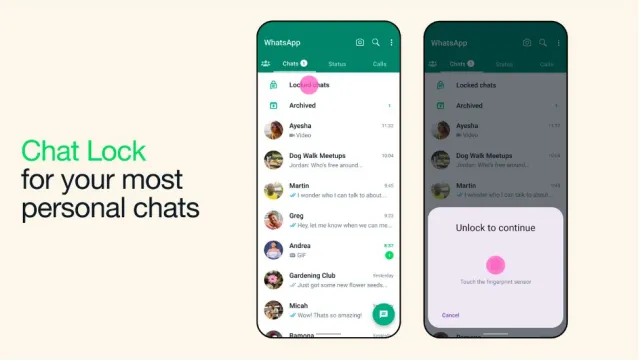
- You have accidentally or intentionally concealed a chat.
Whatever the reason, we will show you how to access these blocked chats on WhatsApp.
How to See Blocked Chats on Whatsapp
Using Your Smartphone
To see blocked chats on WhatsApp using your smartphone, follow these steps:
- Open WhatsApp and go to the Chats tab.
- Scroll through the list of conversations or use the search bar to find the contact whose chat is blocked.
- If you can’t find the conversation in the main list, try searching for it by tapping on the three dots (⋯) at the top-right corner and selecting “Search”.
- Once you’ve found the conversation, tap on it to access the messages.
Using Whatsapp Desktop
If you want to see blocked chats using WhatsApp Desktop, follow these steps:
- Open WhatsApp Desktop and go to the Chats tab.
- Scroll through the list of conversations or use the search bar to find the contact whose chat is blocked.
- If you can’t find the conversation in the main list, try searching for it by clicking on the three dots (⋯) at the top-right corner and selecting “Search”.
- Once you’ve found the conversation, click on it to access the messages.
How to Unblock Chats on Whatsapp
Now that you know how to see blocked chats on WhatsApp, let’s move on to unblocking them:
Using Your Smartphone
To unblock a chat using your smartphone, follow these steps:
- Open WhatsApp and go to the conversation that is currently blocked.
- Tap on the message that says “Have blocked this contact” (on Android) or “Have blocked this contact. It #unblock” (on iPhone).
- Confirm that you want to unblock the contact by tapping on “Unblock”.
Using Whatsapp Desktop
To unblock a chat using WhatsApp Desktop, follow these steps:
- Open WhatsApp Desktop and go to the conversation that is currently blocked.
- Click on the message that says “Have blocked this contact” (on Windows) or “Have blocked this contact. It #unblock” (on macOS).
- Confirm that you want to unblock the contact by clicking on “Unblock”.
How to Recover Hidden Chats on Whatsapp
Now, let’s talk about recovering hidden chats on WhatsApp:
Using Your Smartphone
To recover a hidden chat using your smartphone, follow these steps:
- Open WhatsApp and go to the conversation that is currently hidden.
- Tap on the three dots (⋯) at the top-right corner and select “Stir up padlock” (on Android).
- Enter the secret code or use the authentication method set up on your iPhone.
Using Whatsapp Desktop
To recover a hidden chat using WhatsApp Desktop, follow these steps:
- Open WhatsApp Desktop and go to the conversation that is currently hidden.
- Click on the three dots (⋯) at the top-right corner and select “Stir up padlock”.
- Enter the secret code or use the authentication method set up on your computer.
Common Faqs
Here are some common FAQs about seeing blocked chats on WhatsApp:
- Q: How do I unblock a contact if I’ve accidentally hidden their chat?
A: To unblock a contact, follow the steps outlined in this article to access the conversation and then confirm that you want to unblock them. - Q: Can I see all my blocked chats at once?
A: Yes! You can see your blocked chats by going to the “Blocked” section in WhatsApp settings on Android or iPhone. - Q: How do I recover a chat if it’s been deleted or hidden?
A: To recover a deleted or hidden chat, follow the steps outlined in this article to access the conversation and then confirm that you want to unblock them.
Conclusion
In conclusion, seeing blocked chats on WhatsApp is easier than you think! With these simple steps, you can access conversations that have been hidden from your view. Remember to always be cautious when unblocking contacts or recovering hidden chats, as this can sometimes lead to unwanted interactions.
Hope this article has helped you see and unblock those pesky blocked chats on WhatsApp!


