
How to See Your Google Password on Pc, Smartphone, or Tablet
Are you tired of forgetting your Google password? Do you want to know how to see it easily on your PC, smartphone, or tablet? You’ve come to the right place! In this article, we’ll show you how to access your Google password using various browsers and devices.
Table 1: Seeing Your Google Password on PC
| Browser | Steps to Follow |
|---|---|
| Edge (Windows/macOS/Linux) | Click on the Edge icon on the desktop, click on the three dots in the top right corner, select Settings, then Profile, and finally Password. Type google.Com in the search bar to find your Google account password. |
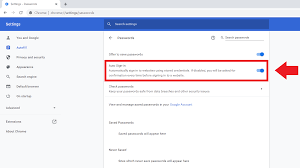
| Google Chrome (Windows/macOS/Linux) | Open Google Chrome, click on the three dots in the top right corner, select Settings, then Autofill, and finally Passwords. Type google.Com in the search bar to find your Google account password. |
| Mozilla Firefox (Windows/macOS/Linux) | Open Mozilla Firefox, click on the menu button in the top right corner, select Settings, then Privacy and Safety, and finally Saved Logins. Type google.Com in the search bar to find your Google account password. |
Table 2: Seeing Your Google Password on Smartphone/ Tablet
| Browser | Steps to Follow |
|---|---|
| Google Chrome (Android/iOS/iPadOS) | Open Google Chrome, click on the three dots in the top right corner, select Settings, then Passwords, and finally Accounts.Google.Com. Type google.Com in the search bar to find your Google account password. |
| Firefox (Android/iOS/iPadOS) | Open Firefox, tap on the menu button in the top right corner, select Settings, then Credentials and Password, and finally Saved Logins. Type google.Com in the search bar to find your Google account password. |
How to Recover Your Google Password
If you’ve forgotten your Google password, don’t worry! You can recover it easily by following these steps:
- Open your browser on PC or smartphone.
- Go to accounts.Google.Com.
- Click on “Forgot password?”
- Follow the recovery process, which may involve answering security questions, entering a code sent to your phone or email, or providing other information.
How to Save Your Google Password
To avoid forgetting your Google password in the future, consider using a password manager like 1Password, Bitwarden, or KeePass. These tools allow you to store and manage all your passwords securely and easily.
Conclusion
In conclusion, seeing your Google password on PC, smartphone, or tablet is easier than you think! By following the steps outlined in this article, you can access your password using various browsers and devices. Remember to recover your password if you forget it, and consider using a password manager to save it securely.


