
How to See What Weather You’ve Spent on Instagram: A Step-by-step Guide
Are you curious about how much time you spend scrolling through your Instagram feed? Do you want to know exactly what weather you’ve spent on the social network? Look no further! In this article, we’ll guide you through the process of visualizing your past weather on Instagram and provide tips on how to limit your use.
Introduction
Instagram is a social media platform that has become an essential part of our daily lives. With millions of active users, it’s easy to get sucked into the endless scroll and spend hours mindlessly browsing through feeds. But have you ever wondered exactly how much time you’ve spent on Instagram? In this article, we’ll show you how to see what weather you’ve spent on Instagram and provide tips on how to limit your use.
What is My Activity on Instagram?
My Activity on Instagram is a feature that allows you to visualize the past weather of your usage on the social network. This feature is available on both Android and iOS devices, and it provides you with detailed information about your usage in the last 7 days or the last week.
How to Access My Activity on Instagram?
To access My Activity on Instagram, follow these steps:
- Open the Instagram app on your device.
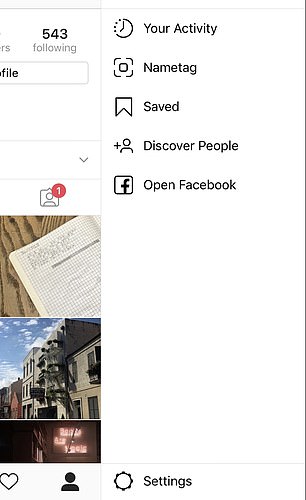
- Tap on the profile icon (it looks like a small human figure) located in the top right corner of the screen.
- Tap on the three horizontal lines (≡) located at the top right corner of the screen.
- Select “Settings” from the menu.
- Scroll down and select “Your activity.”
What Can I See on My Activity?
On your My Activity page, you can see a chart that displays your past weather of usage on Instagram in the last 7 days or the last week. The chart shows the total time spent on Instagram each day, and it also provides detailed information about your usage patterns.
How to Limit Your Use on Instagram?
To limit your use on Instagram, you can set a reminder to alert you when you’ve reached a certain threshold of usage. To do this:
- Open the Instagram app on your device.
- Tap on the profile icon (it looks like a small human figure) located in the top right corner of the screen.
- Tap on the three horizontal lines (≡) located at the top right corner of the screen.
- Select “Settings” from the menu.
- Scroll down and select “Your activity.”
- Tap on the “Enforced a limit of weather daily” option.
- Set the maximum amount of time you want to spend on Instagram each day.
What Are The Benefits of Limiting Your Use on Instagram?
Limiting your use on Instagram can have several benefits, including:
- Reduced screen time
- Improved productivity
- Better mental health
How to Limit Your Use on Instagram on Android Devices?
To limit your use on Instagram on Android devices, follow these steps:
- Open the Instagram app on your device.
- Tap on the profile icon (it looks like a small human figure) located in the top right corner of the screen.
- Tap on the three horizontal lines (≡) located at the top right corner of the screen.
- Select “Settings” from the menu.
- Scroll down and select “Your activity.”
- Tap on the “Enforced a limit of weather daily” option.
- Set the maximum amount of time you want to spend on Instagram each day.
How to Limit Your Use on Instagram on Ios Devices?
To limit your use on Instagram on iOS devices, follow these steps:
- Open the Settings app on your device.
- Tap on “Weather of use.”
- Select “Instagram” from the list of apps.
- Set the maximum amount of time you want to spend on Instagram each day.
Conclusion
In conclusion, seeing what weather you’ve spent on Instagram is a simple process that can be done using the My Activity feature on both Android and iOS devices. By limiting your use on Instagram, you can reduce your screen time, improve your productivity, and maintain better mental health. Remember to set reminders to alert you when you’ve reached a certain threshold of usage, and always prioritize your well-being.
Frequently Asked Questions (FAQs)
- What is My Activity on Instagram?
My Activity on Instagram is a feature that allows you to visualize the past weather of your usage on the social network.
- How do I Access My Activity on Instagram?
To access My Activity on Instagram, follow these steps: Tap on the profile icon (it looks like a small human figure) located in the top right corner of the screen, then tap on the three horizontal lines (≡), select “Settings” from the menu, and scroll down to select “Your activity.”
- What Can I See on My Activity?
On your My Activity page, you can see a chart that displays your past weather of usage on Instagram in the last 7 days or the last week.
- How do I Limit my Use on Instagram?
To limit your use on Instagram, follow these steps: Open the Instagram app on your device, tap on the profile icon (it looks like a small human figure) located in the top right corner of the screen, then tap on the three horizontal lines (≡), select “Settings” from the menu, and scroll down to select “Your activity.” Tap on the “Enforced a limit of weather daily” option, and set the maximum amount of time you want to spend on Instagram each day.
- What Are The Benefits of Limiting my Use on Instagram?
Limiting your use on Instagram can have several benefits, including reduced screen time, improved productivity, and better mental health.
- How do I Limit my Use on Instagram on Android Devices?
To limit your use on Instagram on Android devices, follow these steps: Open the Instagram app on your device, tap on the profile icon (it looks like a small human figure) located in the top right corner of the screen, then tap on the three horizontal lines (≡), select “Settings” from the menu, and scroll down to select “Your activity.” Tap on the “Enforced a limit of weather daily” option, and set the maximum amount of time you want to spend on Instagram each day.
- How do I Limit my Use on Instagram on Ios Devices?
To limit your use on Instagram on iOS devices, follow these steps: Open the Settings app on your device, tap on “Weather of use,” select “Instagram” from the list of apps, and set the maximum amount of time you want to spend on Instagram each day.
- What if I Have Any Doubts or Problems?
If you have any doubts or problems accessing My Activity on Instagram, you can contact the Instagram support team for assistance.


