
How to Tell If a Mobile Has Been Used: A Guide
As a potential buyer or seller of a mobile phone, it’s essential to determine whether the device has been used before. This guide will walk you through the steps to check if a mobile has been used, including checking its appearance, IMEI number, warranty status, battery condition, and usage statistics.
What You Need to Know Before Buying a Used Mobile
Before we dive into the details, it’s crucial to understand that buying a used mobile can be a great way to save money. However, it’s essential to ensure that the device has not been tampered with or stolen. Here are some preliminary information that will help you make an informed decision:
- Acquiring a smartphone from the official store of the producer (e.G., Apple, Huawei, Samsung, etc.) Guarantees that the device is new.
- Online stores like Amazon and eBay have a system of reviews that can give you an idea of the seller’s reputation.
- If you buy a used mobile from one of these platforms, it’s possible to return or cancel the purchase if the device turns out to be used.
Checking The Appearance of The Mobile
When assessing the shopping of a mobile phone, it’s crucial to check its appearance. Here are some signs to look out for:
- The package should be unopened and in good condition.
- Check for any scratches or abrasions on the device.
- Look for signs of water damage or other forms of physical stress.
If you suspect that the mobile has been used, try to observe its appearance carefully. If the device shows signs of heavy use, such as numerous scratches or water damage, it may not be worth buying.
Verifying The Imei Number
The IMEI (International Mobile Equipment Identity) number is a unique code assigned to each mobile phone. It can help you determine if the device has been stolen or tampered with.
Here’s how to check the IMEI number:
- Open the dialer app and compose the code *06#.
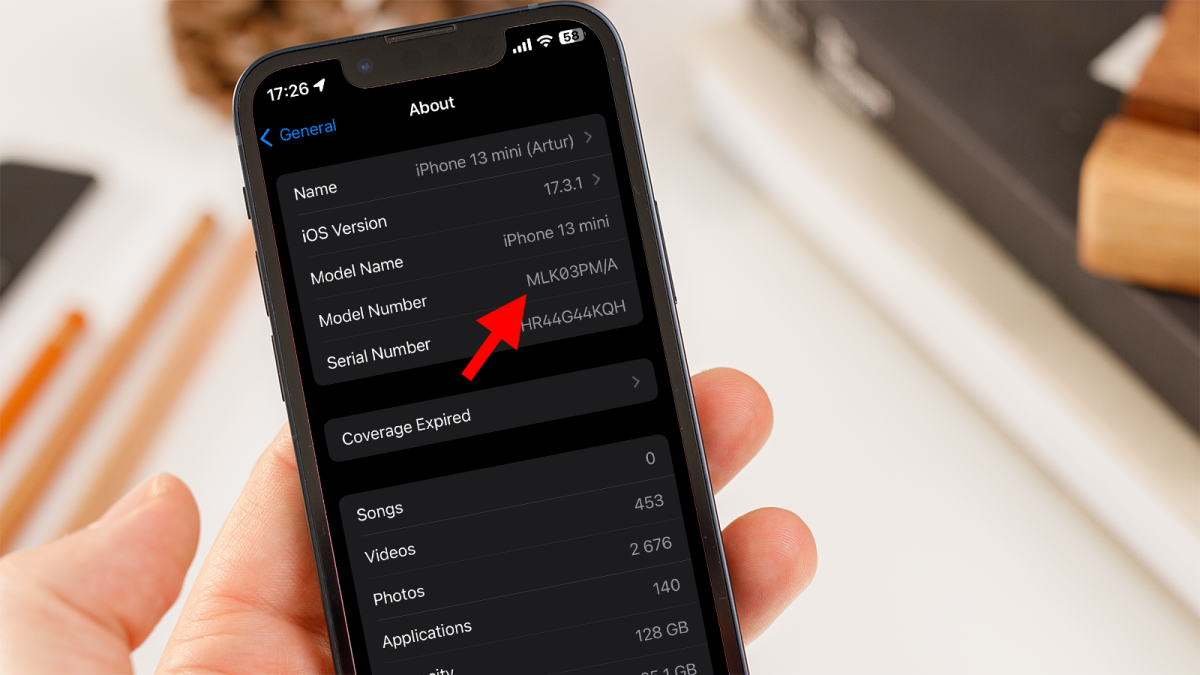
- Alternatively, go to Settings > Info on the phone > State > Given IMEI.
- On iPhone, go to General > Settings > Info > N° of series.
If the device was stolen and reported to the authorities, it will be blocked by the network operator, making it impossible to use. To verify this, you can use services like International Numbering Plans.
Checking The Warranty Status
The warranty status of the mobile phone can give you an idea of its condition. Here’s how to check:
- Find the serial number on the packaging or in Settings > Info on the phone.
- Go to the producer’s website (e.G., Apple, Huawei, Samsung) and enter the IMEI number or serial number to check the warranty status.
If the device has a valid warranty, it may be worth considering purchasing. However, if the warranty is expired, it’s essential to factor in the cost of potential repairs.
Verifying The Battery Condition
A mobile phone’s battery condition can indicate whether the device has been used extensively.
Here’s how to check:
- On Android devices, use apps like AccuBattery to monitor the battery health.
- For iPhone users, go to Settings > Battery and tap on the State battery option to view the maximum capacity.
If the battery is worn out or not functioning correctly, it may be a sign that the device has been used excessively.
Consulting The Statistical of Use
The statistical of use can provide valuable information about how the mobile phone has been used. Here’s how to check:
- On Android devices, compose the code *##4636*##* or try other codes like *#0*# or *7378423*##**.
- On iPhone, go to Settings > Battery and tap on the Last 24 hours option.
By analyzing these statistics, you can get an idea of how the device has been used and whether it’s worth purchasing.
Conclusion
In conclusion, buying a used mobile phone can be a great way to save money, but it’s essential to ensure that the device has not been tampered with or stolen. By following the steps outlined in this guide, you can determine if a mobile phone has been used and make an informed decision about purchasing it.
Faqs
- Q: What is the IMEI number, and why is it important?
A: The IMEI number is a unique code assigned to each mobile phone, which helps identify the device. If the device was stolen and reported to the authorities, it will be blocked by the network operator, making it impossible to use. - Q: How can I check the warranty status of a used mobile phone?
A: To check the warranty status, find the serial number on the packaging or in Settings > Info on the phone and go to the producer’s website (e.G., Apple, Huawei, Samsung) to enter the IMEI number or serial number. - Q: What does it mean if a mobile phone’s battery is worn out?
A: If a mobile phone’s battery is worn out, it may be a sign that the device has been used extensively. This can affect the overall performance and lifespan of the phone. - Q: Can I still buy a used mobile phone with a valid warranty?
A: Yes, you can still purchase a used mobile phone with a valid warranty. However, factor in the cost of potential repairs if the warranty is close to expiring. - Q: How do I check the statistical of use on my Android device?
A: On Android devices, compose the code *##4636*##* or try other codes like *#0*# or *7378423*##*.


