
How to See Your Activity on Instagram: A Step-by-step Guide
Are you curious about your activity on Instagram? Do you want to see what you’ve been up to on the platform? Look no further! In this article, we’ll show you how to see your own activity on Instagram, as well as the activity of others.
Why See Your Activity on Instagram?
Seeing your activity on Instagram can be a great way to track your progress and engagement on the platform. You can see what you’ve been posting, who’s been interacting with your content, and even get an idea of how many people have viewed your posts.
How to See Your Own Activity on Instagram
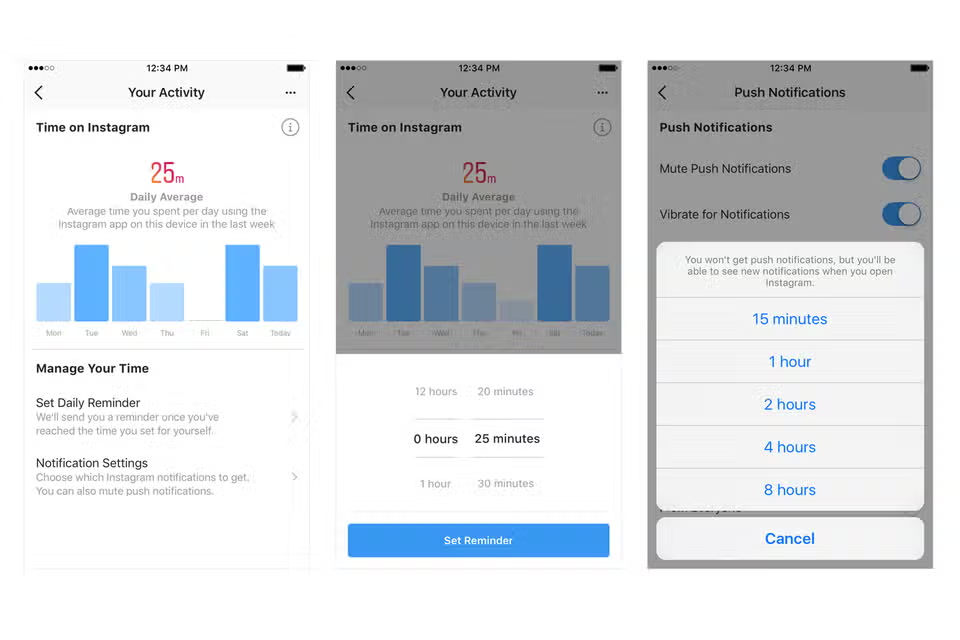
To see your own activity on Instagram, follow these simple steps:
- Open The Instagram App: Open the Instagram app on your smartphone or tablet.
- Go to Your Profile: Tap on the profile icon (it looks like a person) in the bottom right corner of the screen.
- Tap on The Three Horizontal Lines: Tap on the three horizontal lines in the top right corner of the screen.
- Select “Your Activity”: From the menu, select “Your Activity”.
- View Your Activity: You’ll see a list of your recent activity on Instagram, including posts, stories, and interactions.
How to See Chronology Activity on Instagram
If you want to see a detailed chronology of your activity on Instagram, follow these steps:
- Open The Instagram App: Open the Instagram app on your smartphone or tablet.
- Go to Your Profile: Tap on the profile icon (it looks like a person) in the bottom right corner of the screen.
- Tap on The Three Horizontal Lines: Tap on the three horizontal lines in the top right corner of the screen.
- Select “Your Activity”: From the menu, select “Your Activity”.
- Tap on “Chronology”: From the list of your activity, tap on “Chronology” to view a detailed timeline.
How to See Record Activity on Instagram
If you want to see a record of all the devices that have accessed your Instagram account, follow these steps:
- Open The Instagram App: Open the Instagram app on your smartphone or tablet.
- Go to Your Profile: Tap on the profile icon (it looks like a person) in the bottom right corner of the screen.
- Tap on The Three Horizontal Lines: Tap on the three horizontal lines in the top right corner of the screen.
- Select “Settings”: From the menu, select “Settings”.
- Scroll Down to “Safety”: Scroll down to the “Safety” section and tap on “Activity of Access”.
- View Your Record Activity: You’ll see a list of all devices that have accessed your Instagram account.
How to See Stood Activity on Instagram
If you want to see the status of activity on Instagram, follow these steps:
- Open The Instagram App: Open the Instagram app on your smartphone or tablet.
- Go to Your Profile: Tap on the profile icon (it looks like a person) in the bottom right corner of the screen.
- Tap on The Three Horizontal Lines: Tap on the three horizontal lines in the top right corner of the screen.
- Select “Settings”: From the menu, select “Settings”.
- Scroll Down to “Privacy”: Scroll down to the “Privacy” section and tap on “State of Activity”.
- Toggle ON Display State of Activity: Toggle the switch to turn on display state of activity.
How to See Activity on Instagram of a Friend
Unfortunately, it’s no longer possible to see the activity of friends on Instagram in real-time. However, you can still see their recent posts and interactions with your content.
- Open The Instagram App: Open the Instagram app on your smartphone or tablet.
- Go to Your Friend’s Profile: Tap on your friend’s profile icon (it looks like a person).
- Tap on The Three Horizontal Lines: Tap on the three horizontal lines in the top right corner of the screen.
- Select “Followers”: From the menu, select “Followers”.
- View Your Friend’s Activity: You’ll see a list of your friend’s recent activity on Instagram.
Conclusion
In this article, we’ve shown you how to see your own activity on Instagram, as well as the activity of others. Whether you want to track your progress or get an idea of how many people have viewed your posts, seeing your activity on Instagram can be a great way to gain insights and improve your social media game.
Frequently Asked Questions
- Q: Why Can’t I See my Friend’s Activity on Instagram?
A: Unfortunately, it’s no longer possible to see the activity of friends on Instagram in real-time. - Q: How do I See my Record Activity on Instagram?
A: To see your record activity on Instagram, follow the steps outlined in this article under “How to See Record Activity on Instagram”. - Q: Can I Turn Off Display State of Activity on Instagram?
A: Yes, you can toggle off display state of activity on Instagram by following the steps outlined in this article under “How to See Stood Activity on Instagram”.


