
How to See Last Access Instagram: A Step-by-step Guide
Are you wondering how to see when your friends were last active on Instagram? Look no further! In this article, we’ll guide you through the process of accessing the last access feature on Instagram, and provide some additional tips and tricks to help you track your friends’ activity.
What is Last Access on Instagram?
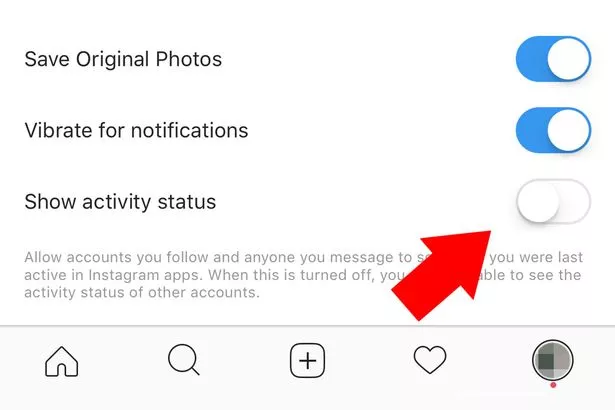
Last access, also known as “Active status,” is a feature introduced by Instagram in 2018 that allows users to see when their contacts were last active on the platform. This feature is similar to Facebook’s “Active Status” and provides users with an indication of whether their friends are online or not.
How to See Last Access on Instagram
From Android And Ios Devices
- Open the Instagram app on your smartphone or tablet.
- Log in to your account by entering your login credentials.
- Tap on the airplane icon in the top-right corner of the screen, or swipe right from the main feed to access the direct messages section.
- Find the contact you’re interested in and look for the “Active status” indicator next to their name.
From Pc
- Log in to your Instagram account using a web browser (e.G., Google Chrome).
- Click on the profile icon in the top-right corner of the screen, then click on “Settings.”
- Select “Messages and answers to stories > Display activity status” from the drop-down menu.
- Find the contact you’re interested in and look for the “Active status” indicator next to their name.
Understanding Last Access Indicators
- Active/to Hour: The user is currently online.
- Active/to [number] Min Ago: The user was last active [number] minutes ago.
- Active/to [number] Hours Ago: The user was last active [number] hours ago.
- Active/to Today: The user was last active within the past 4-5 hours.
- Active/to Yesterday: The user was last active yesterday.
How to See Last Access Without Direct Messages
If you want to see when your friends were last active on Instagram without looking at direct messages, try these alternative methods:
Control The Profile of Your Contact
- Tap on the lens icon in the bottom-right corner of the screen.
- Search for the contact’s name and tap on their profile.
- Scroll down to the “Posts” or “Stories” section and look for the timestamp next to their most recent post.
Check Notifications
- Search for your contact’s name and tap on their profile.
- Tap on the “Follow” button if you haven’t already.
- Enable notifications for posts, stories, IGTV, Reels, and live videos.
How to Disable Last Access on Instagram
If you want to disable last access on Instagram, follow these steps:
From Android And Ios Devices
- Open the Instagram app and tap on your profile icon in the bottom-right corner of the screen.
- Tap on the three horizontal lines (≡) at the top-right corner of the screen.
- Select “Settings” from the drop-down menu.
- Scroll down to the “Messages and answers to stories > Display activity status” section and toggle off the switch.
From Pc
- Log in to your Instagram account using a web browser (e.G., Google Chrome).
- Click on the profile icon in the top-right corner of the screen, then click on “Settings.”
- Select “Messages and answers to stories > Display activity status” from the drop-down menu.
- Toggle off the switch next to “Display activity status.”
Conclusion
In conclusion, seeing last access on Instagram is a useful feature that allows you to stay connected with your friends and see when they were last active on the platform. By following the steps outlined in this article, you can enable or disable last access on Instagram from both Android and iOS devices as well as PC.
Frequently Asked Questions
- What is Last Access on Instagram?
Last access, also known as “Active status,” is a feature that allows users to see when their contacts were last active on the platform. - How do I Enable Last Access on Instagram?
To enable last access on Instagram, follow the steps outlined in this article for both Android and iOS devices as well as PC. - Can I Disable Last Access on Instagram?
Yes, you can disable last access on Instagram by following the steps outlined in this article for both Android and iOS devices as well as PC. - What Does “Active/to Hour” Mean?
“Active/to hour” means that the user is currently online. - How do I Know When my Friend Was Last Active on Instagram?
You can check the timestamp next to their most recent post or story in the “Posts” or “Stories” section of their profile. - Can I See Last Access Without Direct Messages?
Yes, you can try controlling the profile of your contact or checking notifications for alternative methods.
I hope this article has been helpful in answering your questions about seeing last access on Instagram!


