
Unlocking Whatsapp’s Secrets: How to See Your Last Access on Whatsapp
As you navigate through the world of messaging apps, it’s natural to have questions about your online activities. In this article, we’ll delve into the world of WhatsApp and explore how to see your last access on this popular messaging platform.
What is The Last Access Functionality?
The last access functionality on WhatsApp allows users to see when their contacts were last active on the app. This feature can be useful in understanding who’s been online recently and can help you stay connected with friends and family.
Who Can See Your Last Access on Whatsapp?
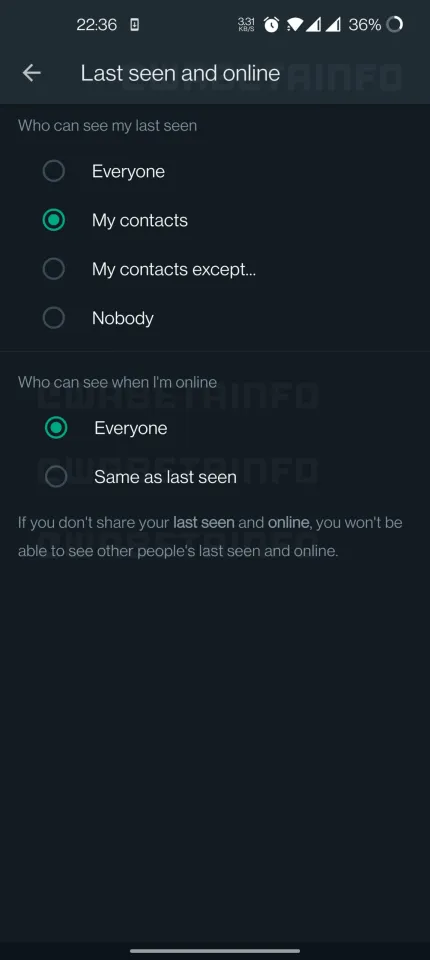
Your last access on WhatsApp is visible to others based on your privacy settings. If you’ve chosen to share this information with anyone, it will be visible to them. However, if you’ve opted for more restrictive settings, only your contacts may see your last access.
How to Check Your Last Access on Whatsapp
To check your last access on WhatsApp, follow these steps:
On Android Devices:
- Open the WhatsApp app and tap on the three dots (⋮) in the top right corner.
- Select “Settings” from the menu.
- Tap on “Last access” under the “Privacy” section.
- Choose who can see your last access: Anyone, only your contacts, or none.
On Iphone Devices:
- Open the WhatsApp app and tap on the Settings icon (gear).
- Select “Account” from the menu.
- Tap on “Last > Privacy access and online”.
- Choose who can see your last access: Anyone, only your contacts, or none.
How to See Your Last Access on Whatsapp Web
To check your last access on WhatsApp Web:
- Open WhatsApp Web in a browser.
- Click on the three dots (⋮) in the top right corner.
- Select “Settings” from the menu.
- Tap on “Last access” under the “Privacy” section.
- Choose who can see your last access: Anyone, only your contacts, or none.
What Happens if I’m Blocked or Don’t See My Last Access?
If you’re blocked on WhatsApp or don’t see your last access, it may be due to various reasons:
- You’ve Been Blocked: If someone has blocked you on WhatsApp, they won’t be able to see your last access.
- Your Settings Are Incorrect: Check if your privacy settings for the last access functionality are correct.
- A Contact Has Disabled Their Last Access: Your contact may have disabled their last access visibility.
How to See Last Access Without Being Online or Visible
Unfortunately, it’s not possible to see someone’s last access without being online or visible on WhatsApp. However, you can ask a mutual friend for this information.
Why Can’t I See My Last Access on Whatsapp?
There are several reasons why you might not be able to see your last access on WhatsApp:
- Your Device is Not Connected: Ensure that your device is connected to the internet.
- The Functionality is Disabled: Check if the last access functionality is enabled in your settings.
- A Contact Has Blocked or Disabled Their Last Access: Your contact may have taken these steps.
Conclusion
In conclusion, seeing your last access on WhatsApp can be a useful feature for staying connected with friends and family. By understanding how this feature works and adjusting your privacy settings accordingly, you can ensure that your online activities are visible to those who matter most.
Faqs:
- Q: Can I See my Last Access on Whatsapp Without Being Online or Visible?
A: Unfortunately, it’s not possible to see someone’s last access without being online or visible on WhatsApp. - Q: Why Can’t I See my Last Access on Whatsapp?
A: There are several reasons why you might not be able to see your last access on WhatsApp, including a device connection issue or incorrect settings. - Q: Can I Ask Someone For Their Last Access Information?
A: Yes, if you have a mutual friend, you can ask them for this information. - Q: How do I Know Who Can See my Last Access on Whatsapp?
A: Check your privacy settings to see who has permission to view your last access. - Q: Can I Change my Last Access Settings on Whatsapp Web?
A: Yes, you can adjust your last access settings on WhatsApp Web just like you would on the app. - Q: What Happens if Someone Blocks me on Whatsapp?
A: If someone blocks you on WhatsApp, they won’t be able to see your last access. - Q: Can I Use Multiple Accounts on Whatsapp at Once?
A: Yes, but using multiple accounts can complicate things and may not work as expected. - Q: How do I Report a Problem With Whatsapp’s Last Access Feature?
A: You can reach out to WhatsApp support for assistance with any issues related to the last access feature.
References:
- WhatsApp official website
- Google Play Store
- Apple App Store


