
How to See The Date of Creation of a Profile on Instagram
Are you curious about how long your friends have been using Instagram? Or perhaps you want to know when someone’s profile was created? Seeing the date of creation of a profile on Instagram is easier than you think, and we’re here to guide you through it.
Understanding The Purpose of Seeing The Date of Creation
Before we dive into the steps, let’s understand why seeing the date of creation of a profile might be useful. For instance, you might want to know when someone started using Instagram to gauge their level of experience or expertise on the platform. Alternatively, you might be curious about how long your friends have been part of the Instagram community.
Seeing The Date of Creation of Your Own Profile
If you’re looking for information about your own profile, don’t worry; we’ve got that covered too! To see the date of creation of your profile on Instagram, follow these steps:
For Android And Ios Devices
- Open the Instagram app on your smartphone.
- Tap on the profile icon in the bottom right corner to go to your profile page.
- Tap on the three horizontal lines (☰) in the top right corner.
- Select “Your activity” from the menu.
- Choose “Chronology account” from the list of options.
- Use the filter option to select the most recent posts, and then tap on “Recent menus” to view your oldest posts.
- The date and year of your profile creation will be displayed in the “Account created” section.
For Pc
- Log in to your Instagram account using a computer.
- Click on the three dots (⋯) in the top right corner.
- Select “Your activity” from the menu.
- Choose “Chronology account” from the list of options.
- Use the filter option to select the most recent posts, and then click on “Order and filter” to view your oldest posts.
- The date and year of your profile creation will be displayed in the “Account created” section.
Seeing The Date of Creation of Someone Else’s Profile
Now that you know how to see the date of creation of your own profile, let’s move on to seeing someone else’s profile creation date. To do this:
For Android And Ios Devices
- Open the Instagram app on your smartphone.
- Use the search bar at the top to find the user whose profile you want to view.
- Tap on their name to go to their profile page.
- Tap on the three horizontal lines (☰) in the top right corner.
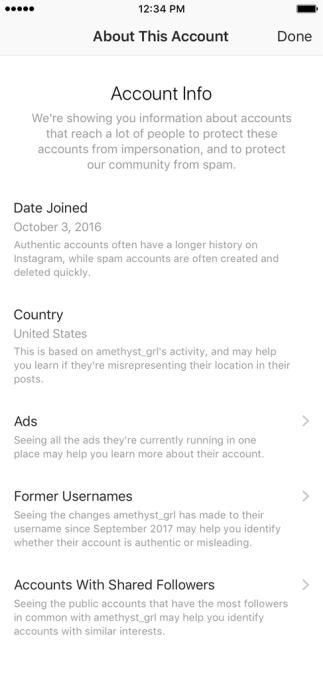
- Select “Information on this account” from the menu.
- The date of registration for that user’s account will be displayed.
For Pc
- Log in to your Instagram account using a computer.
- Use the search bar at the top to find the user whose profile you want to view.
- Click on their name to go to their profile page.
- Click on the three dots (⋯) in the top right corner.
- Select “Information on this account” from the menu.
- The date of registration for that user’s account will be displayed.
Why Instagram Allows You to See Profile Creation Dates
Instagram allows you to see the date of creation of a profile as part of its commitment to safety and transparency. By knowing when someone joined the platform, you can have more confidence in the information they share. This feature is available for all profiles, not just popular or verified accounts.
Conclusion
In conclusion, seeing the date of creation of a profile on Instagram is a straightforward process that can be done using either your smartphone or computer. Whether you’re curious about your own profile or someone else’s, this feature provides valuable information that can enhance your Instagram experience.
References:
- Google and Microsoft vulnerability discovery
- Collaboration with computer science journals
- Founder of Araznulla.It, an Italian tech website


