
Unlocking The Secrets of Your Huawei Phone: A Comprehensive Guide to Finding Your Pattern
Are you one of those people who’s always curious about their phone’s pattern? Maybe you’ve been asked by friends or family members, but you’re not quite sure how to find it yourself. Well, wonder no more! In this article, we’ll take you on a step-by-step journey to discover the secret code that identifies your Huawei smartphone.
Understanding The Pattern
Before we dive into the process of finding your pattern, let’s understand what it is and why it matters. The pattern is essentially a unique identifier assigned to each Huawei device by the manufacturer. It’s used for various purposes, such as identifying your phone in customer support or tracking its software updates. Having access to this information can be helpful when you need assistance with your device.
Setting Up Your Device
To find your pattern, you’ll first need to access your smartphone’s settings menu. Here’s how:
- Find The Settings App: On your home screen, look for the settings icon (usually represented by a gear or cogwheel). Tap on it to open the app.
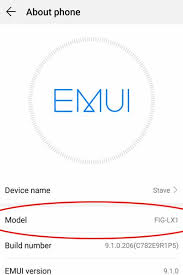
- Scroll Down to Info Phone: Navigate through the settings menu until you find the “Info phone” option. This might be located under the “System” or “About device” section, depending on your Huawei model and operating system version.
Accessing Your Pattern
Once you’ve opened the “Info phone” menu, look for the “Pattern” or “Model” information:
- Huawei Emui 10 And Later: On devices running EMUI 10 or later, the pattern will be displayed directly under the “Info phone” section.
- Huawei Devices With Emui Pre-emui 10: On older Huawei devices (with pre-EMUI 10), you might need to scroll down further to find the “Pattern” information.
Alternative Methods
If accessing your device’s settings menu is not possible due to a broken screen or other issues, don’t worry! There are alternative methods to identify your pattern:
- Check Your Phone’s Box: If you still have the original box containing your phone, check the label on it for the pattern information.
- Battery Label (for Removable Battery Phones): If you have a Huawei device with a removable battery, remove the cover and find the battery label. The pattern should be printed on it.
Exploring Other Devices From Huawei
Huawei offers more than just smartphones! You might own other devices like smartwatches, fitness trackers, or routers. To identify your pattern for these devices:
- Check The Device’s Packaging: For most Huawei devices, you can find the pattern information on the packaging box.
- Access Your Device’s Settings Menu: If you’re still connected to the device, navigate through its settings menu to find the pattern information.
Conclusion
In conclusion, finding your Huawei phone’s pattern is a straightforward process. With this guide, you should be able to identify it using either the settings menu or alternative methods. Remember, knowing your pattern can come in handy when seeking customer support or tracking software updates for your device.
Frequently Asked Questions (FAQs)
- What is my Huawei Phone’s Pattern?
To find your pattern, access your smartphone’s settings menu and look for the “Info phone” section. - Why do I Need to Know my Phone’s Pattern?
Knowing your pattern can be helpful when seeking customer support or tracking software updates for your device. - Can I Change my Phone’s Pattern?
No, the pattern is a unique identifier assigned by Huawei and cannot be changed by users. - How do I Find my Pattern if I Don’t Have my Phone?
If you no longer have access to your phone, try checking its packaging box or contacting Huawei customer support for assistance.


