
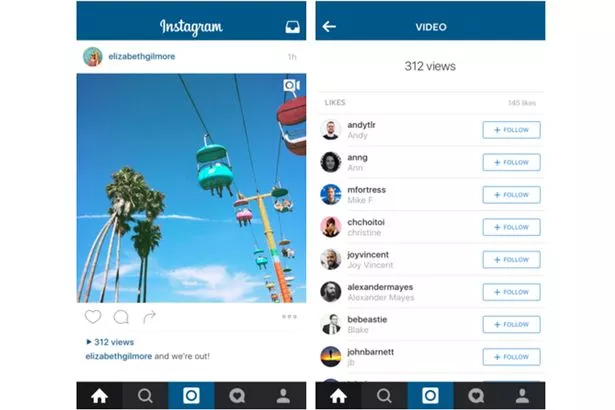
Unlocking Instagram’s Hidden Insights: A Step-by-step Guide
Are you curious about how many people have viewed your videos on Instagram? Do you want to know who has watched your content, but don’t know where to start? Look no further! In this comprehensive guide, we’ll walk you through the process of accessing Instagram’s hidden insights and unlocking the secrets behind your content’s performance.
Why Should You Care About Instagram Insights?
As a content creator or business owner, understanding how your audience interacts with your content is crucial for making informed decisions about your online strategy. By tapping into Instagram’s insights, you can gain valuable insights into:
- The number of people who have viewed your videos
- Who has watched your content (if you’re using the Creator or Company account)
- Engagement metrics, such as likes and comments
- Demographic information about your audience
How to Access Instagram Insights on Your Smartphone
To access Instagram insights on your smartphone, follow these simple steps:
- Open the Instagram app and navigate to your profile page.
- Tap on the three horizontal lines in the top-right corner of the screen.
- Select “Insights” from the menu.
- Choose the type of insight you want to view (e.G., Video views, engagement).
- Use the filters and sorting options to refine your data.
How to Access Instagram Insights on Your Computer
If you prefer to access Instagram insights on your computer, follow these steps:
- Go to the Instagram website and log in to your account.
- Click on the three dots in the top-right corner of the screen.
- Select “Insights” from the menu.
- Choose the type of insight you want to view (e.G., Video views, engagement).
- Use the filters and sorting options to refine your data.
How to See Who Has Watched Your Video on Instagram
If you’re curious about who has watched your video on Instagram, follow these steps:
- Access Instagram insights on your smartphone or computer.
- Select the “Video views” option from the menu.
- Use the filters and sorting options to refine your data.
How to See Who Has Watched Your Reel on Instagram
If you’re interested in seeing who has watched your Reel on Instagram, follow these steps:
- Access Instagram insights on your smartphone or computer.
- Select the “Reel views” option from the menu.
- Use the filters and sorting options to refine your data.
How to See Who Has Watched Your Post on Instagram
If you’re interested in seeing who has watched your post on Instagram, follow these steps:
- Access Instagram insights on your smartphone or computer.
- Select the “Post views” option from the menu.
- Use the filters and sorting options to refine your data.
How to See Instagram Insights After 24 Hours
If you’re interested in seeing Instagram insights after 24 hours, follow these steps:
- Access Instagram insights on your smartphone or computer.
- Select the “Video views” or “Reel views” option from the menu (depending on what type of content you’re interested in).
- Use the filters and sorting options to refine your data.
Tips And Tricks For Getting The Most Out of Instagram Insights
Here are some additional tips and tricks to help you get the most out of Instagram insights:
- Use the filters and sorting options to refine your data and make it easier to understand.
- Experiment with different types of content to see what works best for your audience.
- Use Instagram’s built-in features, such as IGTV and Reels, to expand your reach.
Conclusion
Instagram insights are a powerful tool that can help you better understand how your audience interacts with your content. By following the steps outlined in this guide, you’ll be able to unlock the secrets behind your content’s performance and make informed decisions about your online strategy. So why wait? Start exploring Instagram insights today!


