
How to See Your Whatsapp Name: A Step-by-step Guide
Are you wondering how to see your own name on WhatsApp? Or perhaps you’re curious about how to see the name of a contact on WhatsApp? Look no further! In this article, we’ll guide you through the process of viewing and modifying your own WhatsApp name, as well as seeing the name of a contact.
Why See Your Own Name on Whatsapp?
Before we dive into the steps, let’s talk about why you might want to see your own name on WhatsApp. Perhaps you’ve changed your name recently and want to verify it’s updated correctly. Or maybe you’re simply curious about how to access this information.
Whatever the reason, seeing your own name on WhatsApp is a straightforward process that we’ll walk you through in just a moment.
How to See Your Own Name on Whatsapp (Android)
To see your own name on WhatsApp using an Android device:
- Open Whatsapp: Launch the WhatsApp app on your Android smartphone.
- Tap on Settings: Tap on the three dots (⋮) located in the top-right corner of the screen and select “Settings” from the menu.
- Choose Account: Choose the “Account” option from the settings menu.
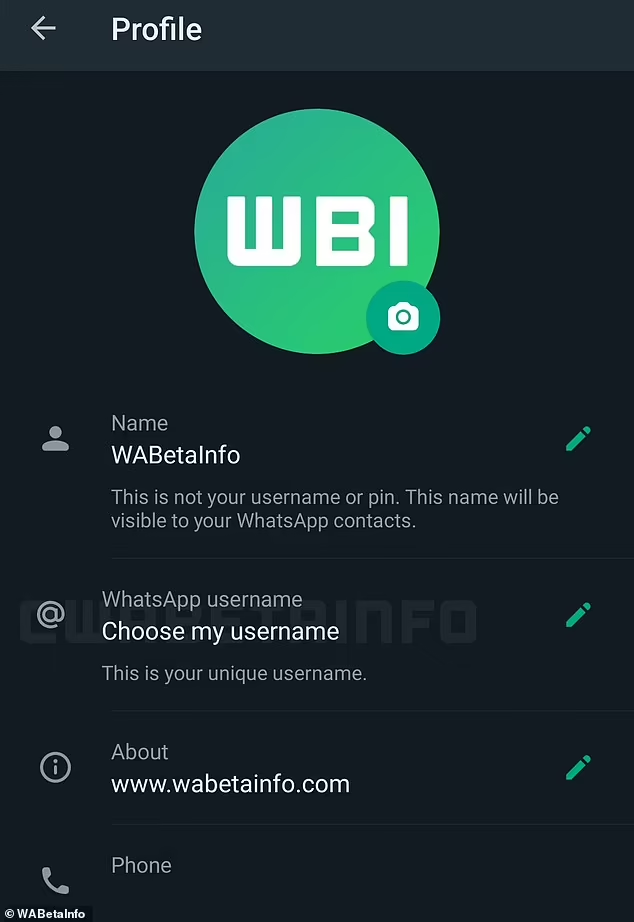
- Select Profile: Select your profile picture or name to access your account information.
- View Your Name: Your WhatsApp name will be displayed on this screen.
How to See Your Own Name on Whatsapp (iPhone)
To see your own name on WhatsApp using an iPhone:
- Open Whatsapp: Launch the WhatsApp app on your iPhone.
- Tap on Settings: Tap on the three dots (⋮) located in the bottom-right corner of the screen and select “Settings” from the menu.
- Choose Profile: Select your profile picture or name to access your account information.
- View Your Name: Your WhatsApp name will be displayed on this screen.
How to See Your Own Name on Whatsapp (Computer)
To see your own name on WhatsApp using a computer:
- Open Whatsapp Web: Open the WhatsApp web version on your computer by visiting www.Whatsapp.Com/web.
- Sign in: Sign in to your WhatsApp account using the same phone number and password you use for the app.
- Access Settings: Click on the three dots (⋮) located in the top-right corner of the screen and select “Settings” from the menu.
- Choose Profile: Select your profile picture or name to access your account information.
- View Your Name: Your WhatsApp name will be displayed on this screen.
How to See a Contact’s Name on Whatsapp (Android)
To see a contact’s name on WhatsApp using an Android device:
- Open Whatsapp: Launch the WhatsApp app on your Android smartphone.
- Tap on Chat: Tap on the chat icon located in the bottom-left corner of the screen and select the conversation with the contact you want to view.
- Tap on Contact Info: Tap on the contact’s name or number to access their contact information.
- View Name: The contact’s WhatsApp name will be displayed on this screen.
How to See a Contact’s Name on Whatsapp (iPhone)
To see a contact’s name on WhatsApp using an iPhone:
- Open Whatsapp: Launch the WhatsApp app on your iPhone.
- Tap on Chat: Tap on the chat icon located in the bottom-left corner of the screen and select the conversation with the contact you want to view.
- Tap on Contact Info: Tap on the contact’s name or number to access their contact information.
- View Name: The contact’s WhatsApp name will be displayed on this screen.
How to See a Contact’s Name on Whatsapp (Computer)
To see a contact’s name on WhatsApp using a computer:
- Open Whatsapp Web: Open the WhatsApp web version on your computer by visiting www.Whatsapp.Com/web.
- Sign in: Sign in to your WhatsApp account using the same phone number and password you use for the app.
- Access Chat: Click on the chat icon located in the top-left corner of the screen and select the conversation with the contact you want to view.
- Tap on Contact Info: Tap on the contact’s name or number to access their contact information.
- View Name: The contact’s WhatsApp name will be displayed on this screen.
Tips And Variations
- If you’re using the latest version of WhatsApp, you might not see your own name on the profile screen. In this case, try tapping on the three dots (⋮) located in the top-right corner of the screen and selecting “Settings” from the menu.
- If you can’t find a contact’s name on WhatsApp, try searching for them using the search bar located at the top of the chat list.
Conclusion
And there you have it! Seeing your own name or a contact’s name on WhatsApp is a straightforward process that we’ve outlined above. Whether you’re using an Android device, iPhone, or computer, the steps are similar and easy to follow.


