
Discover Who’s Blocking You on Instagram: A Step-by-step Guide
Are you tired of wondering who might have blocked you on Instagram? Do you feel like there’s a mystery surrounding your online interactions? Look no further! In this article, we’ll delve into the world of Instagram blocking and provide you with a comprehensive guide on how to discover who’s behind the block.
Understanding Instagram Blocking
Before we dive into the solutions, it’s essential to understand what happens when someone blocks you on Instagram. When an user blocks you, they:
- Prevents you from seeing their profile
- Hides their posts and stories from your feed
- Doesn’t receive notifications from you
- Can’t see any interactions with them
Checking if You’re Blocked
To determine if someone has blocked you on Instagram, follow these simple steps:
Discovering The Blocker’s Profile
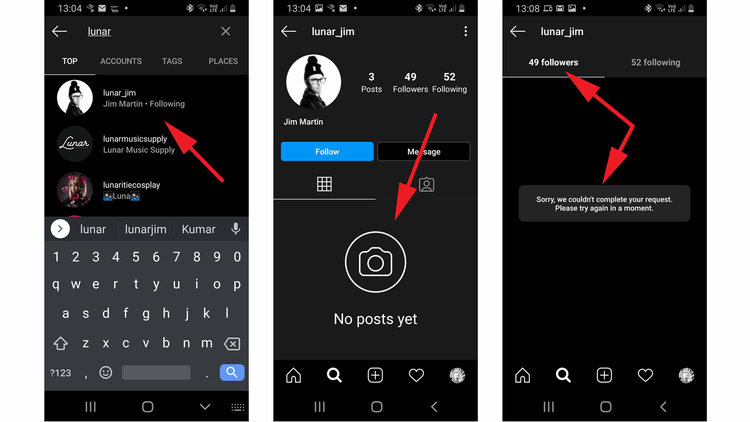
- Open the Instagram app and navigate to the user’s profile.
- If their profile doesn’t appear or shows an error message, it might be a sign that they’ve blocked you.
Checking The User’s History
If you suspect that someone has blocked you, try checking their history:
Seeing Who’s Blocked Your Histories on Instagram
- Look for users who usually post frequently, but have suddenly stopped.
- Check if any of your followers are missing or seem to be “disappeared”.
Using Third-party Apps (Caution Advised)
While there are apps that claim to help you discover who’s blocked you on Instagram, exercise caution:
The Risks of Using Third-party Apps
- These apps often require access to your account information and can compromise your security.
- They might not be reliable or trustworthy.
Unblocking a User (A Last Resort)
If you’re convinced that someone has blocked you unfairly, here are some steps to try:
How to Unblock Someone on Instagram
- Contact the user through another social media platform or messaging app.
- Be respectful and understanding if they’ve blocked you for legitimate reasons.
Conclusion
Discovering who’s blocking you on Instagram can be a challenging task, but with these steps, you’ll have a better idea of what’s going on. Remember to respect other users’ decisions and boundaries.
Frequently Asked Questions (FAQs)
- Q: How do I Know if Someone Has Blocked me on Instagram?
A: Look for missing profiles, hidden posts, or sudden changes in user behavior. - Q: Can I Use Third-party Apps to Discover Who’s Blocking Me?
A: Be cautious and exercise extreme caution when using these apps. - Q: How do I Unblock Someone on Instagram?
A: Contact the user through another social media platform or messaging app. - Q: Why Would Someone Block me on Instagram?
A: Reasons vary, but common ones include misunderstandings, disagreements, or spamming. - Q: Can I Report a Blocked User to Instagram?
A: Yes, you can submit a complaint to Instagram’s support team if you believe the block is unjustified. - Q: Will Instagram Notify me When Someone Blocks Me?
A: Unfortunately, no – you won’t receive notifications for being blocked on Instagram. - Q: Can I See Who’s Been Blocking me in The Past?
A: It’s not possible to view a list of users who’ve previously blocked you on Instagram.
By following these steps and understanding the implications of Instagram blocking, you’ll be better equipped to navigate online relationships and interactions.


