
Understanding Facebook Followers: A Comprehensive Guide
Are you curious about who’s following your profile or page on Facebook? Want to know the secrets behind seeing your followers’ names? Look no further! In this article, we’ll explore the world of Facebook followers, providing you with a step-by-step guide on how to see who’s following you on both mobile and PC.
What Are Facebook Followers?
Facebook followers are people who have chosen to follow your profile or page without sending you a friend request. This means they’ll be able to see your public posts and updates without needing to interact with you directly.
Seeing Your Followers on Mobile: A Step-by-step Guide
To see your followers on mobile, follow these simple steps:
- Open The Facebook App: Launch the Facebook app on your smartphone or tablet.
- Access Your Profile: Tap on your profile picture in the top-left corner to access your profile.
- Tap on ‘Follower’: In the ‘Details’ section of your profile, tap on the ‘Follower’ option.
- View Your Followers: You’ll be taken to a new screen displaying the complete list of people who follow you.
Seeing Your Followers on Pc: A Step-by-step Guide
To see your followers on PC, follow these simple steps:
- Access Facebook Website: Open the Facebook website on your computer.
- Log in to Your Account: Enter your login credentials to access your account.
- Click on Your Profile Picture: Click on your profile picture in the top-right corner to access your profile.
- View Your Followers: In the ‘About’ section of your profile, click on the ‘Followers’ option to view the list of people who follow you.
How to Prevent People From Following You
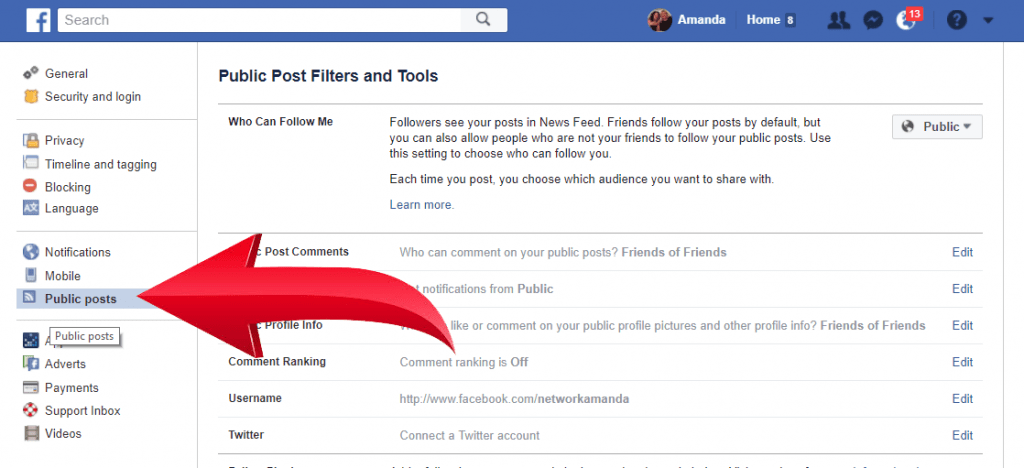
If you want to prevent people from following you, you can adjust your Facebook settings. Here’s how:
- Access Your Profile: Go to your profile page.
- Click on Settings And Privacy: Click on ‘Settings and Privacy’ in the top-right corner.
- Click on Followers And Public Posts: In the ‘Settings’ section, click on ‘Followers and Public Posts’.
- Choose Who Can Follow You: Select who can follow you: ‘Everyone’, ‘Friends of Friends’, or ‘Only Me’.
How to See Who’s Not Following You
Unfortunately, Facebook doesn’t provide a direct way to see who’s not following you. However, there are some third-party apps and services that claim to do so. Be cautious when using these, as they may be malicious and compromise your privacy.
The Risks of Using Third-party Apps
Some apps and services promise to show you who’s not following you on Facebook. However, these can be scams that compromise your account security. Avoid installing such apps or services, as they may:
- Access Your Account Information: These apps may request access to your account information, which can lead to data breaches.
- Install Malware: Some of these apps might install malware on your device, putting you at risk.
Conclusion
In conclusion, seeing who’s following you on Facebook is a simple process that can be done on both mobile and PC. Be cautious when using third-party apps or services that promise to show you who’s not following you, as they may compromise your account security. By following the steps outlined in this article, you’ll be able to see who’s following you on Facebook and adjust your settings accordingly.
Frequently Asked Questions (FAQs)
- Q: Can I See Who’s Following me on Both Mobile And Pc?
A: Yes, you can see who’s following you on both mobile and PC by following the steps outlined in this article. - Q: How do I Prevent People From Following me on Facebook?
A: To prevent people from following you, go to your profile page, click on ‘Settings and Privacy’, and then select who can follow you. - Q: Can I See Who’s Not Following me on Facebook?
A: Unfortunately, Facebook doesn’t provide a direct way to see who’s not following you. - Q: What Are The Risks of Using Third-party Apps That Promise to Show me Who’s Not Following Me?
A: These apps can compromise your account security by accessing your information or installing malware on your device.


