
Unlocking The Power of 5GHz Wifi: A Comprehensive Guide
Are you tired of dealing with slow and congested WiFi networks? Do you want to upgrade your internet experience and take advantage of faster speeds and better performance? Look no further! In this article, we’ll delve into the world of 5GHz WiFi, exploring its benefits, limitations, and how to utilize it on various devices.
What is 5GHz Wifi?
The term “5GHz” refers to a specific frequency band used for wireless communication. It’s a higher frequency range than the traditional 2.4GHz band, which has been widely used for years. The 5GHz band offers faster speeds and better performance, making it an attractive option for those seeking improved internet experiences.
Benefits of 5GHz Wifi
The benefits of 5GHz WiFi are numerous:
- Faster Speeds: 5GHz WiFi provides faster speeds compared to the traditional 2.4GHz band.
- Improved Performance: With lower interference and congestion, 5GHz WiFi offers better performance and a more stable connection.
- Increased Bandwidth: The 5GHz band has more available bandwidth, allowing for smoother video streaming and online gaming experiences.
Limitations of 5GHz Wifi
While 5GHz WiFi offers many benefits, there are some limitations to consider:
- Range And Interference: The 5GHz band has a shorter range than the 2.4GHz band and is more susceptible to interference.
- Compatibility Issues: Not all devices support 5GHz WiFi, which can limit its adoption.
- Complexity: Configuring 5GHz WiFi can be more complex than traditional 2.4GHz setups.
How to Check Your Device’s Support For 5GHz Wifi
To ensure your device supports 5GHz WiFi, follow these steps:
- Windows:
- Go to the Start menu and select Settings.
- Click on Network & Internet.
- Select Wi-Fi.
- Look for the band frequency option (2.4GHz or 5GHz) in the network settings.
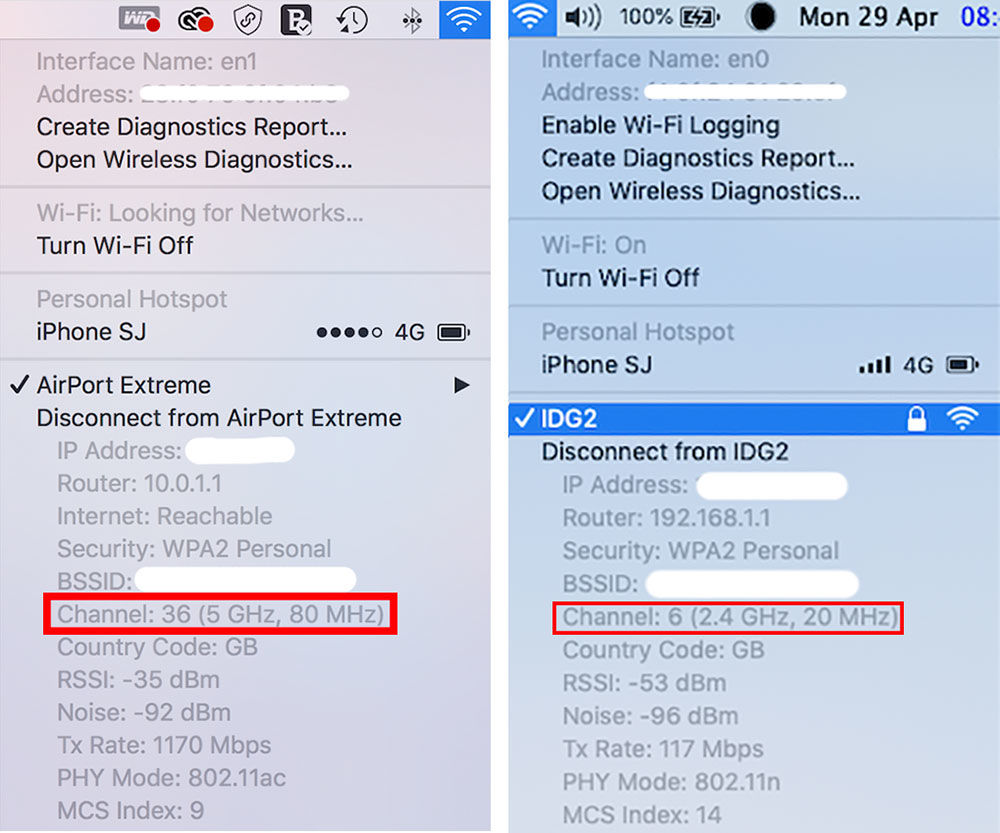
- Macos:
- Click on the Wi-Fi icon in the top-right corner of your screen.
- Select the network you’re connected to.
- Look for the band frequency option (2.4GHz or 5GHz) in the network details.
- Android:
- Go to Settings > Connections > Wi-Fi.
- Select the network you’re connected to.
- Look for the band frequency option (2.4GHz or 5GHz) in the network settings.
- Ios/ipados:
- Open the Settings app and go to Wi-Fi.
- Select the network you’re connected to.
- Look for the band frequency option (2.4GHz or 5GHz) in the network details.
How to Configure 5GHz Wifi
Configuring 5GHz WiFi can be a bit more complex than traditional 2.4GHz setups, but don’t worry – we’ve got you covered! Here are some general steps:
- Router Configuration: Check your router’s settings to ensure it supports 5GHz WiFi.
- Device Configuration: Update your device’s firmware or software to support 5GHz WiFi.
- Network Settings: Configure your network settings to prioritize the 5GHz band.
Conclusion
Upgrading to 5GHz WiFi can significantly improve your internet experience, offering faster speeds and better performance. However, it’s essential to consider the limitations and complexities involved in configuring this technology. By following the steps outlined in this guide, you’ll be able to unlock the full potential of 5GHz WiFi on various devices.
Frequently Asked Questions
- Q: What is The Difference Between 2.4GHz And 5GHz Wifi?
A: The 5GHz band offers faster speeds and better performance compared to the traditional 2.4GHz band. - Q: Which Devices Support 5GHz Wifi?
A: Most modern devices, including smartphones, laptops, and routers, support 5GHz WiFi. - Q: How do I Configure my Device For 5GHz Wifi?
A: Follow the steps outlined in this guide to configure your device for 5GHz WiFi. - Q: What Are The Benefits of Using 5GHz Wifi?
A: The benefits include faster speeds, improved performance, and increased bandwidth. - Q: Can I Use Both 2.4GHz And 5GHz Wifi Simultaneously?
A: Yes, many devices support both bands, but it’s essential to configure your network settings accordingly. - Q: How do I Troubleshoot Issues With my 5GHz Wifi Connection?
A: Check your device’s firmware or software updates, ensure proper router configuration, and restart your device if needed. - Q: Can I Use 5GHz Wifi For Online Gaming And Video Streaming?
A: Yes, 5GHz WiFi is ideal for these applications due to its faster speeds and lower latency. - Q: What Are The Potential Limitations of Using 5GHz Wifi?
A: The limitations include a shorter range, increased interference, and compatibility issues with older devices.
We hope this guide has been helpful in unlocking the power of 5GHz WiFi! If you have any further questions or concerns, feel free to ask.


