
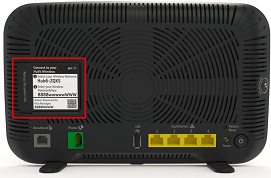
How to See The Password of Your Modem: A Step-by-step Guide
Are you struggling to access your modem’s configuration panel due to a forgotten password? Don’t worry, we’ve got you covered! In this article, we’ll walk you through various methods to recover or see the password of your modem, whether you’re using a PC, smartphone, or tablet.
Understanding Modem Passwords
Before we dive into the solutions, it’s essential to understand that the modem password is different from your Wi-Fi network password. The former is used to access the modem’s configuration panel, while the latter is for connecting to your wireless network. Make sure you’re trying to recover the correct password.
Method 1: Checking Default Passwords
If you’ve never changed the default password of your modem, you might be able to find it online. Here are some resources where you can check:
- Routerpasswords: A website that provides default passwords for various routers.
- Cirt.Net: A site that offers a list of default passwords for different router models.
- Port Forward: Another resource that provides default passwords and settings for various routers.
Method 2: Using Your Browser’s Password Manager
If you’ve saved your modem password in your browser, you can try accessing it using the browser’s built-in password manager. Here’s how:
- Google Chrome: Open Chrome, click on the three vertical dots in the top-right corner, and select “Settings.” Go to “Passwords” and find the entry for your modem.
- Mozilla Firefox: Click on the three horizontal lines in the top-right corner of Firefox, then select “Options.” Navigate to the “Security” tab, click on “Show Passwords,” and look for your modem’s entry.
- Microsoft Edge: Open Edge, click on the three horizontal dots in the top-right corner, and select “Settings.” Go to “Passwords” and find the entry for your modem.
- Safari: Click on Safari in the top menu bar, then select “Preferences.” Navigate to the “Advanced” tab, click on “Show Develop menu,” and select “Show Passwords.” Look for your modem’s entry.
Method 3: Using Routerpassview
RouterPassView is a free software that can help you recover your modem password. Here’s how to use it:
- Download And Install: Download the software from the official website, extract the files, and run the program.
- Run The Program: Select “Open router config rows” or “Grab password from IE Windows” to recover your modem password.
Method 4: Using Access Keychain (macOS)
If you’re using a Mac, you can try accessing your modem’s password using Access Keychain. Here’s how:
- Launchpad: Open Launchpad and find the Access Keychain app.
- Password Manager: Select “Login” from the menu, then click on the password entry for your modem.
Method 5: Contacting Your Internet Service Provider
If none of the above methods work, you can try contacting your internet service provider (ISP) for assistance. They may be able to provide you with the necessary information to access your modem’s configuration panel.
Conclusion
Recovering or seeing the password of your modem can be a challenge, but by following these steps, you should be able to access your modem’s configuration panel and change the password if needed. If you’re still having trouble, don’t hesitate to contact your ISP for assistance.
Frequently Asked Questions (FAQs)
Here are some frequently asked questions related to recovering or seeing the password of your modem:
- What is the difference between my Wi-Fi network password and my modem’s configuration panel password?
- Can I use my browser’s password manager to access my modem’s password?
- Is RouterPassView a safe software to use for recovering my modem’s password?
- How do I reset my modem’s password if I’ve forgotten it?
- Can my internet service provider help me recover or change my modem’s password?
Answers
- The Wi-Fi network password is used to connect to your wireless network, while the modem’s configuration panel password is used to access the modem’s settings.
- Yes, you can try accessing your modem’s password using your browser’s built-in password manager.
- RouterPassView is a legitimate software that can help you recover your modem password, but always exercise caution when downloading and running software from unknown sources.
- Yes, you can reset your modem’s password by following the instructions provided by your manufacturer or contact your ISP for assistance.
- Yes, your internet service provider may be able to help you recover or change your modem’s password.
By following these methods and FAQs, you should be able to recover or see the password of your modem and access its configuration panel with ease!


