
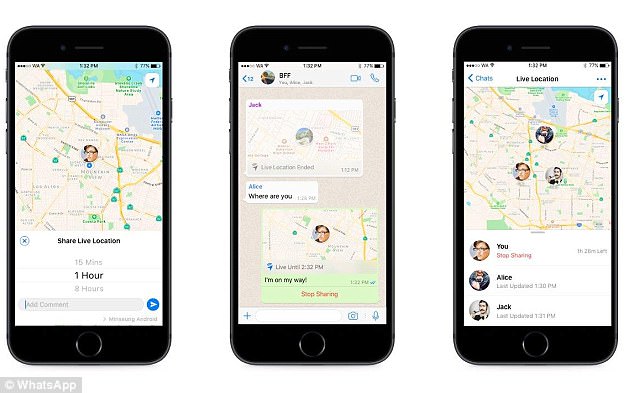
Understanding Whatsapp’s Location Sharing Feature
In today’s digital age, sharing your location has become an essential feature on many social media platforms, including WhatsApp. With just a few taps, you can share your real-time position with friends, family, or colleagues. However, there may be situations where you’d like to share a different location than your actual one. In this article, we’ll explore how to forward a fake location on WhatsApp using various methods.
Why Share a Fake Location?
There are several reasons why you might want to share a fake location on WhatsApp:
- You don’t want to reveal your exact location due to privacy concerns.
- You’re meeting someone and want to share the location of a different place to avoid any awkwardness.
- You need to send a location to someone without revealing your current position.
Methods For Sharing a Fake Location on Whatsapp
There are several methods you can use to share a fake location on WhatsApp:
Using a Gps Emulator App
One way to share a fake location is by using a GPS emulator app. These apps simulate the location data sent from your device’s GPS, allowing you to select a different location. Here’s how to do it:
- Download and install a GPS emulator app from the Google Play Store.
- Concede the necessary permissions to the app.
- Open the app and select the desired location on the map.
- Share the fake location on WhatsApp.
Using a Fake Gps App
Another method is by using a fake GPS app, such as Fake GPS or GPS Emulator. These apps allow you to set a fake location that will be shared with others when you share your position on WhatsApp. Here’s how to do it:
- Download and install the fake GPS app from the Google Play Store.
- Open the app and select the desired location on the map.
- Share the fake location on WhatsApp.
Using an Iphone
If you’re using an iPhone, you can share a fake location on WhatsApp by following these steps:
- Open WhatsApp and navigate to the chat where you want to share your fake location.
- Tap the “+” icon in the top-right corner of the screen.
- Select “Position” from the menu that appears.
- Enter an address or search for a location on the map.
- Share the fake location with others.
Using a Third-party App
There are several third-party apps available that can help you share a fake location on WhatsApp. These apps often have additional features, such as the ability to simulate movement between locations. Here’s how to use them:
- Download and install a third-party app from the Google Play Store.
- Open the app and select the desired location on the map.
- Share the fake location with others.
Conclusion
Sharing a fake location on WhatsApp can be useful in various situations, such as when you want to keep your actual location private or share a different location for convenience. By using a GPS emulator app, a fake GPS app, or an iPhone, you can easily share a fake location with others. Always remember to follow the necessary steps and grant the required permissions to use these methods.
Faqs
- Q: What is Whatsapp’s Location Sharing Feature?
A: WhatsApp’s location sharing feature allows users to share their real-time position with friends, family, or colleagues. - Q: Why Would I Want to Share a Fake Location on Whatsapp?
A: You might want to share a fake location due to privacy concerns, avoiding awkwardness when meeting someone, or sending a location without revealing your current position. - Q: How Can I Share a Fake Location Using a Gps Emulator App?
A: Download and install a GPS emulator app, concede the necessary permissions, open the app, select the desired location on the map, and share the fake location on WhatsApp. - Q: What Are Some Third-party Apps Available For Sharing Fake Locations on Whatsapp?
A: There are several third-party apps available, such as Fake GPS or GPS Emulator, that can help you share a fake location on WhatsApp. - Q: How do I Use an Iphone to Share a Fake Location on Whatsapp?
A: Open WhatsApp, navigate to the chat where you want to share your fake location, tap the “+” icon in the top-right corner of the screen, select “Position” from the menu, enter an address or search for a location on the map, and share the fake location with others. - Q: Are There Any Risks Associated With Using Gps Emulator Apps?
A: Yes, excessive use of GPS emulator apps can cause problems when trying to reset your device’s location.


