
The Evolution of Flash Messages: A Guide to Forwarding Disappearing Texts
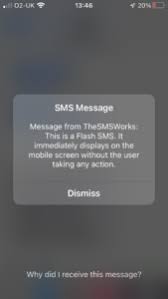
In the era before smartphones, sending a quick flash message was a common practice among friends. With the limited memory on mobile phones, people would often ask each other to send SMS flashes, which would be deleted after reading. However, with the advancement of technology and the rise of instant messaging apps, this practice has become outdated.
But Can We Bring Back Flash Messages?
While it’s not possible to replicate the exact functionality of old smartphones, there are modern alternatives that allow you to forward messages that disappear after a set time. In this article, we’ll explore these options and provide step-by-step guides on how to use them.
Facebook Messenger: A Leading Platform For Forwarding Disappearing Messages
The first application we recommend is Facebook Messenger. As the official app of Facebook, it offers a wide range of features, including forwarding textual messages and multimedia content. Moreover, its deadline feature allows you to set a timer for the message to disappear after being read.
How to Forward Disappearing Messages on Facebook Messenger:
- Open the Facebook Messenger app on your Android or iOS device.
- Login with your Facebook account credentials.
- Identify the person you want to send a disappearing message to by searching for their name in the contact list.
- Tap on the “Details” section and then tap on the “Access secret conversation” option.
- Type the message you want to forward and set a timer for it to disappear after being read.
Telegram: A Popular Alternative For Forwarding Disappearing Messages
Another popular instant messaging app that allows forwarding disappearing messages is Telegram. This app offers various features, including forwarding textual messages and multimedia content.
How to Forward Disappearing Messages on Telegram:
- Open the Telegram app on your Android or iOS device.
- Login with your phone number and configure the app according to your preferences.
- Identify the person you want to send a disappearing message to by searching for their name in the contact list.
- Tap on the “Start secret chat” option and then tap on the “OK” button.
- Type the message you want to forward and set a timer for it to disappear after being read.
Snapchat: A Well-known App For Forwarding Disappearing Messages
The Snapchat app is another popular option for forwarding disappearing messages. Its functionality allows users to send multimedia content that disappears after being viewed.
How to Forward Disappearing Messages on Snapchat:
- Open the Snapchat app on your Android or iOS device.
- Login with your account credentials and access the chat section.
- Identify the person you want to send a disappearing message to by searching for their name in the contact list.
- Tap on the “Forward” option and type the message you want to forward.
Other Apps For Forwarding Disappearing Messages
There are several other apps that allow forwarding disappearing messages, including:
- Confide: A free messaging app that offers a safe mode feature for sending disappearing messages.
- Wickr Me: An instant messaging app that allows setting two different timers for the self-destruction of messages.
- Signal: A secure messaging app that uses end-to-end encryption to protect conversations.
Conclusion
While we can’t bring back the exact functionality of old flash messages, modern apps offer alternative solutions for forwarding disappearing messages. With these options, you can enjoy the benefits of instant messaging while maintaining the security and convenience of disappearing texts.
Frequently Asked Questions (FAQs)
- Q: Can I Use These Apps to Send Disappearing Photos And Videos?
A: Yes, most of the apps mentioned above allow sending disappearing multimedia content.
- Q: Are These Apps Secure?
A: The security features of these apps vary; however, they are generally considered secure for casual use.
- Q: Can I Set Different Timers For Individual Messages?
A: Some apps, like Wickr Me and Signal, allow setting different timers for the self-destruction of individual messages.
- Q: Do These Apps Have Any Limitations or Restrictions?
A: Yes, each app has its own set of rules and guidelines for using their disappearing message feature.
- Q: Can I Use These Apps on Both Android And Ios Devices?
A: Yes, most of the apps mentioned above are available on both Android and iOS platforms.
- Q: Are There Any Specific Settings or Configurations Required to Use These Features?
A: Each app has its own configuration process; follow the guides provided above for step-by-step instructions.
- Q: Can I Forward Disappearing Messages to Groups?
A: Some apps, like Telegram and Signal, allow forwarding disappearing messages to group chats.
- Q: Are There Any Additional Features or Integrations Available on These Apps?
A: Yes, each app has its own set of features and integrations; explore the apps’ settings and documentation for more information.


