
How to Forward Heavy Rows Online: A Comprehensive Guide
Are you tired of struggling to share large files online? Do you find yourself frustrated by the limitations of email attachments and the hassle of uploading files to cloud storage services? Look no further! In this article, we’ll show you how to forward heavy rows online using a variety of services that make it easy and convenient to share large files with others.
The Problem With Email Attachments
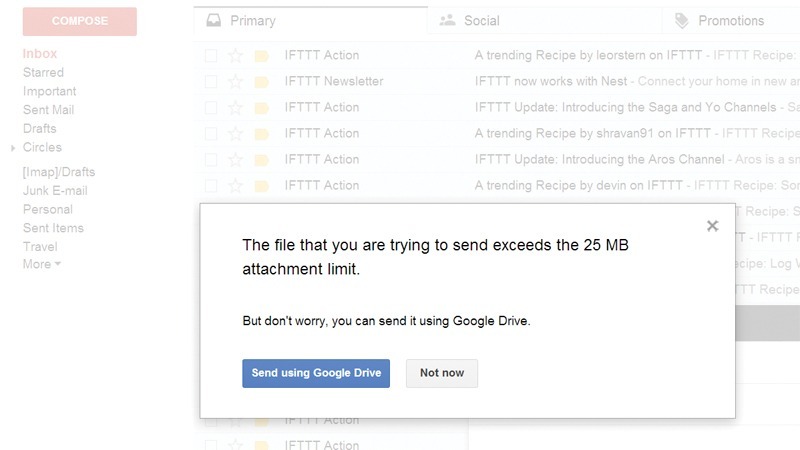
Email attachments are great for small files, but when it comes to larger files, they can be a real pain. Not only do they take up space in your email inbox, but they also require you to download them before you can access the contents. And let’s not forget about the risk of malware and viruses that come with downloading attachments from unknown sources.
The Solution: Cloud Storage Services
Cloud storage services are designed specifically for sharing large files online. They allow you to upload your files to a remote server, where they can be accessed by others without having to download them first. This makes it easy to share files of any size, and reduces the risk of malware and viruses.
Services For Forwarding Heavy Rows Online
There are many cloud storage services that offer free plans or trials, making it easy to get started. Here are a few popular options:
Wetransfer
WeTransfer is one of the most popular services for forwarding heavy rows online. It offers a free plan that allows you to send files up to 2GB in size, with no expiration date. You can also upgrade to a paid plan for additional features and larger file sizes.
- To use WeTransfer, simply go to their website and click on the “Send” button.
- Select the files you want to share and add any desired comments or attachments.
- Enter the recipient’s email address and choose whether to send the file as an attachment or a link.
- Click “Send” and WeTransfer will take care of the rest.
Swisstransfer
SwissTransfer is another popular service for forwarding heavy rows online. It offers a free plan that allows you to send files up to 50GB in size, with no expiration date. You can also upgrade to a paid plan for additional features and larger file sizes.
- To use SwissTransfer, simply go to their website and click on the “Send” button.
- Select the files you want to share and add any desired comments or attachments.
- Enter the recipient’s email address and choose whether to send the file as an attachment or a link.
- Click “Send” and SwissTransfer will take care of the rest.
Dropbox
Dropbox is a cloud storage service that allows you to upload and share files with others. You can use Dropbox to forward heavy rows online, as well as store your files securely for later access.
- To use Dropbox, simply go to their website and sign up for an account.
- Select the files you want to share and click on the “Share” button.
- Enter the recipient’s email address and choose whether to send the file as an attachment or a link.
- Click “Share” and Dropbox will take care of the rest.
Mega
MEGA is another cloud storage service that allows you to upload and share files with others. You can use MEGA to forward heavy rows online, as well as store your files securely for later access.
- To use MEGA, simply go to their website and sign up for an account.
- Select the files you want to share and click on the “Share” button.
- Enter the recipient’s email address and choose whether to send the file as an attachment or a link.
- Click “Share” and MEGA will take care of the rest.
Forwarding Heavy Rows With Email Services
Many email services, such as Gmail and Outlook, have built-in features that allow you to forward heavy rows online. Here’s how to do it:
Gmail
To forward heavy rows with Gmail, follow these steps:
- Sign in to your Google account.
- Click on the “Compose” button to create a new email message.
- Click on the “Drive” icon to upload your file from Google Drive.
- Select the file you want to share and click on the “Share” button.
- Enter the recipient’s email address and choose whether to send the file as an attachment or a link.
- Click “Send” and Gmail will take care of the rest.
Outlook
To forward heavy rows with Outlook, follow these steps:
- Sign in to your Microsoft account.
- Click on the “New Email” button to create a new email message.
- Click on the “OneDrive” icon to upload your file from OneDrive.
- Select the file you want to share and click on the “Share” button.
- Enter the recipient’s email address and choose whether to send the file as an attachment or a link.
- Click “Send” and Outlook will take care of the rest.
To forward heavy rows with WhatsApp, follow these steps:
- Open WhatsApp and create a new chat with the person you want to share your file with.
- Tap on the paperclip icon to attach a file from your phone or computer.
- Select the file you want to share and tap “Send”.
- Note that WhatsApp has a limit of 2GB for file sizes, so if your file is larger than this, you’ll need to use an external service like WeTransfer.
Conclusion
Forwarding heavy rows online can be a breeze with the right services. Whether you’re using WeTransfer, SwissTransfer, Dropbox, MEGA, Gmail, Outlook, or WhatsApp, there’s a solution for every need. Just remember to always follow the terms and conditions of each service, and to use them responsibly.
Frequently Asked Questions
Here are some frequently asked questions about forwarding heavy rows online:
- Q: What is The Best Service For Forwarding Heavy Rows Online?
A: The best service for forwarding heavy rows online depends on your specific needs. If you need to send large files regularly, WeTransfer or SwissTransfer may be a good choice. If you’re looking for a more comprehensive cloud storage solution, Dropbox or MEGA might be a better fit. - Q: Can I Forward Heavy Rows With Email Services?
A: Yes, many email services like Gmail and Outlook have built-in features that allow you to forward heavy rows online. - Q: How Can I Increase The File Size Limit For Forwarding on Whatsapp?
A: Unfortunately, WhatsApp has a hard limit of 2GB for file sizes. If your file is larger than this, you’ll need to use an external service like WeTransfer or SwissTransfer to share it. - Q: Are There Any Free Services For Forwarding Heavy Rows Online?
A: Yes, many cloud storage services offer free plans or trials that allow you to forward heavy rows online. WeTransfer and SwissTransfer are two popular options.
Final Thoughts
Forwarding heavy rows online can be a challenge, but with the right services and tools, it doesn’t have to be. Whether you’re using WeTransfer, SwissTransfer, Dropbox, MEGA, Gmail, Outlook, or WhatsApp, there’s a solution for every need. Just remember to always follow the terms and conditions of each service, and to use them responsibly. Happy sharing!


