
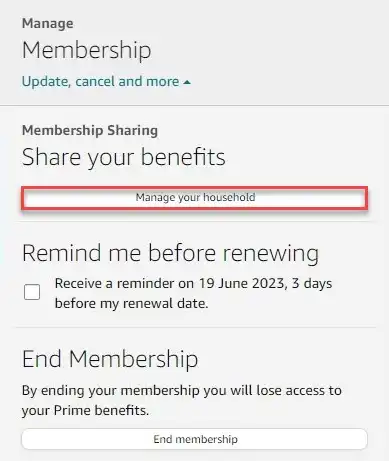
Sharing Amazon Prime: A Comprehensive Guide
Are you an Amazon Prime subscriber looking to share the benefits with your family members? Look no further! This article will guide you through the process of sharing Amazon Prime, including its various services like Prime Video and Music.
Can I Share Amazon Prime?
Before we dive into the nitty-gritty, it’s essential to understand that Amazon Prime cannot be shared directly. The service is tied to a single account, and sharing it with others is not explicitly allowed in the terms and conditions.
Sharing Amazon Prime With Family Members
While you can’t share your Amazon Prime subscription with family members in the classical sense, there are some workarounds to consider:
- Associate Multiple Addresses: You can add multiple delivery addresses to your account, which will allow each family member to receive packages without having to share your login credentials.
- Add Multiple Payment Methods: You can add multiple payment methods to your account, making it easier for each family member to make purchases without having to share your card details.
- Use Amazon Prime’s Family Sharing Feature: If you have Amazon Prime Business, you can share your subscription with up to 100 users.
Sharing Amazon Prime Video
Prime Video is a fantastic service that offers a wide selection of movies and TV shows. You can create multiple profiles within the Prime Video app, allowing each family member to have their own account and access to exclusive content.
To create a new profile:
- Open the Prime Video app on your device.
- Tap on your profile picture in the top-right corner.
- Select “Add Profile” from the menu.
- Enter the name and email address for the new profile.
- Choose an image for the profile, if desired.
Sharing Amazon Prime Music
Unfortunately, Amazon Prime Music is not shareable with family members. The service is tied to a single account, and sharing it with others is not possible.
However, you can consider subscribing to Amazon Music Unlimited’s Family Plan, which allows up to 6 users to access the music library for a flat monthly fee.
Sharing Amazon Prime Business
Amazon Prime Business is a separate subscription plan designed for businesses. You can share your Prime Business subscription with other employees by adding them to your account.
To add new users:
- Log in to your Amazon Prime Business account.
- Click on “Account” and select “Members”.
- Click on the “Add person” button.
- Enter the email address and role for the new user.
Conclusion
While sharing Amazon Prime directly is not possible, there are some workarounds to consider. By associating multiple addresses, adding multiple payment methods, or using Amazon Prime Business’s Family Sharing feature, you can still enjoy the benefits of Amazon Prime with your family members.
Remember to always follow Amazon’s terms and conditions when using their services.
Frequently Asked Questions
- Can I Share my Amazon Prime Subscription With my Family?
No, Amazon Prime cannot be shared directly. - How Can I Add Multiple Addresses to my Amazon Account?
You can add multiple delivery addresses by going to your account settings and selecting “Addresses”. - Can I Share my Amazon Prime Music Subscription?
Unfortunately, no, Amazon Prime Music is not shareable with family members. - How do I Create a New Profile on Prime Video?
To create a new profile, open the Prime Video app, tap on your profile picture, and select “Add Profile”. - Can I Add Multiple Payment Methods to my Amazon Account?
Yes, you can add multiple payment methods by going to your account settings and selecting “Your payments”. - How do I Share my Amazon Prime Business Subscription With Employees?
You can add new users to your Amazon Prime Business account by going to the “Members” section. - Is Amazon Prime Business Available For Individuals?
No, Amazon Prime Business is designed for businesses only. - Can I Use Multiple Profiles on Amazon Prime Video?
Yes, you can create up to 6 profiles within the Prime Video app.
Note: The answers provided are based on the information available at the time of writing and may be subject to change. It’s always a good idea to check with Amazon directly for the most up-to-date information.


