
How to Share Netflix Subscription: A Comprehensive Guide
Are you tired of footing the bill for your Netflix subscription alone? Do you want to share the experience with friends or family members but are unsure how to do it? Look no further! In this article, we will guide you through the process of sharing a Netflix subscription, including the different plans available and how to create shared profiles.
Understanding The Different Plans
Before we dive into the nitty-gritty of sharing a Netflix subscription, let’s take a look at the different plans available. There are three main plans:
- Basic Plan: This plan costs €5.49/Month and allows you to stream content in HD on one device.
- Standard Plan: This plan costs €12.99/Month and allows you to stream content in HD on two devices simultaneously.
- Premium Plan: This plan costs €17.99/Month and offers the highest quality streaming experience, including Ultra HD and HDR.
Sharing a Netflix Subscription With Friends or Family
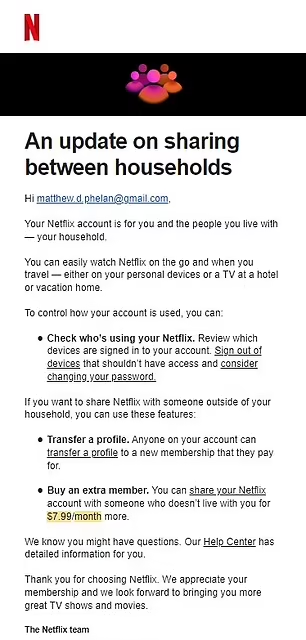
If you want to share your Netflix subscription with friends or family members who live with you, this is perfectly fine. In fact, Netflix encourages users to share their accounts with people they trust. Here’s how to do it:
- Choose The Right Plan: Select the plan that best suits your needs and budget.
- Create Shared Profiles: You can create up to five profiles for each account. This allows you to keep track of individual viewing history and preferences.
- Share Your Account: Once you’ve created shared profiles, you can share your Netflix subscription with friends or family members who live with you.
Sharing a Netflix Subscription With Strangers
Unfortunately, it’s not possible to share a Netflix subscription with strangers. This is because Netflix has strict policies against sharing accounts with people outside of your household.
Sharing Netflix on TV
If you want to share Netflix with others in the same room, you can use a device like Chromecast to stream content directly to your TV. Here’s how to do it:
- Connect Your Device: Connect your smartphone or tablet to the same Wi-Fi network as your Chromecast.
- Launch Netflix: Launch the Netflix app on your device and select the content you want to watch.
- Share With Others: Use the SharePlay feature to share the video with others in the same room.
Sharing Netflix on Facetime
FaceTime is a great way to catch up with friends or family members who live far away, but unfortunately, it’s not possible to share Netflix content directly on FaceTime.
Sharing Netflix on Discord
Discord is a popular platform for gamers and communities, but it’s not possible to share Netflix content directly on Discord. This is because streaming services like Netflix have strict policies against sharing content with strangers.
Conclusion
In conclusion, sharing a Netflix subscription can be a great way to save money and enjoy your favorite shows and movies with others. Whether you want to share with friends or family members who live with you or use devices like Chromecast to stream content directly to your TV, we hope this guide has been helpful in explaining the process.
Frequently Asked Questions
- Q: Can I Share my Netflix Subscription With Friends Who Don’t Live With Me?
A: Unfortunately, no. Netflix has strict policies against sharing accounts with people outside of your household. - Q: How do I Create Shared Profiles on Netflix?
A: You can create up to five profiles for each account by going to the Account menu and selecting “Create New Profile.” - Q: Can I Share Netflix Content Directly on Facetime or Discord?
A: Unfortunately, no. Streaming services like Netflix have strict policies against sharing content with strangers. - Q: What is The Best Plan For Sharing a Netflix Subscription?
A: The Premium Plan offers the highest quality streaming experience and allows you to stream content in Ultra HD on up to four devices simultaneously. - Q: Can I Transfer a Profile From One Account to Another?
A: Yes, you can transfer a profile from one account to another by going to the Account menu and selecting “Transfer Profile.” - Q: How do I Cancel my Netflix Subscription?
A: You can cancel your Netflix subscription at any time by going to the Account menu and selecting “Cancel Membership.” - Q: Can I Get a Refund For my Netflix Subscription?
A: If you cancel your subscription within 30 days of signing up, you’ll be eligible for a full refund. - Q: How do I Contact Netflix Customer Support?
Table 1: Netflix Plans And Pricing
| Plan | Cost per Month |
|---|---|
| Basic | €5.49 |
| Standard | €12.99 |
| Premium | €17.99 |
Table 2: Shared Profiles on Netflix
| Shared Profiles | Number of Profiles |
|---|---|
| Yes | Up to 5 profiles per account |
| No | Not available for accounts shared with strangers |
Table 3: Devices Supported by Netflix
| Device | Supported |
|---|---|
| Chromecast | Yes |
| FaceTime | No |
| Discord | No |
| Apple TV | Yes |
| Disney+ | Yes |
_How to Share Netflix Subscription: A Comprehensive Guide**_


