
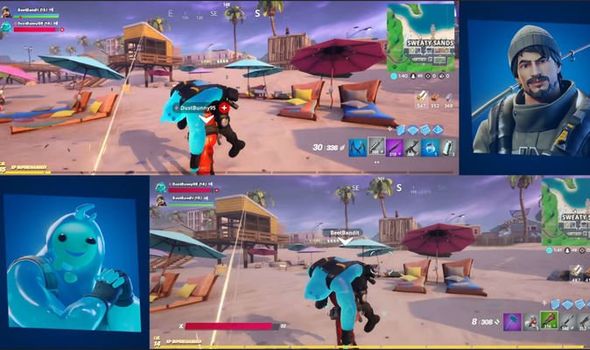
Sharing The Monitor on Fortnite: A Guide
Are you a big fan of Fortnite, the popular battle royale game from Epic Games? Do you want to share the monitor with your friend or family member while playing together online? If so, you’ve come to the right place! In this article, we’ll guide you through the process of sharing the monitor on Fortnite, including the steps for PS4 and other platforms.
What is Split-screen Mode?
Before we dive into the details, let’s talk about split-screen mode. This modality allows two players to play together on the same monitor, with each player having their own half of the screen. It’s a great way to play with a friend or family member while still experiencing the thrill of Fortnite.
How to Share The Monitor on Fortnite Ps4
To share the monitor on Fortnite PS4, follow these steps:
- Light up The Second Controller: This is the first step in sharing the monitor. Make sure the second controller is lit up and ready for use.
- Access a Secondary Account: Before starting Fortnite, access a secondary account using the second controller. You can do this by pressing the PS button and selecting the secondary profile.
- Initiate Fortnite: Once you’ve accessed the secondary account, start Fortnite as usual.
- Select Couples or Teams: In the game menu, select “Couples” or “Teams” as your split-screen mode.
- Invite a Friend to Join: Invite a friend to join you by pressing the X button on their controller. They’ll be able to join and play alongside you.
Tips And Tricks
Here are some tips and tricks for playing with split-screen mode:
- To switch between players, use the controller’s right analog stick.
- Make sure both players have their own profile set up and ready to go before starting the game.
- If you experience any lag or issues during gameplay, try restarting the game or checking your internet connection.
Sharing The Monitor on Other Platforms
Unfortunately, split-screen mode is not available on PC, Nintendo Switch, or mobile devices. However, it’s worth noting that Epic Games has hinted at releasing this feature in the future for PC and Nintendo Switch users.
Conclusion
Sharing the monitor on Fortnite can be a fun and exciting way to play with friends or family members. By following these steps and tips, you’ll be able to experience the thrill of Fortnite together while sharing your screen. Happy gaming!
Here are some FAQs related to sharing the monitor on Fortnite:
- Q: How do I Share The Monitor on Fortnite Ps4?
A: To share the monitor on Fortnite PS4, access a secondary account using the second controller, initiate Fortnite, select Couples or Teams as your split-screen mode, and invite a friend to join. - Q: Is Split-screen Mode Available on Pc, Nintendo Switch, or Mobile Devices?
A: Unfortunately, no. Split-screen mode is not currently available on these platforms, but Epic Games has hinted at releasing this feature in the future for PC and Nintendo Switch users. - Q: How do I Switch Between Players During Gameplay?
A: To switch between players, use the controller’s right analog stick. - Q: What if I Experience Lag or Issues During Gameplay?
A: If you experience any lag or issues during gameplay, try restarting the game or checking your internet connection.
Hope this helps! Let me know if you have any other questions.


