
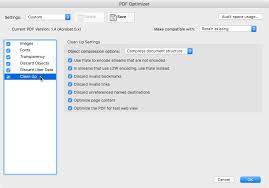
How to Compress a Pdf File: A Comprehensive Guide
Are you tired of dealing with large and cumbersome PDF files? Do you want to know how to compress them without sacrificing their quality? Look no further! In this article, we will guide you through the process of compressing a PDF file using various methods, including online tools and mobile apps.
What is Pdf Compression?
PDF compression, also known as PDF reduction or PDF shrinking, is the process of reducing the size of a PDF file without compromising its quality. This is achieved by removing unnecessary data, such as metadata, images, and text, to make the file smaller.
Why Compress a Pdf File?
There are several reasons why you might want to compress a PDF file:
- Save Storage Space: By reducing the size of your PDF files, you can save valuable storage space on your computer or mobile device.
- Faster Sharing And Transmission: Smaller PDF files are easier to share and transmit over the internet, making it faster for others to access them.
- Improved File Management: Compressed PDF files are also easier to manage and organize, especially when working with large collections of documents.
Methods For Compressing a Pdf File
There are several methods you can use to compress a PDF file:
- Using Online Tools
- Mobile Apps
- Software Programs
- Browser Extensions
Method 1: Using Online Tools
Online tools, such as iLovePDF and Smallpdf, allow you to compress your PDF files directly from your browser without needing any software or mobile apps.
Here are some popular online tools for compressing PDF files:
- Ilovepdf: This tool offers a range of features, including compression, password protection, and merging.
- Smallpdf: Another versatile tool that allows you to compress, merge, split, and rotate your PDF files.
Method 2: Mobile Apps
If you’re using a mobile device, there are several apps available for both Android and iOS that can help you compress your PDF files:
- Compress Pdf (Android/iOS): This app is designed specifically for compressing PDF files and offers various quality settings.
- Pdf Compressor (Android): A free app that allows you to compress your PDF files with adjustable compression levels.
Method 3: Software Programs
For those who prefer using software programs, there are several options available:
- Free Pdf Compressor (Windows): A free program that can help you compress your PDF files.
- Shrinkit (macOS): A macOS-exclusive app that allows you to compress and resize your PDF files.
Method 4: Browser Extensions
Browser extensions, such as Adobe Acrobat Reader and Foxit PhantomPDF, offer additional features and tools for managing and compressing your PDF files.
How to Compress a Pdf File Using Free Pdf Compressor (Windows)
Here’s a step-by-step guide on how to use the Free PDF Compressor software program:
- Download And Install: Download the software from the official website and follow the installation instructions.
- Launch The Software: Launch the software and select the “Compress” option from the main menu.
- Select The Pdf File: Choose the PDF file you want to compress from your computer’s hard drive.
- Adjust Compression Settings: Adjust the compression settings according to your needs, such as image quality and file size reduction.
- Start Compression: Click on the “Compress” button to initiate the compression process.
How to Compress a Pdf File Using Ilovepdf
Here’s how you can compress a PDF file using iLovePDF:
- Visit The Website: Visit the iLovePDF website and upload your PDF file from your computer or cloud storage service.
- Select Compression Settings: Choose the compression settings according to your needs, such as file size reduction and image quality.
- Click on “Compress”: Click on the “Compress” button to initiate the compression process.
Benefits of Compressing Pdf Files
Compressing PDF files has numerous benefits:
- Save Storage Space: Smaller PDF files take up less storage space, making it easier to manage and organize your digital documents.
- Faster Sharing And Transmission: Compressed PDF files are faster to share and transmit over the internet.
- Improved File Management: Compressed PDF files are also easier to manage and organize.
Tips And Tricks For Compressing Pdf Files
Here are some tips and tricks to help you compress your PDF files effectively:
- Remove Unnecessary Data: Remove unnecessary data, such as metadata and images, to reduce file size.
- Adjust Compression Settings: Adjust compression settings according to your needs, such as image quality and file size reduction.
- Use The Right Tool: Choose the right tool for compressing PDF files based on your specific needs.
Conclusion
Compressing PDF files is a straightforward process that can help you save storage space, speed up sharing and transmission, and improve file management. With various methods available, such as online tools, mobile apps, software programs, and browser extensions, you can choose the one that suits your needs best.
We hope this article has provided you with a comprehensive guide on how to compress PDF files using different methods and tools. Happy compressing!
Frequently Asked Questions (FAQs)
- What is The Maximum File Size Limit For Online Compression Tools?
The maximum file size limit varies depending on the online tool, but it’s usually around 100 MB. - Can I Compress a Pdf File Without Losing Its Quality?
Yes, you can compress a PDF file while maintaining its original quality by choosing the right settings and using the correct tool. - How Long Does it Take to Compress a Large Pdf File?
The compression time depends on the size of the file and the method used. Larger files may take longer to compress.
Common Issues With Compressing Pdf Files
- Loss of Quality: If you’re compressing a PDF file without choosing the right settings, it may result in a loss of quality.
- Incompatibility Issues: Some tools or software programs may not be compatible with your operating system or device.
- File Corruption: Compressing a corrupt or damaged PDF file can lead to further corruption.
Troubleshooting Common Issues
- Check The Compression Settings: Ensure that you’ve chosen the correct compression settings according to your needs.
- Update Software or App: Update your software or mobile app to the latest version for optimal performance.
- Contact Support: Reach out to customer support for assistance with resolving any issues related to compression.
How to Protect Your Pdf File
To protect your PDF file, you can:
- Password-protect it: Use a password to secure your PDF file.
- Use Encryption: Encrypt your PDF file using software or online tools.
- Save Multiple Copies: Save multiple copies of your PDF file in different locations.
How to Compress Multiple Pdf Files
To compress multiple PDF files, you can:
- Use Batch Compression Tools: Use batch compression tools that allow you to compress multiple files at once.
- Select Multiple Files: Select multiple PDF files and compress them simultaneously using online tools or software programs.
- Split Large Files: Split large PDF files into smaller ones for easier compression.
Conclusion
Compressing multiple PDF files is a useful technique that can help you manage your digital documents more efficiently. With various methods available, such as batch compression tools, online tools, and software programs, you can choose the one that suits your needs best.
We hope this article has provided you with valuable insights on how to compress multiple PDF files using different methods and tools. Happy compressing!


