
The Ultimate Guide to Digital Signatures: A Step-by-step Guide
Are you tired of signing physical documents, only to have them lost or misplaced? Do you want to switch to a more efficient and secure way of documenting your agreements and transactions? Look no further! In this comprehensive guide, we’ll walk you through the world of digital signatures, exploring its types, benefits, and how to obtain and use them.
What is a Digital Signature?
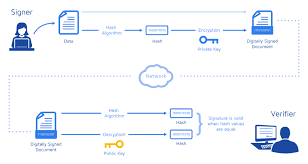
A digital signature is an electronic equivalent of a handwritten signature. It’s a unique code that identifies the signer and verifies the authenticity of a document. Unlike traditional signatures, digital signatures are more secure, efficient, and environmentally friendly.
Types of Digital Signatures
There are several types of digital signatures, each with its own level of security and legal validity:
- Facile Electronic Signature: This is the most basic type of digital signature. It’s obtained by typing or scanning a handwritten signature, but it lacks any legal value.
- Advanced Electronic Signature (AES): AES uses cryptography to ensure the integrity and authenticity of a document. While not recognized in all jurisdictions, it has some legal value.
- Qualified Electronic Signature (QES): QES is a more advanced type of digital signature that requires specific hardware and software. It’s legally binding in most countries.
- Digital Electronic Signature: This is the most secure type of digital signature, using asymmetric cryptography to verify the authenticity of a document.
How to Obtain a Digital Signature
Obtaining a digital signature is relatively straightforward:
- Acquire a Kit: You can purchase a digital signature kit from a certified agency.
- Verify Your Identity: This step ensures that your identity is secure and verified.
- Activate The Signature: Once you’ve acquired the kit, you’ll need to activate the digital signature.
How to Sign a Digital Document
To sign a digital document, follow these steps:
- Choose The Correct Type of Signature: Select the type of digital signature that suits your needs (AES, QES, or Digital Electronic Signature).
- Acquire And Activate The Signature: Follow the steps outlined above to obtain and activate the digital signature.
- Sign The Document: Once you’ve acquired the correct type of digital signature, follow the instructions provided by the entity certifier to sign the document.
Signing a Digital Document Without Legal Value
If you need to sign a digital document without legal value, you can use the facile electronic signature. This type of signature is obtained by typing or scanning a handwritten signature and lacks any legal significance.
Conclusion
Digital signatures are an efficient and secure way to document your agreements and transactions. By understanding the different types of digital signatures and how to obtain and use them, you’ll be able to make informed decisions about which type of signature suits your needs.
Frequently Asked Questions (FAQs)
- Q: What is a digital signature?
- A: A digital signature is an electronic equivalent of a handwritten signature.
- Q: How many types of digital signatures are there?
- A: There are four types of digital signatures: Facile electronic signature, advanced electronic signature, qualified electronic signature, and digital electronic signature.
- Q: What is the difference between a facile electronic signature and a legal digital signature?
- A: The main difference lies in their level of security and legal validity. Facile electronic signatures lack any legal value, while legal digital signatures have varying levels of security and legal validity.
- Q: How do I obtain a digital signature?
- A: You can acquire a kit from a certified agency, verify your identity, and activate the signature to obtain a digital signature.
- Q: Can I sign a digital document without any legal value?
- A: Yes, you can use the facile electronic signature to sign a digital document without any legal significance.
Conclusion
In conclusion, this article has provided a comprehensive guide to digital signatures. From understanding the different types of digital signatures to learning how to obtain and use them, we’ve covered everything you need to know about digital signatures. Whether you’re looking for an efficient way to document your agreements or want to switch to a more secure method, digital signatures are the perfect solution.
Conclusion
In conclusion, this guide has provided a comprehensive overview of digital signatures. We hope that this information has been helpful and informative.


