
How to Enroll Your Company on Facebook: A Comprehensive Guide
Are you a business owner looking to increase your online visibility? Do you want to reach a wider audience and promote your brand? Then, enrolling your company on Facebook is the perfect solution for you! In this article, we will guide you through the process of creating a Facebook page for your business, highlighting its benefits, and providing tips on how to optimize it.
What is a Facebook Page?
A Facebook page is a public profile that allows businesses to promote their brand, products, or services. It’s an excellent way to connect with customers, share updates, and engage with potential clients. Unlike personal profiles, Facebook pages are designed for businesses and have more advanced features to help you manage your online presence.
Why Open a Facebook Page?
Opening a Facebook page is essential for any business looking to establish a strong online presence. Here are some reasons why:
- Increased Visibility: A Facebook page helps you reach a wider audience, increasing your visibility and brand awareness.
- Targeted Advertising: With Facebook’s advertising platform, you can target specific audiences based on demographics, interests, and behaviors.
- Engagement: A Facebook page allows you to engage with customers, respond to comments, and build relationships.
- Customer Insights: The Insights tool provides valuable information about your audience, helping you refine your marketing strategies.
How to Create a Facebook Page
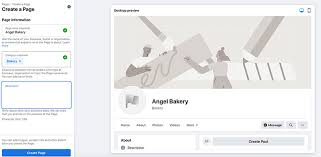
Creating a Facebook page is a straightforward process. Here’s a step-by-step guide:
- Log in to your personal Facebook account.
- Click on the “Pages” tab and select “Create New Page.”
- Choose the category that best describes your business.
- Add a profile picture and cover photo for your page.
- Enter your page name, description, and contact information.
Tips For Optimizing Your Facebook Page
To get the most out of your Facebook page, follow these tips:
- Post Regularly: Share updates, news, and engaging content to keep your audience informed.
- Use High-quality Images: Visuals help grab attention and make your content more shareable.
- Engage With Your Audience: Respond to comments, messages, and reviews in a timely manner.
- Monitor Your Page Insights: Use the Insights tool to track your page’s performance, identify areas for improvement, and refine your marketing strategies.
Conclusion
Creating a Facebook page is an essential step in establishing a strong online presence for your business. By following these guidelines, you can create a professional-looking page that showcases your brand and engages with potential clients. Remember to post regularly, use high-quality images, engage with your audience, and monitor your page insights to optimize your Facebook experience.
Frequently Asked Questions
Here are some frequently asked questions about creating a Facebook page:
- Q: What is The Difference Between a Personal Profile And a Business Page?
A: A personal profile is for individuals, while a business page is designed for businesses. - Q: How do I Target Specific Audiences With my Facebook Advertising?
A: You can use demographics, interests, and behaviors to target specific audiences. - Q: What Are The Benefits of Using Facebook Insights?
A: Facebook Insights provides valuable information about your audience, helping you refine your marketing strategies.
Common Mistakes to Avoid When Creating a Facebook Page
When creating a Facebook page for your business, there are some common mistakes to avoid. Here are a few:
- Using a Personal Profile: Don’t use a personal profile for your business; instead, create a separate business page.
- Not Optimizing Your Page: Make sure to complete all the necessary information and optimize your page with relevant keywords.
- Not Engaging With Your Audience: Respond to comments, messages, and reviews in a timely manner to build relationships with potential clients.
Benefits of Using Facebook For Business
Using Facebook for business has numerous benefits. Here are a few:
- Increased Visibility: A Facebook page helps you reach a wider audience, increasing your visibility and brand awareness.
- Targeted Advertising: With Facebook’s advertising platform, you can target specific audiences based on demographics, interests, and behaviors.
- Engagement: A Facebook page allows you to engage with customers, respond to comments, and build relationships.
Tips For Effective Facebook Marketing
To create an effective Facebook marketing strategy, follow these tips:
- Post Regularly: Share updates, news, and engaging content to keep your audience informed.
- Use High-quality Images: Visuals help grab attention and make your content more shareable.
- Engage With Your Audience: Respond to comments, messages, and reviews in a timely manner.
Common Misconceptions About Facebook
There are some common misconceptions about Facebook that you should be aware of. Here are a few:
- Myth: Facebook is Only For Personal Use.
Reality: Facebook has numerous features designed specifically for businesses. - Myth: I Need to Spend a Lot of Money on Advertising to See Results.
Reality: With a well-planned strategy, you can achieve your marketing goals without breaking the bank.
How to Use Facebook Insights
Facebook Insights is a powerful tool that provides valuable information about your audience. Here’s how to use it:
- Accessing Insights: Go to your Facebook page and click on the “Insights” tab.
- Understanding Your Audience: Use the demographics, interests, and behaviors sections to get a better understanding of your target audience.
Tips For Creating Engaging Content
Creating engaging content is crucial for attracting and retaining an audience. Here are some tips:
- Use High-quality Images: Visuals help grab attention and make your content more shareable.
- Post Regularly: Share updates, news, and engaging content to keep your audience informed.
- Engage With Your Audience: Respond to comments, messages, and reviews in a timely manner.
Common Mistakes to Avoid When Creating Content
When creating content for Facebook, there are some common mistakes to avoid. Here are a few:
- Not Optimizing Your Content: Make sure to complete all the necessary information and optimize your page with relevant keywords.
- Not Engaging With Your Audience: Respond to comments, messages, and reviews in a timely manner to build relationships with potential clients.
Benefits of Using Facebook Groups
Using Facebook groups can be beneficial for businesses. Here are some reasons why:
- Increased Engagement: A group allows you to engage with your audience in real-time.
- Targeted Advertising: With Facebook’s advertising platform, you can target specific audiences based on demographics, interests, and behaviors.
Tips For Effective Facebook Group Management
To manage a Facebook group effectively, follow these tips:
- Post Regularly: Share updates, news, and engaging content to keep your audience informed.
- Use High-quality Images: Visuals help grab attention and make your content more shareable.


