
How to Silence Your Apple Watch: A Step-by-step Guide
Are you tired of notifications disrupting your peace? Do you want to enjoy a quiet time with your Apple Watch without any distractions? Look no further! In this article, we will guide you through the simple steps to silence your Apple Watch, ensuring that you can focus on what matters most.
What is Silent Mode on Apple Watch?
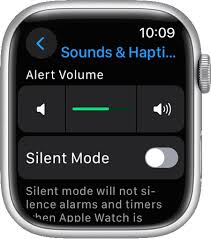
Before we dive into the tutorial, it’s essential to understand what Silent Mode does. Silent Mode allows you to disable all sounds from your Apple Watch, including notifications, alarms, and more. This feature comes in handy when you want to enjoy a quiet time or avoid distractions.
How to Silence Apple Watch Using Watchos
To silence your Apple Watch using watchOS, follow these steps:
- Access The Control Center: On your Apple Watch, swipe down from the top of the screen to access the Control Center.
- Tap on The Bell Icon: Tap on the bell icon in the bottom-right corner of the screen.
- Select Silent Mode: Select “Silent Mode” from the menu.
- Confirm The Selection: Confirm that you want to enable Silent Mode by tapping on the confirmation prompt.
How to Silence Apple Watch Using Iphone
If you prefer to silence your Apple Watch using your iPhone, follow these steps:
- Open The Watch App: Open the Watch app on your iPhone.
- Tap on The “My Watch” Tab: Tap on the “My Watch” tab at the bottom of the screen.
- Select Sounds And Haptics: Select “Sounds and Haptics” from the menu.
- Enable Silent Mode: Enable Silent Mode by tapping on the toggle button next to it.
Other Ways to Silence Apple Watch
In addition to using watchOS or iPhone, you can also silence your Apple Watch using other methods:
- Theater Mode: Activate Theater Mode to disable all sounds and notifications from your Apple Watch.
- Do Not Disturb: Enable Do Not Disturb mode to silence notifications and calls on your Apple Watch.
- Sleep Mode: Put your Apple Watch in Sleep Mode to disable all sounds and notifications.
Frequently Asked Questions (FAQs)
Here are some frequently asked questions about silencing your Apple Watch:
- Q: Can I Silence my Apple Watch Using Siri?
A: Yes, you can use Siri to enable Silent Mode on your Apple Watch. - Q: Will Silencing my Apple Watch Affect Its Functionality?
A: No, silencing your Apple Watch will not affect its functionality or performance. - Q: Can I Silence my Apple Watch And Still Receive Notifications?
A: Yes, you can silence your Apple Watch while still receiving notifications.
Conclusion
Silencing your Apple Watch is a simple process that can help you avoid distractions and enjoy a quiet time. Whether you use watchOS or iPhone, we’ve got you covered with this step-by-step guide. Remember to explore other features like Theater Mode, Do Not Disturb, and Sleep Mode for added convenience.
Additional Tips
- Use Silent Mode Wisely: Only silence your Apple Watch when necessary, as it can affect your ability to receive important notifications.
- Explore Other Watchos Features: Discover more watchOS features that can enhance your Apple Watch experience.
- Stay Up-to-date With Software Updates: Regularly update your Apple Watch and iPhone software for the latest features and security patches.
We hope you found this guide helpful! Do you have any questions or concerns about silencing your Apple Watch? Let us know in the comments below.


