
How to Initiate Your PC in Provisional Modality
Are you tired of dealing with pesky computer problems? Do you want to know how to initiate your PC in provisional modality, a feature that can help you troubleshoot issues without affecting your system’s performance? Look no further! In this article, we’ll guide you through the steps to access the provisional modality on Windows 10, Windows 8.1, And Windows 7.
What is Provisional Modality?
Provisional modality is a feature that allows your PC to start in a minimalistic mode, with only the essential files and drivers loaded. This means that you can still access your computer without loading all the unnecessary programs and settings. It’s like having a “bare-bones” version of Windows that lets you focus on troubleshooting issues.
How to Initiate Your PC in Provisional Modality: Windows 10
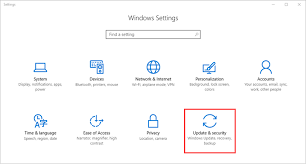
If your PC is running Windows 10, you can initiate the provisional modality by following these steps:
- Press Win+i: Open the Settings app and click on Update & Security.
- Click on Recovery: Select the Advanced Start option and click on Restart now.
- Access Provisional Modality: Your PC will restart in provisional modality. You can access this mode by pressing the 4 key on your keyboard.
How to Initiate Your PC in Provisional Modality: Windows 8.1
If you’re running Windows 8.1, You can initiate the provisional modality by following these steps:
- Press Win+i: Open the Settings app and click on Update & Recovery.
- Click on Restart Now: Select the Advanced Start option and click on Restart now.
- Access Provisional Modality: Your PC will restart in provisional modality. You can access this mode by pressing the 4 key on your keyboard.
How to Initiate Your PC in Provisional Modality: Windows 7
If you’re running Windows 7, you can initiate the provisional modality by following these steps:
- Restart Your PC: Press and hold the Shift key while clicking on Restart.
- Access Provisional Modality: Your PC will restart in provisional modality. You can access this mode by pressing the F8 key repeatedly.
How to Initiate Your Mac in Safe Mode
If you’re using a Mac, you can initiate safe mode by following these steps:
- Restart Your Mac: Press and hold the Shift key while clicking on Restart.
- Access Safe Mode: Your Mac will restart in safe mode. You’ll see a message indicating that your Mac is running in safe mode.
Why Use Provisional Modality?
Provisional modality can be useful when:
- You’re experiencing issues with your PC or Mac and want to troubleshoot without affecting the system’s performance.
- You need to access your computer without loading all the unnecessary programs and settings.
- You’re trying to resolve problems with a specific driver or software.
Conclusion
In conclusion, initiating your PC in provisional modality can be a great way to troubleshoot issues without affecting your system’s performance. Whether you’re running Windows 10, Windows 8.1, Windows 7, or a Mac, we hope this article has provided you with the necessary steps to access this feature.
Frequently Asked Questions
Q: What is provisional modality?
A: Provisional modality is a feature that allows your PC to start in a minimalistic mode, with only the essential files and drivers loaded.
Q: How do I initiate my PC in provisional modality on Windows 10?
A: Press Win+I, click on Update & Security, select Recovery, and click on Restart now. Then, access provisional modality by pressing the 4 key on your keyboard.
Q: Can I use provisional modality on a Mac?
A: Yes, you can initiate safe mode on a Mac by restarting it while holding the Shift key.
Q: Why should I use provisional modality?
A: Provisional modality can be useful when troubleshooting issues without affecting the system’s performance.
Q: Will using provisional modality affect my personal files?
A: No, using provisional modality will not affect your personal files.
Q: Can I initiate provisional modality on a Mac with an Intel processor?
A: Yes, you can initiate safe mode on a Mac with an Intel processor by restarting it while holding the Shift key.
Q: What if I’m experiencing issues with my Mac and want to use provisional modality?
A: You can try initiating safe mode by restarting your Mac while holding the Shift key.


