
Sailing Safely on The Internet: A Guide
As we navigate the vast expanse of the internet, it’s essential to prioritize our safety and security. With the rise of online threats and cybercrime, being cautious is no longer a mere suggestion, but a necessity. In this article, we’ll delve into the world of internet safety, exploring tips and best practices to help you sail in safety on the digital seas.
Understanding Internet Safety
Before we dive into the specifics, it’s crucial to understand the concept of internet safety. This involves protecting yourself from online threats, such as malware, viruses, and phishing scams. It also encompasses being mindful of your personal data and online activities, ensuring that you’re not compromising your privacy or security.
Rules For Navigating Safely on The Internet
To sail in safety on the internet, follow these essential rules:
1. Keep Your Browser Always Up-to-date
Keeping your browser up-to-date is crucial for navigating safely online. Ensure that your browser is always updated to the latest version, as outdated browsers can leave you vulnerable to security threats.
2. Verify a Website’s Reliability Before Visiting
Verify the reliability of websites before visiting them. Use tools like WOT (Web of Trust) or Trust Pilot to check a website’s reputation and user reviews.
3. Use Good Antivirus Software
Using good antivirus software is essential for protecting your device from online threats. Ensure that your antivirus is up-to-date and running regularly.
4. Browse in Incognito Mode to Protect Your Local Privacy
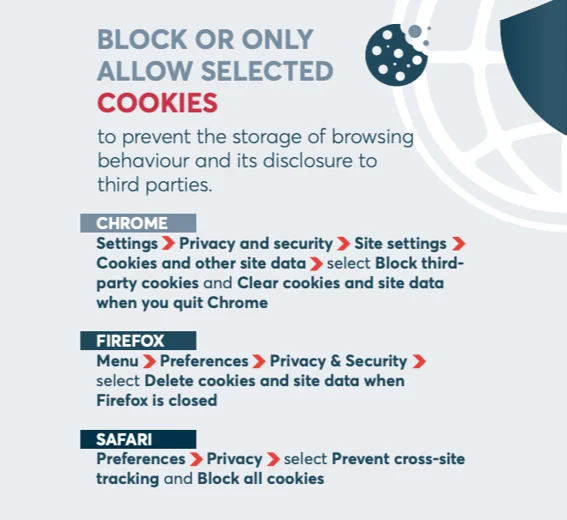
Navigating in incognito mode can help protect your local privacy, but be aware of its limitations. This mode doesn’t save browsing history or cookies, but it may still leave traces on the device.
5. Use Temporary Emails
When signing up for online services, use temporary emails to avoid revealing your main email address. This can help prevent spam and protect your personal data.
Avoid sharing sensitive information on social media platforms. Keep your personal data private, and be cautious when sharing details about yourself or others.
7. Avoid Chatting With Strangers Online
Don’t engage in conversations with strangers online. This can help prevent identity theft and other malicious activities.
8. Use a Vpn to Conceal Your IP Address
Consider using a VPN (Virtual Private Network) to conceal your IP address, protecting your online activities from prying eyes.
9. Use Strong Passwords And Two-factor Authentication
Use strong passwords and two-factor authentication to secure your accounts. This can help prevent unauthorized access and protect your sensitive information.
Navigating Safely on The Internet: Tips For Children
As a parent, it’s essential to teach children about internet safety. Keep them away from explicit content, and use parental control features on devices to block access to potentially hazardous websites.
Conclusion
Sailing in safety on the internet requires attention to detail and a willingness to take necessary precautions. By following these guidelines, you can minimize your risk of online threats and ensure a secure experience while navigating the digital world.
Frequently Asked Questions (FAQs)
- What is The Best Way to Keep my Browser Up-to-date?
Keep your browser updated by regularly checking for updates or enabling automatic updates.
- How do I Verify a Website’s Reliability?
Use tools like WOT (Web of Trust) or Trust Pilot to check a website’s reputation and user reviews.
- What is The Purpose of Using an Antivirus Software?
An antivirus software helps protect your device from online threats, such as malware, viruses, and phishing scams.
- How Does Navigating in Incognito Mode Affect my Privacy?
Navigating in incognito mode can help protect your local privacy, but be aware of its limitations, as it may still leave traces on the device.
- What is a Temporary Email, And How do I Use One?
A temporary email is a disposable email address used for signing up online services without revealing your main email address. Use these when creating new accounts to maintain your privacy.
- Why Should I Avoid Sharing Sensitive Information on Social Media?
Sharing sensitive information on social media can compromise your personal data and increase the risk of identity theft or other malicious activities.
- How do I Protect my IP Address Online?
Consider using a VPN (Virtual Private Network) to conceal your IP address, protecting your online activities from prying eyes.
- What is Two-factor Authentication, And Why Should I Use It?
Two-factor authentication adds an extra layer of security by requiring a code or another form of verification in addition to your password. This can help prevent unauthorized access and protect your sensitive information.


