
How to Track Your Amazon Package: A Step-by-step Guide
Are you tired of waiting anxiously for your Amazon package to arrive? Do you want to know exactly when it will be delivered to your doorstep? Look no further! In this article, we’ll show you how to track your Amazon package with ease.
What You Need to Know Before Tracking Your Package
Before you start tracking your package, make sure you have the necessary information. This includes:
- The order number or tracking number for your package
- A valid email address and password for your Amazon account
Tracking Your Package on Amazon’s Website
To track your package on Amazon’s website, follow these steps:
- Log in to your Amazon account using your email address and password.
- Click on the “Orders” tab at the top of the page.
- Find the order number or tracking number for your package.
- Click on the “Track Package” button next to the order number.
Tracking Your Package on Amazon’s Mobile App
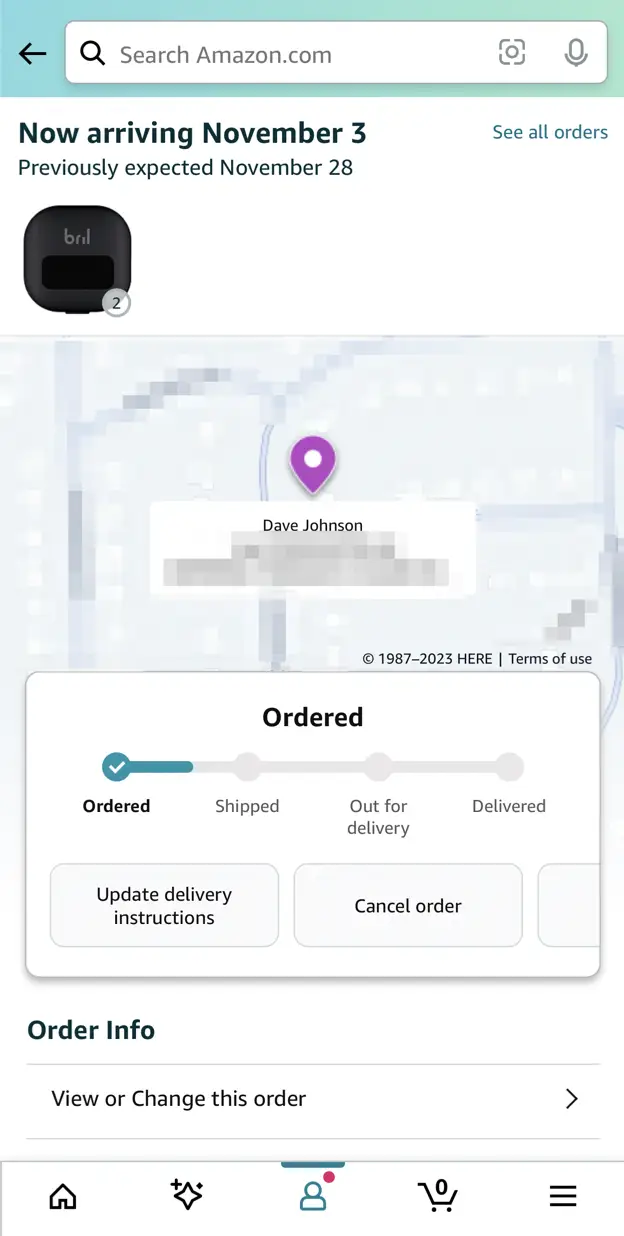
If you have the Amazon mobile app installed on your smartphone, you can track your package using the app:
- Open the Amazon app and log in to your account.
- Tap on the “Orders” tab at the bottom of the screen.
- Find the order number or tracking number for your package.
- Tap on the “Track Package” button next to the order number.
Tracking Your Package With a Tracking Number
If you have a tracking number for your package, you can track it using Amazon’s website or mobile app:
- Go to the Amazon website and log in to your account.
- Click on the “Help” tab at the top of the page.
- Select “Track Package” from the dropdown menu.
- Enter the tracking number in the required field.
- Click on the “Track Package” button.
Tracking Your Package With a Bar Code
If you have a bar code for your package, you can track it using Amazon’s website or mobile app:
- Go to the Amazon website and log in to your account.
- Click on the “Help” tab at the top of the page.
- Select “Track Package” from the dropdown menu.
- Enter the bar code number in the required field.
- Click on the “Track Package” button.
How to Track Your Package With Amazon Logistics
If you have a package shipped using Amazon Logistics, you can track it using Amazon’s website or mobile app:
- Go to the Amazon website and log in to your account.
- Click on the “Orders” tab at the top of the page.
- Find the order number or tracking number for your package.
- Click on the “Track Package” button next to the order number.
How to Track Your Package With Italian Post
If you have a package shipped using Italian Post, you can track it using Amazon’s website or mobile app:
- Go to the Amazon website and log in to your account.
- Click on the “Help” tab at the top of the page.
- Select “Track Package” from the dropdown menu.
- Enter the tracking number in the required field.
- Click on the “Track Package” button.
How to Track Your Package With Bartolini
If you have a package shipped using Bartolini, you can track it using Amazon’s website or mobile app:
- Go to the Amazon website and log in to your account.
- Click on the “Help” tab at the top of the page.
- Select “Track Package” from the dropdown menu.
- Enter the tracking number in the required field.
- Click on the “Track Package” button.
Conclusion
Tracking your Amazon package is a straightforward process that can be done using Amazon’s website or mobile app. By following these steps, you can stay up-to-date on the status of your package and know exactly when it will arrive at your doorstep.
Frequently Asked Questions (FAQs)
- What do I Need to Track my Amazon Package?
- You’ll need the order number or tracking number for your package.
- How Can I Track my Package if I Don’t Have a Valid Email Address And Password For my Amazon Account?
- If you’re unable to access your Amazon account, you may be able to recover your tracking information using a third-party service.
- Can I Track my Package on The Amazon Mobile App?
- Yes! You can track your package using the Amazon mobile app.
- What if I Have a Bar Code For my Package? Can I Use it to Track my Package?
- Yes! If you have a bar code for your package, you can enter it into the tracking system and receive updates on its status.
- How do I Know Which Shipping Carrier is Handling my Package?
- Check your Amazon account or the shipping label on the box to see which carrier is handling your package.


