
How to Track Your Shein Packages: A Step-by-step Guide
Are you tired of waiting anxiously for your SHEIN packages to arrive? Do you want to stay updated on the status of your orders? Look no further! In this article, we’ll guide you through the process of tracking your SHEIN packages using various methods.
Why Track Your Packages?
Tracking your packages is essential to ensure that they are delivered to you safely and efficiently. By monitoring the status of your orders, you can:
- Stay updated on delivery dates
- Avoid waiting anxiously for long periods
- Resolve any issues with your package
Method 1: Tracking Via Shein Website (PC)
To track your packages using the SHEIN website, follow these steps:
Step 1: Log in to Your Shein Account
- Go to the SHEIN website (www.Shein.Com) and log in to your account.
- Use the same credentials you used to place your order.
Step 2: Access Your Order History
- Click on the profile icon at the top right corner of the screen.
- Select “Access” from the drop-down menu.
- Enter your login credentials if prompted.
Step 3: Find Your Order And Track It
- Navigate to the “My Orders” section.
- Look for the order containing the package you want to track.
- Click on the “Track” button next to the order number.
You will be redirected to a page displaying the tracking information, including the shipping carrier, estimated delivery date, and any updates on the status of your package.
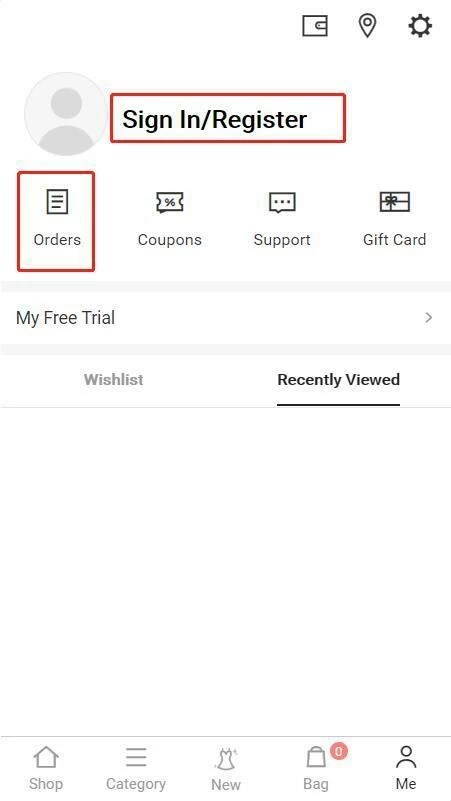
Method 2: Tracking Via Shein App (Mobile)
To track your packages using the SHEIN app, follow these steps:
Step 1: Download And Install The Shein App
- Go to the App Store (for iOS devices) or Google Play Store (for Android devices).
- Search for the “SHEIN” app and download it.
- Install the app on your mobile device.
Step 2: Log in to Your Shein Account
- Open the SHEIN app and log in to your account using the same credentials you used to place your order.
Step 3: Track Your Order
- Navigate to the “Me” section.
- Tap on the “See everything” button in the top right corner.
- Scroll down to the “My Orders” section.
- Find the order containing the package you want to track and tap on it.
- Select the “Track” option.
You will be redirected to a page displaying the tracking information, including the shipping carrier, estimated delivery date, and any updates on the status of your package.
Method 3: Tracking Via Gls Website
To track your packages using the GLS website, follow these steps:
Step 1: Visit The Gls Website
- Go to the GLS website (www.Gls.It) and log in to your account.
- Use the same credentials you used to place your order.
Step 2: Search For Your Package
- Click on the “Research” button at the top of the page.
- Enter the tracking number provided by SHEIN in the search bar.
- Select the correct tracking number from the search results.
You will be redirected to a page displaying the tracking information, including the shipping carrier, estimated delivery date, and any updates on the status of your package.
Method 4: Tracking Via Gls App (Mobile)
To track your packages using the GLS app, follow these steps:
Step 1: Download And Install The Gls App
- Go to the App Store (for iOS devices) or Google Play Store (for Android devices).
- Search for the “GLS Mobile” app and download it.
- Install the app on your mobile device.
Step 2: Log in to Your Gls Account
- Open the GLS app and log in to your account using the same credentials you used to place your order.
Step 3: Track Your Order
- Navigate to the “Track & Trace” section.
- Enter the tracking number provided by SHEIN in the search bar.
- Select the correct tracking number from the search results.
You will be redirected to a page displaying the tracking information, including the shipping carrier, estimated delivery date, and any updates on the status of your package.
What if I Still Haven’t Received My Package?
If you haven’t received your package after following these steps, don’t worry! You can:
- Contact SHEIN customer support directly for assistance.
- Refer to our guide on resolving issues with your package.
Remember to track your packages regularly to ensure they are delivered safely and efficiently. Happy shopping!
References:
- SHEIN official website
- GLS official website
- GLS Mobile app (iOS and Android)
- Microsoft and Google security blogs
We hope this guide has been helpful in tracking your SHEIN packages. Happy shopping!


