
How to Transfer Data From Huawei to Oppo: A Step-by-step Guide
Are you planning to upgrade your smartphone from HUAWEI to OPPO? If so, this article is just what you need! Transferring data from one phone to another can be a daunting task, but don’t worry, we’ve got you covered. In this comprehensive guide, we’ll walk you through the process of transferring data from your old HUAWEI smartphone to your new OPPO phone.
Why Transfer Data?
Before we dive into the nitty-gritty, let’s talk about why it’s essential to transfer your data. Your smartphone is more than just a device; it’s a treasure trove of memories, contacts, and important information. Losing all that data can be frustrating and time-consuming to recover.
Method 1: Cloning
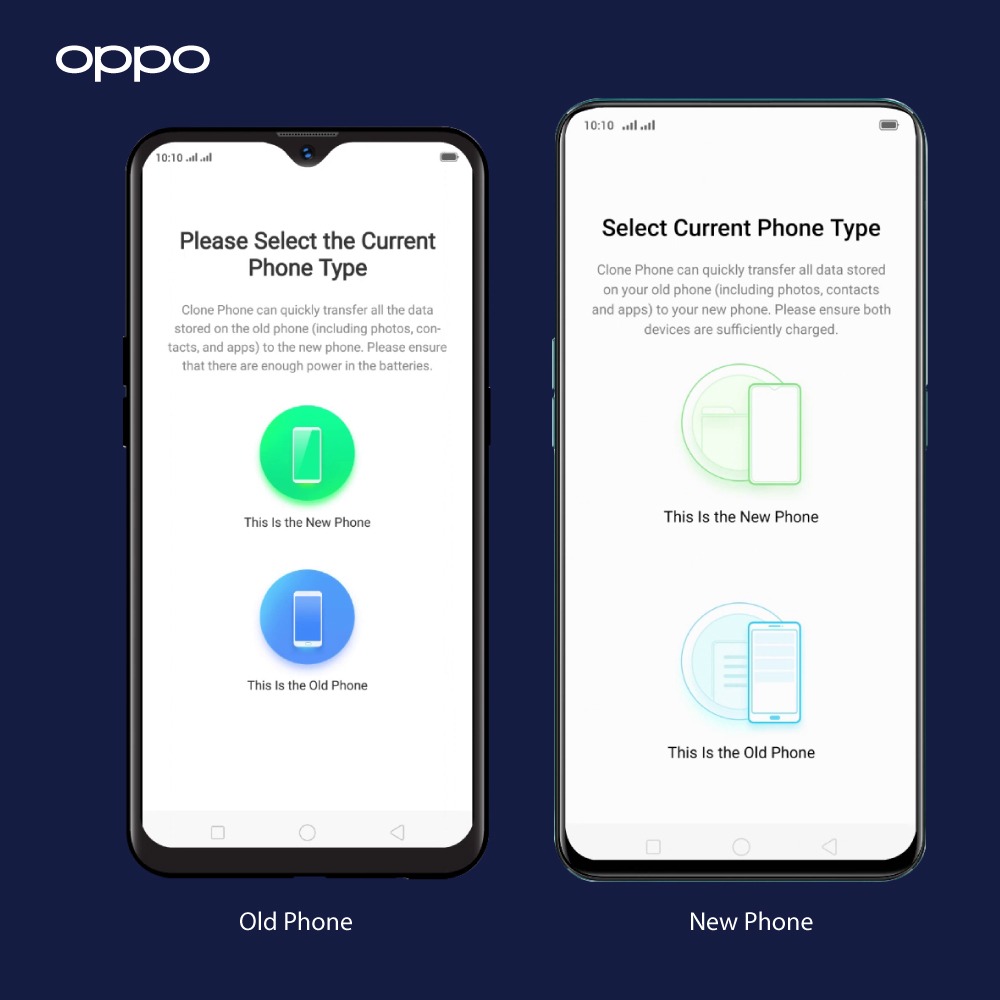
The first method we’ll explore is cloning. This process allows you to transfer all the data from your old HUAWEI phone to your new OPPO phone with ease. Here’s how it works:
- Download The Clone Phone App: First, download and install the Clone Phone app on both your HUAWEI and OPPO phones.
- Launch The App: Launch the app on both devices and follow the prompts to connect them.
- Select Data to Transfer: Choose the data you want to transfer, such as contacts, photos, and apps.
Method 2: Google Drive
Another way to transfer your data is by using Google Drive. This method allows you to transfer all your Google-related data, including contacts, calendar events, and more. Here’s how it works:
- Enable Google Backup: Enable Google Backup on both your HUAWEI and OPPO phones.
- Sync Data: Sync the data from your HUAWEI phone to Google Drive.
- Restore Data: Restore the data from Google Drive to your new OPPO phone.
Method 3: Manual Transfer
If you don’t have access to a computer, don’t worry! You can still transfer your data manually. Here’s how:
- Use a Usb Cable: Use a USB cable to connect your HUAWEI and OPPO phones.
- Transfer Data: Transfer the data from your HUAWEI phone to your OPPO phone using the cable.
Method 4: Bluetooth
You can also transfer small files like photos, music, or videos using Bluetooth. Here’s how:
- Enable Bluetooth: Enable Bluetooth on both your HUAWEI and OPPO phones.
- Connect Devices: Connect your devices to each other via Bluetooth.
- Transfer Files: Transfer the files you want from one device to the other.
Method 5: Whatsapp Backup
If you’re worried about losing your WhatsApp chat history, don’t panic! You can transfer your WhatsApp data using a backup. Here’s how:
- Enable Whatsapp Backup: Enable WhatsApp backup on both your HUAWEI and OPPO phones.
- Backup Data: Backup the data from your HUAWEI phone to Google Drive or another cloud storage service.
- Restore Data: Restore the data from the backup to your new OPPO phone.
Conclusion
Transferring data from one smartphone to another may seem daunting, but with these methods, you’ll be able to transfer all your important information. Don’t forget to check out our FAQs at the end of this article for more detailed answers!
Frequently Asked Questions (FAQs)
Here are some frequently asked questions and their answers:
-
Q: What is Cloning?
A: Cloning is a process that allows you to transfer all your data from one phone to another with ease. -
Q: How do I Enable Google Backup on my Huawei And Oppo Phones?
- Enable Google Backup on both devices by going to Settings > Accounts > Google.
- Make sure the option is turned on for both devices.
-
Q: Can I Transfer Whatsapp Data Using a Backup?
- Yes, you can transfer your WhatsApp data using a backup.
- Enable WhatsApp backup on both devices and follow the prompts to create a backup.
- Then, restore the backup to your new OPPO phone.
-
Q: How do I Transfer Small Files Like Photos, Music, or Videos?
- Use Bluetooth to transfer small files between phones.
- Enable Bluetooth on both devices and connect them to each other.
- Then, transfer the files you want from one device to the other.
-
Q: Can I Use a Computer to Transfer my Data?
- Yes, you can use a computer to transfer your data if you have access to it.
- Use a USB cable to connect your phones and transfer the data manually.
- Or, sync the data from one phone to Google Drive and then restore it on the other device.
Conclusion
Transferring data from HUAWEI to OPPO may seem daunting, but with these methods, you’ll be able to transfer all your important information. Don’t forget to check out our FAQs at the end of this article for more detailed answers!
Method 6: Telegram
If you’re looking for an alternative way to transfer files between phones, consider using Telegram. Here’s how:
- Download And Install Telegram: Download and install Telegram on both your HUAWEI and OPPO phones.
- Create a Channel: Create a channel in Telegram where you can save files from one device and access them from the other.
Method 7: Bluetooth
Bluetooth is another option for transferring small files like photos, music, or videos. Here’s how:
- Enable Bluetooth: Enable Bluetooth on both your HUAWEI and OPPO phones.
- Connect Devices: Connect your devices to each other via Bluetooth.
- Transfer Files: Transfer the files you want from one device to the other.
Method 8: Whatsapp Backup
If you’re worried about losing your WhatsApp chat history, don’t panic! You can transfer your WhatsApp data using a backup. Here’s how:
- Enable Whatsapp Backup: Enable WhatsApp backup on both your HUAWEI and OPPO phones.
- Backup Data: Backup the data from your HUAWEI phone to Google Drive or another cloud storage service.
- Restore Data: Restore the data from the backup to your new OPPO phone.
Method 9: Manual Transfer
If you don’t have access to a computer, don’t worry! You can still transfer your data manually. Here’s how:
- Use a Usb Cable: Use a USB cable to connect your HUAWEI and OPPO phones.
- Transfer Data: Transfer the data from your HUAWEI phone to your OPPO phone using the cable.
Method 10: Google Drive
Another way to transfer your data is by using Google Drive. This method allows you to transfer all your Google-related data, including contacts, calendar events, and more. Here’s how:
- Enable Google Backup: Enable Google Backup on both your HUAWEI and OPPO phones.
- Sync Data: Sync the data from your HUAWEI phone to Google Drive.
- Restore Data: Restore the data from Google Drive to your new OPPO phone.
Method 11: Clone Phone
The first method we’ll explore is cloning. This process allows you to transfer all the data from your old HUAWEI phone to your new OPPO phone with ease. Here’s how it works:
- Download The Clone Phone App: First, download and install the Clone Phone app on both your HUAWEI and OPPO phones.
- Launch The App: Launch the app on both devices and follow the prompts to connect them.
- Select Data to Transfer: Choose the data you want to transfer, such as contacts, photos, and apps.
Method 12: Manual Transfer
If you don’t have access to a computer, don’t worry! You can still transfer your data manually. Here’s how:
- Use a Usb Cable: Use a USB cable to connect your HUAWEI and OPPO phones.
- Transfer Data: Transfer the data from your HUAWEI phone to your OPPO phone using the cable.
Method 13: Bluetooth
You can also transfer small files like photos, music, or videos using Bluetooth. Here’s how:
- Enable Bluetooth: Enable Bluetooth on both your HUAWEI and OPPO phones.
- Connect Devices: Connect your devices to each other via Bluetooth.
- Transfer Files: Transfer the files you want from one device to the other.
Method 14: Whatsapp Backup
If you’re worried about losing your WhatsApp chat history, don’t panic! You can transfer your WhatsApp data using a backup. Here’s how:
- Enable Whatsapp Backup: Enable WhatsApp backup on both your HUAWEI and OPPO phones.
- Backup Data: Backup the data from your HUAWEI phone to Google Drive or another cloud storage service.
- Restore Data: Restore the data from the backup to your new OPPO phone.
Method 15: Manual Transfer
If you don’t have access to a computer, don’t worry! You can still transfer your data manually. Here’s how:
- Use a Usb Cable: Use a USB cable to connect your HUAWEI and OPPO phones.
- Transfer Data: Transfer the data from your HUAWEI phone to your OPPO phone using the cable.
Conclusion
Transferring data from one smartphone to another may seem daunting, but with these methods, you’ll be able to transfer all your important information. Don’t forget to check out our FAQs at the end of this article for more detailed answers!


