
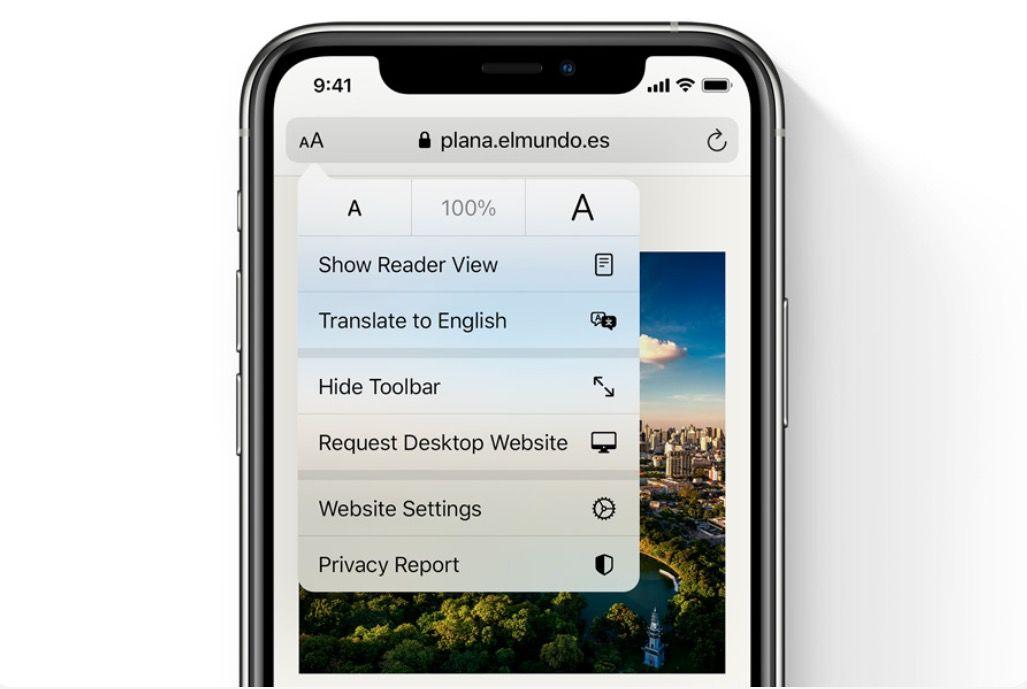
How to Translate a Web Page on Your Mobile
Are you tired of navigating foreign language websites on your mobile device? Do you wish there was an easy way to translate the content into your preferred language? Look no further! In this article, we will guide you through the process of translating web pages on your mobile using various apps and online services.
The Importance of Translation
In today’s globalized world, language barriers can be a significant obstacle for many people. Whether you’re traveling abroad, communicating with international clients, or simply trying to understand content from other cultures, translation is an essential tool that can facilitate communication and understanding.
Chrome (Android/iOS)
One of the most popular browsers on mobile devices is Google Chrome. But did you know that Chrome also has a built-in translation feature? If you’re using an Android device, you can simply tap on the Chrome icon on your home screen or in the app drawer to access it. If you’re using an iOS device, you’ll need to download and install Chrome from the App Store.
Once you’ve accessed Chrome, navigate to the webpage you want to translate. Tap on the three dots in the top-right corner of the screen, then select “Translate” from the menu. Choose your preferred language from the list, and Chrome will automatically translate the page for you.
Safari (iOS)
If you’re an iPhone user, you can also use Safari to translate web pages. Simply navigate to the webpage you want to translate, tap on the share icon in the bottom-left corner of the screen, then select “Translate” from the menu. Choose your preferred language, and Safari will do the rest.
Other Apps to Translate a Web Page
But Chrome and Safari aren’t the only options available. There are several other apps that can help you translate web pages on the go. Some popular alternatives include:
- Itranslate: This app is available for both Android and iOS devices and offers real-time language translation.
- Reverso: This app supports 14 languages and also has an engine of enquiry to provide examples of use.
- Wordref: This app specializes in translating English text and also provides contextual information.
Online Services to Translate a Web Page
If you don’t want to download another app, there are several online services that can help you translate web pages. Some popular options include:
- Google Translator: This service is available for free and can translate web pages into multiple languages.
- Microsoft Bing Translator: This service supports many languages and also has a feature to listen to pronunciation and transfer corrections to vocabulary.
- Babelfish: This service offers accurate translations in several languages, but with limited support.
Tips And Tricks
When using any of these translation services or apps, here are some tips and tricks to keep in mind:
- Always choose the correct language for your destination.
- Be aware that automatic translation may not always be 100% accurate.
- Use online dictionaries or other tools to verify translations if necessary.
- Consider downloading a dedicated translation app for more complex tasks.
Conclusion
Translating web pages on your mobile device is easier than ever, thanks to the variety of apps and online services available. Whether you’re a traveler, businessperson, or simply someone who loves exploring foreign cultures, these tools can help facilitate communication and understanding. Remember to always choose the correct language for your destination and be aware that automatic translation may not always be 100% accurate.
Frequently Asked Questions
- Q: Which App is Best For Translating Web Pages?
A: The best app for translating web pages depends on your personal preferences and needs. - Q: Can I Use Google Translator Offline?
A: Unfortunately, Google Translator requires an internet connection to function. - Q: How do I Verify Translations if Necessary?
A: You can use online dictionaries or other tools to verify translations if you’re unsure about the accuracy of a particular translation. - Q: Can I Translate Web Pages in Multiple Languages at Once?
A: Some apps and services allow for simultaneous translations, while others may require separate requests. - Q: Is There a Limit to The Number of Characters That Can be Translated?
A: Some apps and services have character limits or restrictions on the length of text that can be translated. - Q: Can I Use Translation Apps For Non-english Languages?
A: Yes, many translation apps and services support multiple languages beyond English. - Q: How do I Report Errors in Translations?
A: Many apps and services allow you to report errors or inaccuracies in translations, which can help improve their overall quality. - Q: Can I Use Translation Apps For Voice Conversations?
A: Some apps and services offer real-time language translation for voice conversations, but this may require additional setup or configuration.


